
我们如何帮助您?
Find answers to frequently asked questions about GoValid QR Code Platform

快速入门
了解 GoValid 基础知识Authentication For Everyone
Our vision: An authentication ecosystem with enterprise-grade security accessible to all.
GoValid is a community-first trust infrastructure that enables small producers, farmers, MSMEs (Micro, Small and Medium Enterprises), and creators to prove authenticity, ownership, and origin—without the cost and complexity of traditional systems.
Unlike standard QR generators, GoValid connects items to their origin, owner, and complete history. We provide enterprise-grade QR code authentication, traceability, and verification designed for:
- Individual creators and freelancers
- MSMEs and small businesses
- Farmers and cooperatives
- Government offices and NGOs
- Educational institutions
- Artists and craftspeople
安全级别
| 智能二维码 | Compact, efficient for general use |
| 安全二维码 | Encrypted, tamper-resistant protection |
| 企业二维码 | Digital signatures with Ed25519 cryptography |
主要功能
- PDF盖章: Embed QR codes with OTP and expiry features
- Real-time Analytics: Scan monitoring and Anti-fraud Detection
- Data Control: Password protection, expiry dates, and partial masking
- Institutional Numbering: High-volume document and certificate management
集成
- Microsoft Office Add-ins (Word, Excel, PowerPoint)
- Open Journal System (OJS) for academic publishing
- WordPress plugins
- Mobile apps (Android & iOS)
- Custom APIs for developers
商业模式
- Subscription-based: Monthly QR quotas with predictable annual costs
- Credit-based: Pay-as-you-go flexibility for irregular needs
如果您符合以下情况,请选择基于计划的(订阅):
- 每月定期生成二维码
- 希望可预测的年度成本
- 需要访问PDF盖章和自定义表单等高级功能
- 偏好每月自动重置的配额
如果您符合以下情况,请选择基于积分的(按需付费):
- 有不规律的二维码生成需求
- 只想为实际使用付费
- 偏好无承诺的灵活性
- 偶尔或突发需要二维码
You select your preferred model during registration, and this choice determines your pricing and features throughout your account lifetime.
- 个人 = 个人 (适用于个人和自由职业者)
- 机构 = 组织 (适用于企业、学校和组织)
Individual/Personal account holders can be invited to join an Institution/Organisation as a member, allowing them to work under the institution's account while maintaining their personal account.
Note: Only Plan-based (subscription) users can join an institution. Credit-based (pay-as-you-go) users cannot be added as institution members.
功能比较
| 功能 | 个人 | 机构/组织 |
|---|---|---|
| 账户用途 |
• 个人使用 • 自由职业者 • 个人专业人士 |
• 微型、小型和中型企业 • 学术 • 农民团体/合作社 • 组织 |
| 二维码生成 |
全部表单 文档、证书、商品、时间线等 |
全部表单 文档、证书、商品、时间线等 |
|
第三方插件 与外部平台集成 |
可用 Microsoft Office: Word, Excel, PowerPoint CMS: WordPress, OJS, Joomla |
可用 Microsoft Office: Word, Excel, PowerPoint CMS: WordPress, OJS, Joomla |
|
二维码上的标志 品牌标志显示在二维码中心 |
不可用 |
可用 机构标志居中显示在二维码上 |
|
模式编号 使用自定义模式自动生成顺序编号 |
不可用 |
可用 创建自定义编号模式 |
| 社会环境功能 | ||
|
C-Trace 碳可追溯性和供应链追踪 |
不可用 |
可用 追踪碳足迹 |
| 批量证书签发 |
可用 Excel 集成 |
可用 Excel 集成 + 模式 |
|
团队成员 添加团队成员进行协作 |
不可用 仅限个人账户 |
可用 2(免费),5(入门),15(商业),40(旗舰) |
| 二维码前缀 |
I-XXXX个人前缀 |
N-XXXX机构前缀 |
| 定价积分用户 | 标准费率 |
优惠费率 每二维码折扣价格 |
两种账户类型都可以使用所有基本的二维码生成功能和安全级别。
机构/组织账户 get additional features for branding (logo on QR codes), advanced numbering systems, and comprehensive socio-environmental tracking tools designed for enterprise use.
Build Your Reputation. Unlock Achievements.
Stand out in the community with badges that showcase your identity and accomplishments!
GoValid's badge system helps build trust and recognizes your contributions to the community. There are two types of badges you can display on your profile:
身份徽章
Verified status badges that show WHO you are. These are assigned by staff after verification.
- Displayed on your avatar
- Builds instant trust
- Shows verified status
成就徽章
Earned through your activities and contributions. Level up as you use GoValid!
- Unlock automatically
- Feature on your profile
- Show your expertise
身份徽章
These badges verify your account type and are displayed prominently on your avatar across the platform.
| 预览 | 名称 | 描述 | How to Get |
|---|---|---|---|


|
政府 | Official Government Institution account | Invited Only |

|
GoValid Staff | Official GoValid team member | Internal Only |

|
Provos | Community Trust & Safety team | Invited Only |

|
Verified Business | Verified Business/Institution account | Submit Business Docs |

|
已验证用户 | Identity verified individual | Complete ID Verification |
成就徽章
Unlock these badges as you use GoValid! They showcase your expertise and contribution to the community.
QR Activity Badges
QR Master
500+ 二维码Scanner Pro
500+ 扫描次数Verification Expert
1,000+ 扫描次数Viral Creator
10K+ on 1 QRWorld Connector
10+ 国家Office Champion
1,000+ Office QRsCommunity & Trust Badges
Trust Builder
Multi-source TrustCommunity Leader
100K+ 信任Early Adopter
365+ 天Animal Tracking Badges
Herd Master
50+ AnimalsAnimal Guardian
10+ AnimalsVet Partner
20+ 验证Environmental Champion Badges
Earth Defender
10+ 树木Forest Contributor
Publish TreesWaste Warrior
Special AwardEnergy Saver
Special AwardWater Saver
Special AwardRenewable Hero
Special Award二维码
关于二维码生成和管理的一切GoValid提供7种类型的二维码:
- 文档二维码: 用于通用文档和文件
- 证书二维码: 用于证书和凭证
- 商品二维码: 用于产品和库存追踪
- 时间线二维码: 用于追踪事件和历史记录
- 自定义表单 设计您自己的表单(商业+计划)
- PDF盖章: 直接将二维码嵌入PDF(入门+计划)
- Excel集成: 从Excel数据批量生成二维码
每种类型都针对特定用例进行了优化,并包含相关字段和功能。
GoValid提供为不同用例设计的多个安全级别。比较我们最受欢迎的选项:
| 安全级别 | 加密 | 二维码尺寸 | 最适合 | 套餐必填 |
|---|---|---|---|---|
| 智能二维码 | 96位 |
最小
超紧凑 |
• 微型标签 • 产品包装 • 空间有限的物品 |
All Plans |
| 安全二维码 | 256位 |
平衡
中大小 |
• 商业版文档 • 证书 • 标准安全需求 |
All Plans |
| 企业二维码 | Ed25519 + 不可否认性 |
最大
最高安全性 |
• 法律合同 • 官方文件 • 法规合规 • 需要审计追踪 |
All Plans |
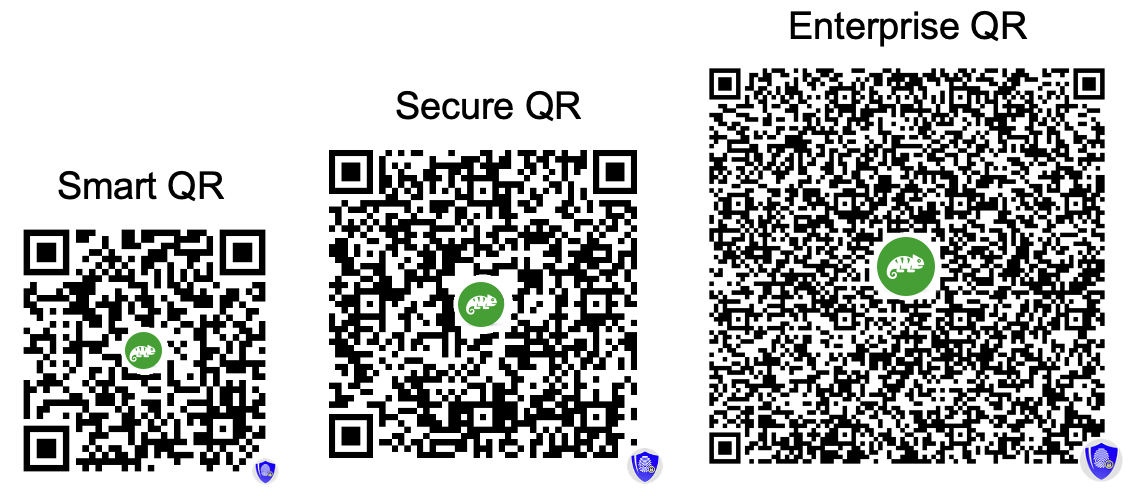
不同安全级别二维码大小的可视化对比
密码保护选项
通过密码保护为任何二维码添加额外的安全层。选择最适合您工作流程的方法:
二维码主密码
一个密码适用于所有二维码
- 在您的设置中设置一次 账户设置
- 自动应用于所有受密码保护的二维码
- 容易记住 - 只有一个密码
- 非常适合个人使用或小团队
- 可随时更改(更新所有二维码)
二维码独立密码
每个二维码有独立密码
- 为每个二维码设置不同的密码
- 最高安全性 - 一个密码泄露不会影响其他密码
- 非常适合与不同人员/部门共享
- 非常适合客户特定的文档
- 每个二维码独立保护
- 无法查看 创建后
- 无法更改 后
- 无法恢复 如果忘记
- 请确保 安全保存!
好消息! GoValid now automatically embeds distinctive logos into your QR codes based on your subscription plan - at no extra cost! This exciting feature:
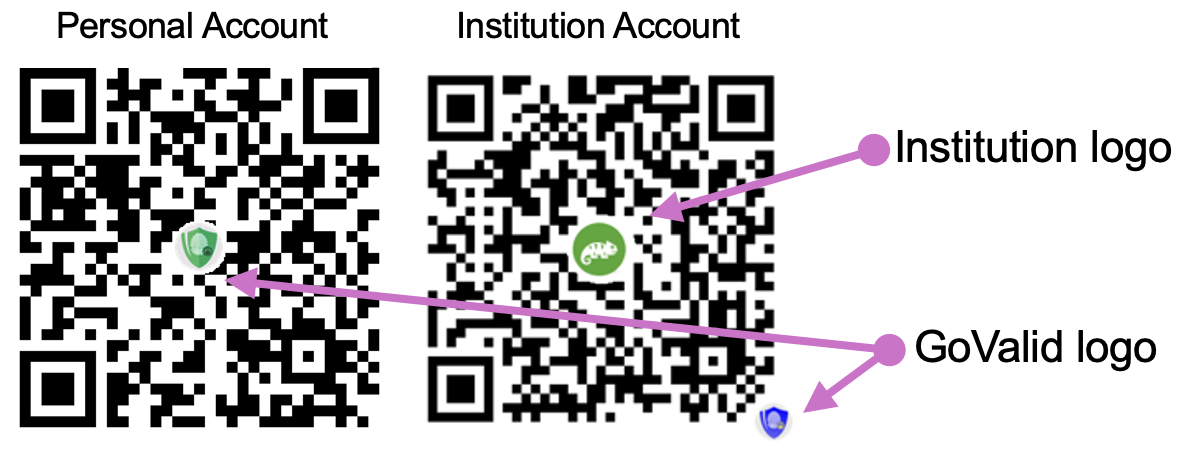
示例:基于订阅计划的不同颜色标志的二维码
您的二维码现在以专业的、特定计划的标志脱颖而出,显示您正在使用高级验证系统。
收件人立即识别GoValid保护的二维码,增加扫描率和对您内容的信心。
不同颜色的标志表示您的订阅等级 - 一种微妙的方式展示您的专业承诺。
按计划的标志颜色:
|
橙色标志 免费计划和按需付费用户 |
标准保护 |
|
绿色标志 入门、商业和旗舰计划 |
高级版验证 |

|
蓝色标志 具有完全验证的企业 |
最高信任级别 |
This feature was added to enhance security perception and brand value. The transparent logos don't interfere with QR code scanning and work with all QR readers.
当有人扫描您的二维码时:
- 他们被引导到安全验证页面
- 系统验证二维码的真实性
- 如果有密码保护,他们必须输入正确的密码
- 验证后,他们可以查看相关信息
- 每次扫描都会记录设备信息、位置和时间戳
您可以在仪表盘中追踪所有扫描,包括:
- 扫描者的位置和IP地址
- 设备类型和浏览器
- 扫描时间戳
- 安全威胁评估
- 选择要转移的二维码
- 输入收件人的邮箱地址
- 收件人收到邮件通知
- 他们必须在24小时内接受转移
- 维护完整的转移历史
注意:免费计划用户和积分用户需要升级才能使用此功能。
The "Invalid and hiding date" feature allows you to set an automatic expiration date for your QR codes. When this date is reached, your QR code will either be invalidated or hidden based on your selection.
此功能非常适合:
- 具有特定结束日期的临时活动、促销或营销活动
- Time-sensitive documents that should expire (contracts, offers, tickets)
- 符合数据保留和隐私政策
- 自动管理二维码生命周期,无需手动干预
- 需要按计划激活/停用的季节性内容
工作原理:
- Enable the "Invalid and hiding date" option when creating or editing a QR code
- 选择操作应发生的日期(和可选的时间)
- Choose between "Invalidate QR" or "Hide QR" action
- 当到达日期时,系统将自动处理您的二维码
When setting an "Invalid and hiding date" for your QR code, you can choose between two different actions that will take effect on the specified date:
使二维码无效(永久停用)
此选项永久使您的二维码无效,使其完全无法使用。
- 访客看到的内容: "This QR code has been removed and is no longer valid"
- 状态 永久 - 二维码一旦失效就无法重新激活
- 您的数据: 所有数据保留在您的账户中,用于您的记录和合规
- 二维码图像: 二维码图像保持不变,但扫描时显示错误消息
- 最适合:
- 已过期的促销活动或限时优惠
- 在特定日期后变得过时的文档
- 活动结束后的门票或通行证
- 过期的证书或凭证
- 任何有明确结束日期的内容
隐藏二维码(临时隐藏)
此选项暂时将您的二维码内容从公共视图中隐藏,同时在系统中保持完整。
- 访客看到的内容: "This QR code data is currently inactive and hidden from verification"
- 状态 临时 - 可通过联系支持团队重新激活
- 您的数据: 所有数据完全保留,可以恢复
- 二维码图像: 二维码图像保持不变,但扫描时内容被隐藏
- 最适合:
- 需要临时隐藏的季节性内容
- 暂时缺货的产品
- 正在审核或临时暂停的内容
- 合规暂停或法律要求
- 需要临时禁用访问的测试目的
重要说明
- The expiration process runs automatically every few hours, so there may be a slight delay before the QR code is invalidated or hidden after reaching the set date.
- 二维码处理后,您无法更改操作类型(使无效与隐藏)。
- 对于这两个选项,您在仪表盘中保留对二维码数据和统计信息的完全访问权限。
自动过期流程每天定期运行:
您设置无效和隐藏日期
Choose date/time and select either "Invalidate QR" or "Hide QR" action
系统监控过期日期
系统每隔几小时检查过期的二维码
到达过期日期
根据您选择的操作(使无效或隐藏)自动处理二维码
二维码在过期后被扫描
访客根据操作类型看到相应的消息
您的数据保持安全
所有二维码数据保存在您的账户中供您记录
您的数据保持安全:
- 二维码图像被保留
- 所有上传的附件仍然存储
- 表单数据和信息保持完整
- 您仍然可以从仪表盘访问所有内容
- 随时下载或导出您的数据
变化内容:
- 二维码扫描被阻止
- 验证页面显示错误消息
- 禁止公开访问数据
过期前:
- 目前,您无法通过UI修改过期日期
- 联系支持 [email protected] 获取帮助
- 我们可以帮助延长或删除过期日期
过期后:
- For "Hidden" QR codes: Contact support for reactivation
- For "Invalidated" QR codes: Cannot be reactivated (create a new QR instead)
- 您仍然可以从仪表盘访问和下载所有数据
是的!过期功能与批量生成无缝配合:
- 批量生成的所有二维码收到相同的过期日期
- Excel集成支持设置过期日期
- 为所有即将过期的二维码发送批量通知
- 批处理确保一致的处理
示例用例:
- 活动日期后过期的门票
- 带有活动结束日期的促销码
- 访客临时通行证
- 季节性产品批次
Timeline QR codes are designed for tracking events, history, and changes over time. Perfect for maintenance logs, service records, and chain of custody documentation.
Core Fields
| 字段 | 描述 | 必填 |
|---|---|---|
| 标题 | Name of the item/asset being tracked (max 100 characters) | 是 |
| Identifier | Reference number with smart patterns: {counter}, {YYYY}, {random}, etc. | 否 |
| 描述 | Detailed description of the item (max 500 characters) | 否 |
Timeline Entries - Add Events Anytime, Anywhere
Add unlimited history entries to track events over the item's lifecycle:
- Entry Title: Brief description of the event
- Entry Description: Detailed notes about what happened
- Date & Time: When the event occurred (auto-filled with current time)
- 位置 Where the event took place (auto-detect GPS or manual entry)
- Photos: Visual documentation (capture directly from camera or upload)
- Files: Attach supporting documents (PDF, images, etc.)
- Tagged Users: Link GoValid users to entries (privacy-respecting)
Scan & Add Workflow
- Scan QR code with any smartphone
- Click "Add New Entry" button
- Fill in event details
- Capture photo or attach files
- Submit - entry is saved instantly
Works Everywhere
- Field technicians on-site
- Warehouse workers during handling
- Delivery personnel at each stop
- Inspectors during audits
- Anyone authorized to add events
User Tagging Feature
Tag other GoValid users in timeline entries with privacy-respecting search:
Internal Users (Same Institution)
- Search by name, email, or user ID
- Full name and photo visible
- Instant search results
External Users
- Respects user's privacy settings
- 4-digit verification code required
- Name may be masked (Jo** Sm***)
- 5 failed attempts = 24h lockout
Smart Identifier Patterns
Use dynamic patterns in your identifier field:
| 格式 | 描述 | 示例输出 |
|---|---|---|
{counter} |
Auto-incrementing number | 1, 2, 3... |
{counter:5} |
Padded counter (5 digits) | 00001, 00002... |
{YYYY} |
Current year | 2025 |
{MM} |
Current month | 01-12 |
{DD} |
Current day | 01-31 |
{random} |
Random alphanumeric string | A7X9B2 |
{random:8} |
Random string (8 characters) | K9M2P4X8 |
Example: INV-{YYYY}-{counter:4} produces INV-2025-0001, INV-2025-0002, etc.
Mobile-Optimized Entry Form
When scanning a Timeline QR code, users can add new entries directly from their mobile device:
- Quick photo capture with device camera
- Auto-detect current GPS location
- Date/time pre-filled with current timestamp
- Attach files from device storage
- Tag other users with privacy controls
Create unlimited custom forms with drag-and-drop simplicity. Available for Business and Ultimate plan subscribers.
Available Field Types
文本字段
Single-line text input for names, titles, short answers. Supports character limits and placeholder text.
文本区域
Multi-line text for descriptions, comments, notes. Configurable rows and character limits.
Dropdown Select
Single or multiple choice from predefined options. Perfect for categories, status, types.
Date Picker
Calendar-based date selection. Supports date ranges, min/max dates, and various formats.
文件上传
Attach documents, images, PDFs. Configurable file types and size limits with encryption.
User Tag
Link to GoValid users with privacy-respecting search. Supports external user verification.
Form Templates
Start quickly with pre-built templates:
- Inspection Form: Checklist items, photos, inspector details, date/time
- Service Record: Service type, technician, parts used, next service date
- Handover Form: From/to parties, condition, signatures, witnesses
- Blank Template: Start from scratch with your own design
Field Configuration Options
| Option | 描述 |
|---|---|
| 必填 | Mark fields as mandatory for form submission |
| 标签 | Custom field label displayed to users |
| 占位符 | Helper text shown inside empty fields |
| Default Value | Pre-filled value for faster data entry |
| 验证 | Character limits, patterns, email/phone formats |
| Help Text | Additional guidance displayed below field |
Drag-and-Drop Builder
The visual form builder makes design intuitive:
- Click "Add Field" to add new field types
- Drag fields to reorder them
- Click on any field to configure its settings
- Preview your form before saving
- Forms auto-save as you work
Digital Signatures & Non-Repudiation
Custom forms support Enterprise-level security with legally binding digital signatures:
Ed25519 Digital Signatures
- Cryptographically sign form data
- 256-bit elliptic curve security
- Tamper detection on any modification
- Smaller signatures, faster verification
Non-Repudiation
- Legally binding proof of origin
- Creator cannot deny authorship
- 时间戳验证
- Complete audit trail
Embed secure QR codes directly into your PDF documents with interactive preview and precise positioning. Available for Starter plans and above.
Interactive Preview
See exactly how your stamped PDF will look before processing:
- Real-time PDF preview in the browser
- Drag-and-drop QR code positioning
- Multi-page navigation with stamp preview on each page
- Zoom controls for precise placement
- Resize QR code with corner handles
Positioning Options
Fixed Position
Corner placements: top-left, top-right, bottom-left, bottom-right, or center
Custom Drag
Drag to exact pixel coordinates anywhere on the page
Size Control
Resize from 20px to 200px while maintaining scannability
Page Selection
Control which pages receive the QR stamp:
- All Pages: Stamp every page of the document
- First Page Only: Stamp just the first page
- Last Page Only: Stamp just the final page
- Custom Pages: Specify exact pages (e.g., 1, 3, 5-10)
- Odd/Even Pages: Stamp alternating pages for duplex printing
Digital Signature Integration
Combine PDF stamping with Enterprise-level security:
- Ed25519 Digital Signatures: Cryptographically sign the PDF content
- Tamper Detection: Any modification invalidates the signature
- Non-Repudiation: Legally binding proof of origin
- Timestamp Verification: Proves document existed at specific time
Three Delivery Options
| Option | 描述 | 最适合 |
|---|---|---|
| Automatic Download | Stamped PDF downloads immediately after processing | Quick single-document processing |
| Email Delivery | Stamped PDF sent to your email with download link | Large files, archive reference |
| Cloud Storage | Saved to your GoValid secure storage for later access | Batch processing, team access |
批量处理
Process multiple PDFs efficiently:
- Upload multiple PDFs at once
- Apply same stamp position to all documents
- Each PDF gets unique QR code with individual tracking
- Download as ZIP archive or individual files
Track products, inventory, and physical assets with ownership records and verification. Perfect for supply chain management and anti-counterfeiting.
Core Fields
| 字段 | 描述 | 必填 |
|---|---|---|
| 产品名称 | Name of the product or item | 是 |
| SKU/Serial Number | Unique identifier with smart patterns support | 否 |
| 描述 | Product details, specifications, features | 否 |
| 分类 | Product category for organization | 否 |
| Manufacture Date | Production date for traceability | 否 |
| 保质期 | For perishable products | 否 |
Ownership Tracking
Track the complete chain of ownership:
- Current Owner: Who currently possesses the item
- Ownership History: Complete record of all previous owners
- Transfer Records: Date, time, and location of each transfer
- Verification: Both parties must confirm transfers
Encryption & Security
Goods QR codes support enterprise-grade security:
- AES-256-GCM: Military-grade data encryption
- ChaCha20-Poly1305: High-performance encryption
- Ed25519 Signatures: Tamper-proof verification
- Encrypted Attachments: Product photos, manuals encrypted
- Secure Keys: Per-item encryption keys
- 审计跟踪: Complete access history
Anti-Counterfeiting Features
- Unique QR Codes: Each product gets a cryptographically unique code
- First Scan Detection: Alert if item was scanned before (potential counterfeit)
- Location Verification: Flag suspicious scan patterns
- Reporting System: Report suspected counterfeits
Issue and verify certificates, diplomas, licenses, and professional credentials with tamper-proof verification and instant authentication.
Core Fields
| 字段 | 描述 | 必填 |
|---|---|---|
| Certificate Title | Name of the certificate or credential | 是 |
| Recipient Name | Person or organization receiving the certificate | 是 |
| 证书编号 | Unique identifier with smart pattern support | 否 |
| 签发日期 | When the certificate was issued | 是 |
| 保质期 | When the certificate expires (if applicable) | 否 |
| Issuing Authority | Organization issuing the certificate | 否 |
Security Levels for Certificates
Choose the appropriate security level based on certificate importance:
| Level | 安全 | 最适合 |
|---|---|---|
| 智能二维码 | 96-bit encryption, compact size | Training certificates, internal credentials |
| 安全二维码 | 256-bit AES encryption | Professional certifications, licenses |
| 企业二维码 | Ed25519 signatures + non-repudiation | Academic degrees, official government documents |
Verification Process
When someone scans a Certificate QR code:
- QR code is scanned with any smartphone camera
- User is directed to secure verification page
- System validates cryptographic signature
- Certificate details are displayed with authenticity status
- Expiry status is checked and displayed
- Verification is logged for audit trail
Institution Integration
Connect certificates to your organization:
- Institution Badge: Display your organization's verified badge
- Government Verified: Special badge for government-verified institutions
- Logo Display: Your institution logo on verification page
- Contact Info: Link to institution for verification inquiries
Bulk Certificate Generation
Issue many certificates efficiently:
- Upload Excel/CSV with recipient data
- Auto-generate unique certificate numbers
- Batch QR code creation with individual tracking
- Email distribution to recipients
- Download all certificates as ZIP
All SmartSecure QR types share these powerful features for comprehensive document and asset management.
Anti-Counterfeiting Protection System
GoValid's advanced anti-counterfeiting system uses AI-powered detection algorithms to identify and flag suspicious scan patterns, protecting your brand and products from fraud.
9 Intelligent Detection Algorithms
- Scan Limit: Single-use, limited scans, or unlimited modes
- Rapid Repeat: Same QR from different devices/locations within minutes
- Device Count: Too many unique devices scanning same QR
- City Spread: Product scanned in too many cities (total or within time window)
- Distance Check: Scan too far from first/original scan location
- Impossible Travel: Physically impossible speed between scans (e.g., 500km in 1 hour)
- Age Check: Scan too long after first scan (configurable days)
- Before Issue Date: Product scanned before official issue date
- After Expiry: Product scanned after expiration date
- Auto-detects 46+ date field name variations
- Supports 10+ date formats automatically
- Works with: issue dates, expiry, manufacture, planting dates, etc.
Customizable Brand Protection Profiles
Create tailored protection profiles for different product lines or use cases:
| Assignment Type | 描述 | 示例 |
|---|---|---|
| 默认个人资料 | Applied to all QR codes without specific assignment | General brand protection |
| 由表单类型 | Automatic assignment based on QR type (12 categories) | Certificates: strict single-scan; Goods: multi-scan allowed |
| 由标签 | Assign profiles using custom tags on QR codes | "luxury-watches" tag → ultra-strict detection |
Violation Response Actions
警告模式
Show alert message but still display content. Good for:
- Soft enforcement during rollout
- Products with expected high scan rates
- Collecting data before stricter enforcement
阻止模式
Hide content completely on violation. Good for:
- High-value luxury products
- Single-use authentication
- Strict counterfeit prevention
11 Violation Types Tracked
| Violation | What It Means |
|---|---|
scan_limit_exceeded |
QR scanned more times than allowed |
too_many_cities |
Product verified in too many different cities (total) |
too_many_cities_recent |
Too many cities within configured time window |
too_far_from_first |
Current scan location too far from first scan |
impossible_travel |
Physically impossible travel speed detected between scans |
scan_too_old |
Scan occurred too long after first scan |
rapid_repeat_different_device |
Same QR from different device within minutes |
rapid_repeat_different_location |
Same QR from different location within minutes |
too_many_devices |
Scanned from more unique devices than allowed |
scan_before_issue_date |
Product scanned before official issue/manufacture date |
scan_after_expire_date |
Product scanned after expiration date |
Multi-Channel Violation Alerts
邮箱提醒
Detailed HTML with scan context, GPS link, device info. Rate-limited (24h cooldown)
控制台提醒
In-app notifications with direct links to violation details and analytics
Push Notifications
Instant mobile push for immediate awareness of violations
Public Counterfeit Reporting System
Allow consumers to report suspected counterfeits directly:
Report Submission
- Public form - no login required
- Purchase source: marketplace, physical store, vendor, social media
- Photo evidence upload
- Seller name and details
- Optional reporter email for updates
Status Workflow
- Pending: New report awaiting review
- 已审核: Under investigation
- Confirmed: Verified as counterfeit
- Dismissed: Not counterfeit
- Reporter receives email on status change
First Scan Anchor Technology
The first scan of any QR code establishes the anchor point for all subsequent detection:
- 时间戳 Exact date and time of first verification
- GPS坐标 Latitude and longitude of first scan location
- City & Country: Geographic region of origin
- Device Fingerprint: Unique identifier of first scanning device
Comprehensive Statistics & Analytics
- Total violations with warning/block breakdown
- Affected QR codes count
- Violation type distribution
- Period-over-period trend analysis
- Geographic hotspots (where violations occur most)
- Report counts by status
扫描分析
Track every scan with detailed analytics:
- Scan Count: Total number of scans
- 位置数据: GPS coordinates, city, country
- 设备信息 Mobile/desktop, browser, OS
- Timestamps: Exact date and time of each scan
- IP地址: For security and fraud detection
- Threat Assessment: VPN, proxy, suspicious activity flags
- Trends: Daily, weekly, monthly scan patterns
- Map View: Visual representation of scan locations
通知
- Scan Alerts: Get notified when your QR code is scanned
- Security Alerts: Warnings for suspicious scan activity
- Expiry Reminders: Notification before QR codes expire
- Transfer Notifications: Alerts for ownership transfer requests
QR Code Customization
Customize your QR code appearance:
颜色
Foreground and background colors
Logo
Embed your logo in the center
Shapes
Module shapes and eye patterns
Export Options
- PNG: High-resolution raster image
- SVG: Scalable vector format for any size
- PDF: Print-ready format with metadata
- Bulk Export: Download multiple QR codes as ZIP
API集成
Integrate with your existing systems:
- RESTful API for all QR operations
- JWT认证
- Webhook notifications for scan events
- Bulk operations support
- OpenAPI documentation available
即时二维码
日常使用的快速二维码生成GoValid 提供两个强大的二维码系统,专为不同需求设计:
即时二维码
非常适合快速、日常的二维码
- 几秒钟内生成二维码
- 无需复杂表单
- 18+ 种二维码类型(WiFi、网址、联系人等)
- 对所有用户免费(有配额)
- 可编辑的登陆页面
- 签到/考勤跟踪
最适合: 活动、出勤追踪、快速分享、个人使用
SmartSecure 二维码
用于文档和验证的高级二维码
- 4个安全级别(从验证到企业)
- 文档验证与确认
- 自定义表单和PDF盖章
- 高级分析
- 企业版集成
- 合规与审计跟踪
最适合: 证书、法律文件、商业合规、官方记录
Use Instant QR for quick, everyday needs like event check-ins, WiFi sharing, or contact cards. Use SmartSecure QR when you need document verification, compliance tracking, or enterprise-level security.
Instant QR is GoValid's fast, user-friendly QR code generator that lets you create professional QR codes in seconds without complex forms or technical knowledge.
工作原理:
选择二维码类型
从18+种类型中选择:WiFi、网址、签到、联系人等
输入详情
填写简单信息 - 无需复杂表单
自定义设计
颜色、形状、标志、边框 - 打造属于您的风格!
下载和分享
立即获取您的二维码 - 即可使用!
我们的招牌功能 - 脱颖而出!
签到二维码是 GoValid 与普通二维码生成器的区别所在。它不仅仅是一个二维码 - 它是一个完整的考勤管理系统!
为什么签到二维码无与伦比:
GPS位置验证
Ensure attendees are actually at your event location - prevent fake check-ins!
基于时间的控制
Set exact check-in windows - only accept attendance during your event hours!
实时考勤仪表盘
查看谁签到了、什么时候、从哪里 - 人们到达时实时更新!
导出考勤数据
下载完整的Excel考勤报告 - 非常适合工资或合规!
适用于:
- 企业活动: 会议、培训课程、团队会议
- 教育: 课堂考勤、研讨会签到、考试验证
- 工作场所: 员工考勤追踪、班次验证
- 社区活动: 聚会、研讨会、志愿活动
- 场所: 健身房签到、共享办公空间、会员俱乐部
为什么竞争对手无法匹敌:
像QR.io或QRCode Monkey这样的通用二维码生成器只能创建简单的扫描码。他们不能:
- 使用GPS验证参会者位置
- 管理签到时间窗口
- 提供实时考勤仪表盘
- 生成考勤报告
- 追踪谁在何时何地扫描
使用GoValid签到二维码,您将获得一个完整的考勤管理系统,而不仅仅是一个二维码!
是的,当然可以! Instant QR最好的功能之一是您的登陆页面可以随时完全编辑。
您可以编辑的内容:
- 页面标题和描述
- 内容和信息
- 图片和品牌
- 颜色和样式
- 链接和网址
- 联系信息
- 事件详情时间位置
- 隐私设置
如何编辑:
- 前往您的Instant QR仪表盘
- 找到您要编辑的二维码
- 点击「编辑登陆页面」按钮
- 进行更改并保存
- 更改立即生效 - 无需更新二维码!
Instant QR quotas depend on your account status. Here's the complete breakdown:
Everyone gets 10 free Instant QR codes per week - all types included (Check-in, Feedback, Guestbook, Queue, Coupon, etc). Verified users can continue beyond this limit.
Complete Quota Breakdown:
| 用户类型 | Free Limit | 重置 | After Limit |
|---|---|---|---|
| 匿名 No Account | 10/week | 每周 | Blocked. Create account for more! |
| 已注册 未验证 | 10/week | 每周 | Blocked. Verify your account to unlock more! |
| 已验证 基于计划 | 10/week | 每周 | Deduct from monthly subscription quota |
| 已验证 Credit-based | 10/week | 每周 | Pay per QR (standard/premium rates) |
After using your 10 free weekly QR codes, verified plan-based users continue from their monthly quota, while credit-based users pay per QR at standard or premium rates.
Upgrade Your Experience:
Register & Verify
10/week 免费
Then continue with quota or credits!
订阅到套餐
Monthly quota
See pricing plans
Pay As You Go
Per QR
Top up credits when needed
- Weekly free limits: Reset every Monday at midnight
- Monthly quotas (plan-based): Reset on your subscription anniversary date
Instant QR支持18+种二维码类型,适用于各种用例:
最受欢迎
签到/考勤
活动出勤、GPS验证、时间追踪
WiFi访问
即时分享WiFi凭证 - 无需输入!
网址/网站
链接到任何网站或在线资源
通讯
Phone Call
SMS
商业与专业
vCard (Contact)
Business Page
Event
Location
营销与互动
Coupon
Feedback
Social Media
Menu
其他类型
Plain Text
Payment
App Store
是 Everyone gets 10 free Instant QR codes per week. Verified users can continue beyond this limit - no credit card required to get started!
始终免费:
- All 18+ QR types (no restrictions!)
- Check-in, Feedback, Guestbook, Queue, Coupon
- QR design customization (colors, shapes, logo)
- 可编辑的登陆页面
- Basic scan analytics
- Download PNG, SVG, PDF
Verified User Benefits:
- 10 free Instant QR per week
- Continue from quota (plan) or credits (pay-as-you-go)
- SmartSecure QR monthly quota (based on plan)
- 高级分析与报告
- Remove GoValid branding
- 优先支持
Everyone gets 10 free QR codes per week! Verified users can continue beyond this limit using subscription quota or pay-as-you-go credits.
Getting started with Instant QR is super easy - no signup required!
快速入门(3步):
- 访问: https://my.govalid.org/i/
- 选择您的二维码类型 从主页
- 填写详情并生成 - 就这样!
- 10 QR codes per week
- All QR types available
- Full customization
- Blocked after 10/week
- No QR management (anonymous)
- 10 free QR codes per week
- Continue with quota or credits after
- QR code history & management
- Edit landing pages anytime
- Scan analytics
Check-in QR is a powerful attendance and presence tracking system with anti-fraud protection:
- Pin exact check-in location on map
- Auto-calculate distance from target location
- Set maximum allowed distance (10m - 5km)
- Auto-flag suspicious check-ins
- QR code rotates every 60 seconds
- Prevents screenshot sharing/fraud
- 密码保护的显示页面
- Schedule active hours automatically
Additional Features:
Feedback QR lets you collect customer reviews and opinions with flexible rating options:
Rating Styles:
1-5 rating
Up or Down
1-5 rating
1-10 scale
Custom Questions:
| Question Type | 示例 |
|---|---|
| Star Rating | How would you rate our service? |
| Text Answer | What can we improve? |
| Multiple Choice | 您是如何了解我们的? |
| Yes/No | Would you recommend us? |
| Scale (1-10) | How likely are you to return? |
Branding & Analytics:
- Add your business logo
- Custom thank you message
- View all responses in dashboard
- Track feedback locations
Guestbook QR is a complete digital guestbook system with beautiful themes and rich media support:
Beautiful Themes:
- Up to 3 photos per entry
- Video messages
- Digital signature/drawing
- Star ratings
- Messages & Well Wishes
- Memories & Stories
- Thank You & Tributes
- Reviews & Advice
Display Modes:
Advanced Features:
- Reactions (like, heart, wow)
- Entry moderation
- Password protection
- Owner replies
- World map of guests
- PDF export
Queue QR is a complete queue management system that eliminates physical waiting lines:
Auto Queue Numbers
Custom prefix (A, B, VIP, etc.)
Wait Time Estimate
Based on average service time
Turn Notifications
Email & browser push alerts
Queue Status Tracking:
- Join queue by scanning QR
- See real-time position
- Get notified when turn is near
- 选择服务类型
- Call next customer
- Mark as serving/completed
- Handle no-shows
- View daily statistics
Anti-Fraud Protection:
- Dynamic QR mode (rotates every 60 seconds)
- Password-protected staff display
- Device fingerprinting
Coupon QR lets you create and track digital coupons with powerful redemption analytics:
- Coupon code (e.g., SAVE20)
- Discount amount (%, $, etc.)
- Expiry date
- Terms & conditions
- Redemption URL (optional)
- Total views & unique views
- Redemption count
- Conversion rate
- Geographic stats
- First & last redemption times
Redemption Status:
Usage Controls:
Menu QR creates beautiful digital menus for restaurants, cafes, and food businesses:
- Business name & tagline
- Address & contact info
- Instagram & Facebook links
- Business logo
- Add menu items with prices
- Organize by categories
- Item descriptions
- Link to external menu URL
优点:
Short Links Are Dead
Remember bit.ly/xK7jP2q? Neither do we. And neither does anyone else.
bit.ly/xK7jP2q
s.id/a8Yx3z
tinyurl.com/y7abc123
- Impossible to remember
- Meaningless random characters
- Can't say it out loud
- Copy, paste, lose, repeat
- One link = one destination
- Disposable and forgettable
nexhub.earth/YourName
nexhub.earth/MyBrand
nexhub.earth/Event2025
- Instantly memorable
- Your name, your brand
- Easy to say out loud
- Click, scan, save — done
- One link = everything
- Permanent and professional
The Only 3 Actions You Need
CLICK
Tap the link, you're thereSCAN
QR code, zero typingSAVE
Bookmark once, access foreverYour Brain Deserves Better
Your memory should store what matters — names, faces, moments. Not random characters like xK7jP2q.
nexhub.earth/YourName — That's something worth remembering.
The Verbal Test
Try saying this:
"bit dot ly slash x capital K seven lowercase j capital P two q"
😵 Confused? So is everyone else.
Now try this:
"linkhub dot earth slash your name"
✨ Simple. Clear. Memorable.
Welcome to the Future
One memorable link. Everything inside. Update anytime. Share everywhere.
Create Your NeXHub NowJoin the revolution. Short links are dead.
Your All-in-One Link Hub - Better Than Linktree!
NeXHub is a powerful micro-landing page builder that lets you create beautiful, customizable pages with your own unique URL at nexhub.earth/YourName
Why NeXHub Stands Out:
Your Unique URL
nexhub.earth/YourName - Easy to remember, professional, and all yours!
18 Content Blocks
Links, social media, gallery, videos, registration forms, countdown timers, and more!
12 Ready-Made Templates
Event, business, and personal templates - start beautiful in seconds!
Built-in Registration
Collect sign-ups with custom forms, dashboard analytics, and Excel export!
Available Content Blocks:
Ready-Made Templates:
- Conference
- Workshop
- Wedding
- Meetup
- Company Profile
- Restaurant
- 服务提供商
- Product Showcase
- Portfolio
- Content Creator
- Link Hub
- Blank Canvas
Why Choose NeXHub Over Linktree?
- 18 block types vs just links
- Built-in registration forms
- Gallery & video support
- Countdown timers
- Document attachments
- QR code included!
NeXHub includes a powerful registration form builder that lets you collect sign-ups, RSVPs, and leads directly from your hub page:
- Custom field labels
- Required/optional fields
- Text, email, phone inputs
- Photo & document uploads
- Location capture
- Terms & conditions checkbox
- Total registrations count
- Confirmed vs pending stats
- Today & this week counts
- 30-day trend chart
- Registration by block stats
- Search & filter submissions
Management Features:
Registration Status Tracking:
NeXHub gives you complete control over your page's look and feel:
- Profile image (logo/avatar)
- Cover/banner image
- Hub name (main title)
- Subtitle/tagline
- Primary/accent color
- Background color
- Text color
Font Options:
Security Options:
功能与限制
了解平台功能和限制存储限制因计划而异:
| 套餐 | 存储限制 | 每月二维码配额 |
|---|---|---|
| Free | 10 MB | 10 二维码 |
| Starter | 500 MB | 250 二维码 |
| Business | 2.3 GB | 750 二维码 |
| Ultimate | 5.0 GB | 1.500 二维码 |
存储包括与您的二维码关联的所有附件、图片和文档。
Every user (including FREE plan) can use Smart QR, Verified QR, Secure QR, and Enterprise QR. Choose the security level that fits your needs!
计划影响什么:
- 二维码配额: 10/月 (Free), 250/月 (Starter), 750/月 (Business), 1.500/月 (Ultimate)
- 存储限制: 10 MB (Free), 500 MB (Starter), 2.3 GB (Business), 5.0 GB (Ultimate)
- 机构成员限制: 见下表
- 高级版功能 见下方列表
按订阅级别的最大机构成员数
| 订阅级别 | 最大机构成员数 |
|---|---|
| FREE Free | 1 成员 |
| STRT Starter | 3 成员 |
| BUSI Business | 7 成员 |
| ULTI Ultimate | 15 成员 |
注意:这些限制仅适用于机构/组织账户。个人账户无法添加团队成员。
高级版功能由套餐
- QR Brand Logo: Starter plan and above (Institution accounts only)
- PDF盖章: 入门计划及以上
- 自定义表单 商业计划及以上
- 二维码转让: 入门计划及以上
- API密钥和OAuth应用: 仅限商业和旗舰计划
- 批量操作: 所有计划(限制不同)
- Excel集成: 全部套餐
积分用户可以使用所有功能,但按生成的每个二维码付费。
对于计划用户:
- 每月二维码生成受您的计划配额限制
- 二维码扫描没有限制
- 存储受计划级别限制
- API速率限制适用(商业+计划)
对于积分用户:
- 没有月度限制 - 只要积分允许就可以生成
- 二维码扫描没有限制
- 按使用的GB收费存储
- 一次10个以上二维码的批量折扣
一般限制:
- 每次批量操作最多1000个二维码
- 每个二维码最多100个附件
- 时间线二维码:每个时间线最多100个事件
防伪保护
智能欺诈检测,保护您的产品和品牌声誉防伪保护是 GoValid 的高级欺诈检测系统,监控二维码扫描模式以识别可能被复制或克隆的二维码。当造假者将您的二维码复制到假冒产品上时,该系统会检测可疑模式并向您和您的客户发出警报。
假冒问题
造假者不只复制您的产品 - 他们也复制您的二维码。一个二维码图像可以被复制到数千个假冒产品上。没有检测,您的客户无法分辨真假,直到为时已晚。
如何保护您的业务:
检测克隆的二维码
当同一个二维码同时从多个地点被扫描时,您就知道存在复制品。
即时警报
在检测到可疑活动的瞬间获得邮件和仪表板通知。
警告您的客户
客户扫描可能是假冒产品时会看到清晰的警告。
众包报告
客户可以直接报告疑似假冒品,帮助您追踪欺诈来源。
我们的检测系统实时分析扫描模式。当二维码被扫描时,系统将扫描数据与您定义的规则进行比较以识别可疑行为。
检测方法:
扫描限制
设置每个二维码的最大扫描次数。
- 一次性使用: 用于门票、优惠券、药品
- 有限 用于奢侈品(例如最多 3 次)
- 无限 用于证书文档
地理分布
检测异常位置模式。
- 同一二维码在太多城市被扫描
- 扫描位置距首次购买太远
- 短时间内多个城市
不可能的旅行
捕捉最强的欺诈信号。
设备分析
追踪唯一扫描设备。
- 太多不同设备 = 复制品已分发
- 来自不同设备的快速扫描
- 设备指纹比较
基于时间的检测
检测首次验证后过久才被扫描的产品(带复制二维码的过期产品),以及几分钟内的快速重复扫描(同一二维码在多个地点被检查)。
检测配置文件是可自定义的规则集,定义了对于您的产品什么是「可疑」的。不同产品有不同的正常行为 - 配置文件让您可以针对特定用例定制检测。
一块奢侈手表可能一生只被扫描 1-2 次,而一份证书可能被验证数百次。一刀切不适用 - 您最了解您的产品。
示例个人资料
| 产品类型 | 正常行为 | 可疑行为 |
|---|---|---|
| 奢侈手表 | 终身 1-2 次扫描 | 10+ 次扫描 = 存在复制品 |
| 药盒 | 每包装 1 次扫描 | 任何重复扫描 = 复制品 |
| 事件工单 | 入场 1 次扫描 | 第二次扫描 = 已使用/假票 |
| 证书 | 多次扫描正常 | 不可能的旅行模式 |
| 当地食品 | 少量扫描,本地区域 | 500公里外的扫描 |
创建中个人资料
前往配置文件
二维码设置 → 防伪
设置规则
启用检测检查
选择操作
信息、警告或阻止
分配给二维码
由表单类型或标签
You control what happens when suspicious activity is detected. Choose from three response levels based on your brand's needs.
响应操作
信息模式
扫描者看到的内容:
带有扫描统计(扫描次数、位置等)的正常验证页面 - 中立,无判断。
最适合: 在不惊动客户的情况下进行监控
警告模式
扫描者看到的内容:
黄色警告横幅列出发现的问题。产品信息仍可见,附带警告说明。
最适合: 大多数产品 - 通知而不阻止
阻止模式
扫描者看到的内容:
红色警报 - 疑似假冒。为安全起见,产品信息完全隐藏。
最适合: 药品、安全关键物品、一次性物品
您将收到:
邮箱提醒
Immediate notification with QR details, scan location, time, and list of triggered violations. Includes direct link to QR analytics.
控制台通知
在您的 GoValid 仪表盘中查看实时警报。在一处查看所有违规,支持筛选和导出。
You can assign detection profiles to QR codes in three flexible ways, giving you granular control over which products get which protection.
分配方法:
由表单类型
自动将配置文件应用于特定类型的所有二维码。
所有「商品」二维码 → 「奢侈品保护」配置文件
由标签
将配置文件应用于具有特定标签的二维码以进行精细控制。
标签「premium-watch」 → 「一次性使用」配置文件
默认个人资料
没有特定分配的二维码的备用配置文件。
所有其他二维码 → 「标准保护」
优先级顺序
当二维码匹配多个规则时:
- 标签分配 (最高优先级 - 最具体)
- 表单类型分配
- 默认个人资料 (备用)
Your customers see clear, professional verification pages that build trust. When issues are detected, the warnings are informative without being alarming.
客户体验:
所有检查通过
- 绿色「验证真品」徽章
- 完整产品信息
- 扫描统计可选
- 建立信心的消息
触发警告
- 黄色警告横幅
- 发现的问题列表
- 产品信息仍然可见
- 举报按钮可用
内容已阻止
- 红色「疑似假冒」警报
- 产品信息已隐藏
- 显示安全警告
- 联系人制造商按钮
When customers suspect they have a counterfeit product, they can submit a report directly from the verification page. This crowd-sourced intelligence helps you track fraud sources and take action.
收集的举报信息:
- 购买地点(市场、商店、供应商)
- 商店/卖家名称
- 问题描述
- 照片证据(可选)
- 举报人联系方式以便跟进
- 自动扫描位置/时间
您可以使用举报做什么:
追踪欺诈来源
查看哪些卖家/市场有问题
采取法律行动
使用证据进行执法
联系举报人
跟进以获取更多详情
任何假冒损害品牌声誉、客户安全或收入的行业都可以受益。以下是主要用例:
制药和医疗保健
假药可能致命。阻止模式确保患者永远不会在不知情的情况下使用假药。
一次性验证奢侈品和时尚
保护品牌价值。有限扫描和地理检查可捕获假冒产品上复制的二维码。
有限扫描 + 位置活动与娱乐
Single-use tickets prevent duplicate entry. Second scan immediately blocks access.
一次性 + 阻止食品与饮料
本地分销检查确保产品不会出现在未授权区域。
距离 + 时间限制电子产品与汽车零件
设备数量和地理分布检测二维码被复制到大规模生产的假货时。
设备数量 + 分布证书与文件
不可能的旅行检测可以发现同一证书同时在多个地方被验证的情况。
不可能的旅行设置防伪保护只需几分钟。以下是您的快速入门指南:
5分钟设置指南:
-
创建个人资料
前往二维码设置 → 防伪配置文件 → 创建配置文件。根据您的产品类型命名。
-
启用检测规则:
选择对您产品重要的检查:扫描限制、地理分布、不可能的旅行、设备数量等。
-
设置响应操作:
选择信息(仅统计)、警告(显示警报)或阻止(隐藏内容)来处理违规。
-
分配给二维码:
设为默认,按表单类型(商品、证书等)分配,或按标签分配给特定产品。
-
完成
您的二维码现已受到保护。从仪表盘监控违规情况。
快速提示:
- 先使用警告模式查看模式,然后再阻止
- 为需要不同规则的不同产品线使用标签
- 启用邮件提醒以实时了解情况
- 定期查看违规页面以发现模式
Microsoft Office 加载项
GoValid 与 Word、Excel 和 PowerPoint 的集成GoValid Office 加载项是一款强大的生产力工具,直接集成到 Microsoft Word、Excel 和 PowerPoint 中,让您无需离开 Office 应用程序即可生成安全、可验证的二维码。
- 在文档、电子表格和演示文稿中直接生成二维码
- 与您的 GoValid 账户自动集成
- 支持所有二维码类型:文档、证书、货物、时间线等
- Excel 批量处理(一次生成数百个二维码)
- 支持 Windows、Mac 和 Web 版 Office
支持的应用程序:
Microsoft Word
文档二维码Microsoft Excel
批量处理Microsoft PowerPoint
演示文稿二维码安装步骤:
- 有效的 GoValid 账户(个人或机构)
- Microsoft Office 2016 或更高版本(Windows/Mac) 或 Microsoft Office 在线版
- 互联网连接
方法一:从 Microsoft AppSource 安装(推荐)
- 打开 Word、Excel 或 PowerPoint
- 点击「插入」→「获取加载项」(或「插入」→「Office 加载项」)
- 在商店中搜索「GoValid QR Generator」
- 点击「添加」安装加载项
- 加载项将出现在「开始」选项卡功能区
方法二:手动安装(旁加载)
- 从以下位置下载清单文件 GoValid Office 加载项页面
- 打开 Word、Excel 或 PowerPoint
- 点击「插入」→「我的加载项」→「管理我的加载项」→「上传我的加载项」
- 选择下载的 manifest.xml 文件
- 点击「上传」,加载项将被安装
安装后,点击功能区的「GoValid QR」按钮。系统会提示您使用 GoValid 账户凭据登录。完成身份验证后,即可立即开始生成二维码!
GoValid 的 Microsoft Word 加载项允许您将安全二维码直接嵌入文档,用于验证、认证和追踪目的。
主要功能:
- 文档二维码: 生成带有自定义元数据的文档验证二维码
- 证书二维码: 创建带二维码验证的安全证书
- 自定义位置: 在文档任意位置插入二维码 - 页眉、页脚、边距或正文中
- 安全级别: 选择 PUBLIC、SECURE 或 VERIFIED 保护级别
- 品牌标识(机构账户): 二维码中心包含您的机构徽标
- 多种二维码类型: 文档、证书、货物、时间线等
使用方法:
- 打开您的 Word 文档
- 点击「开始」选项卡功能区的「GoValid QR」按钮
- 如有提示则登录
- 选择要生成的二维码类型
- 填写所需信息(文档名称、标识符等)
- 选择安全级别和位置
- 点击「生成二维码」
- 二维码将自动插入到光标位置
对于正式文档和证书,使用 VERIFIED 安全级别以确保最高真实性。二维码将链接到显示所有文档详情的验证页面。
Excel 加载项专为批量二维码生成而设计,非常适合大规模证书签发、库存管理和批量处理。
主要功能:
- 批量处理: 从 Excel 数据一次生成数百或数千个二维码
- 列映射: 将 Excel 列映射到二维码字段(名称、标识符、描述等)
- 证书签发: 非常适合批量生成带有唯一二维码的证书
- 库存管理: 为货物追踪和库存管理生成二维码
- 自动插入: 二维码自动插入到指定单元格
- 进度跟踪: 大批量处理时的实时进度指示器
您可以批量生成的二维码数量取决于您的订阅计划。使用批量生成功能时,您当前的限额会显示在加载项界面中。
使用方法(批量处理):
- 准备好包含列数据的 Excel 电子表格
- 包含以下列:姓名、标识符、描述、日期等
- 从「开始」选项卡打开 GoValid 加载项
- 选择「批量生成」模式
- 将您的列映射到二维码字段
- 选择数据范围(例如 A2:D100)
- 选择插入二维码的位置(例如 E 列)
- 点击「批量生成二维码」
- 等待处理完成(显示进度条)
- 二维码将插入到指定的列中
Excel 加载项非常适合需要向多名接收者颁发证书的教育机构、培训中心和组织。每张证书都会获得一个与接收者详细信息关联的唯一二维码。
PowerPoint 加载项允许您在演示文稿中添加可验证的二维码,使其具有互动性和可追踪性。
主要功能:
- 幻灯片二维码: 为单个幻灯片或整个演示文稿生成二维码
- 屏幕捕获: 自动捕获幻灯片缩略图用于二维码验证页面
- 事件追踪 追踪演示期间谁扫描了二维码
- 互动演示文稿: 添加资源链接、反馈表单或证书
- 自定义位置: 将二维码放置在幻灯片角落、标题或自定义位置
- 多幻灯片支持: 一次为多个幻灯片生成唯一的二维码
使用方法:
- 打开您的 PowerPoint 演示文稿
- 导航到您想要添加二维码的幻灯片
- 点击「开始」选项卡功能区的「GoValid QR」按钮
- 如有提示则登录
- 选择「演示文稿二维码」或「幻灯片二维码」
- 填写演示文稿详细信息(标题、描述等)
- 可选择启用「捕获幻灯片」以包含缩略图
- 选择二维码在幻灯片上的位置
- 点击「生成二维码」
- 二维码将被插入到您的幻灯片中
常见用例:
教育演示文稿
链接到课程材料、作业或其他资源商务演示文稿
提供联系方式、产品链接或反馈表单会议与活动
分享演示材料、演讲者信息或活动详情培训证书
向培训参与者颁发数字证书启用「屏幕捕获」功能可在二维码验证页面自动包含幻灯片预览。这有助于用户确认他们正在查看正确的演示内容。
GoValid Office 加载项使用安全的 JWT(JSON Web Token)身份验证来连接您的 GoValid 帐户。
身份验证流程:
- 首次打开加载项时,您会看到登录界面
- 输入您的 GoValid 用户名和密码
- 如果您已启用双因素认证,请输入验证码
- 加载项会收到一个安全的访问令牌(有效期 24 小时)
- 令牌存储在 Office 应用程序会话本地
- 24 小时后,您需要重新进行身份验证
如果您的 GoValid 帐户启用了双因素认证,您需要在登录 Office 加载项时输入验证码。
我们强烈建议启用双因素认证以增强安全性,特别是对于机构帐户。
如何退出登录:
- 打开 GoValid 加载项
- 点击右上角的个人资料/用户图标
- 选择「退出登录」
- 您的身份验证令牌将被清除
您的密码永远不会存储在加载项中。只存储安全的临时访问令牌,且会在 24 小时后过期。与 GoValid 服务器的所有通信都使用 HTTPS 加密。
是的,Office 加载项需要一个有效的 GoValid 帐户。通过加载项生成的二维码将计入您帐户的二维码配额或积分。
工作原理:
- 通过 Office 加载项生成的二维码计入您的每月配额
- 您当前的配额和剩余余额会显示在加载项中
- Excel 批量处理限制根据您的套餐等级而定
- 配额每月重置
- 每生成一个二维码将从您的余额中扣除积分
- 您当前的积分余额会显示在加载项中
- 随时按需充值积分
- 无月度限制 - 积分有多少用多少
您当前的配额或积分余额始终显示在加载项界面顶部。生成二维码或购买后,点击右上角的刷新图标(🔄)可更新您的余额。
有时您需要刷新加载项以更新配额余额、重新加载数据或修复显示问题。
快速刷新(推荐):
- 在加载项右上角查找圆形刷新图标(🔄)
- 点击刷新图标
- 您的配额/积分余额和用户信息将会更新
- 这不会使您退出登录
- 生成二维码后更新剩余配额
- 购买订阅或充值积分后
- 当您看到过时的配额/余额信息时
完全重新加载(解决问题时):
如果加载项无法正常工作或显示错误:
- 桌面版 Office(Windows/Mac):
- 关闭加载项任务窗格
- 再次点击功能区中的「GoValid QR」按钮重新打开
- Office Online(网页版):
- 刷新浏览器页面(F5 或 Ctrl+R / Cmd+R)
- 加载项将自动重新加载
- 如果问题仍然存在:
- 从加载项退出登录(点击个人资料图标 → 退出登录)
- 关闭并重新打开加载项
- 重新登录
刷新图标(🔄)仅从服务器更新数据。如果您遇到屏幕冻结或错误等技术问题,请使用上述完全重新加载方法。
常见问题:
功能区中未显示加载项按钮
解决方案:
- 完全重启 Office 应用程序
- 检查加载项是否已启用:文件 → 选项 → 加载项 → 管理 COM 加载项 → 启用 GoValid
- 从 AppSource 重新安装加载项或手动上传
- 确保您使用的是 Office 2016 或更高版本
无法登录 / 身份验证失败
解决方案:
- 验证您的用户名和密码是否正确
- 如果您启用了双因素认证,请确保输入正确的验证码
- 检查您的网络连接
- 先尝试通过网页浏览器登录以确认凭据
- 清除 Office 中的浏览器缓存(文件 → 选项 → 信任中心 → 清除)
二维码未插入到文档中
解决方案:
- 确保在生成前光标已定位在文档中
- 检查文档是否处于只读模式
- 验证您还有剩余的二维码配额/积分
- 尝试重新生成 - 可能发生了临时网络问题
- 对于 Word:确保您不在打印版式限制中
Excel 批量处理失败或停止
解决方案:
- 检查您是否未超过套餐的列/行限制
- 确保所有必需的列都有数据(映射列中没有空单元格)
- 验证您有足够的二维码配额/积分用于批量大小
- 对于大批量(>1000),请分成更小的块
- 检查 Excel 是否正在运行可能干扰的宏
加载项缓慢或无响应
解决方案:
- 检查您的网络连接速度
- 关闭其他 Office 文档和应用程序
- 对于批量处理,减少批量大小
- 清除 Office 缓存:文件 → 选项 → 高级 → 清除 Office 缓存
- 更新到最新版本的 Office
如果您继续遇到问题:
- 访问我们的支持页面: https://govalid.org/office-add-in-govalid/
- 联系支持: [email protected]
- 请提供:Office 版本、Windows/Mac、错误消息截图
支持的平台:
| 平台 | 最低版本 | Word | Excel | PowerPoint |
|---|---|---|---|---|
| Windows 桌面版 | Office 2016 或更高版本 | |||
| Mac 桌面版 | Office 2016 或更高版本 | |||
| Office Online(网页版) | 当前版本 | |||
| Microsoft 365 | 所有版本 | |||
| iPad/移动设备 | iPad/移动设备版 Office |
- Windows:Office 2019、Office 2021 或 Microsoft 365
- Mac:Office 2019 for Mac 或更高版本
- 网页版:Chrome、Edge、Firefox 或 Safari 的最新版本
- 移动版:iOS 和 Android 的 Office Mobile 应用
是的,您的数据隐私和安全是我们的首要任务。以下是我们保护您信息的方式:
数据安全措施:
- 无完整文档上传: 我们绝不会上传或存储您的完整 Office 文档
- 最小化数据收集: 只发送二维码元数据(名称、标识符、描述)
- HTTPS 加密: 所有数据传输使用 SSL/TLS 加密
- 安全身份验证 24小时过期的JWT令牌
- 本地存储: 认证令牌仅存储在Office会话本地
- 无第三方共享: 您的数据从不与第三方共享
我们收集哪些数据:
| 数据类型 | 用途 | 是否存储? |
|---|---|---|
| 二维码元数据 | 生成并显示验证页面 | |
| 用户账户信息 | 身份验证和配额追踪 | |
| 使用量统计 | 监控配额并改进服务 | |
| 完整文档内容 | — | 从不 |
| 文档密码 | — | 从不 |
When you use the 'Capture Slide' feature in PowerPoint, only a low-resolution thumbnail (960x540px) of the current slide is uploaded. This is used solely for the QR verification page preview. You can disable this feature if preferred.
The GoValid Office Add-in complies with GDPR, CCPA, and other data protection regulations. You can request data deletion at any time from your GoValid account settings.
OJS插件(开放期刊系统)
用于学术期刊和出版商的GoValid集成获取GoValid OJS插件
Generate verifiable certificates, secure QR codes, and professional email templates directly from your OJS journal.
The GoValid OJS Plugin is a powerful integration that brings GoValid's authentication and verification capabilities directly into Open Journal Systems (OJS). It enables academic journals to generate secure, verifiable certificates and QR codes for reviewers, authors, and editors without leaving the OJS environment.
为什么期刊喜爱GoValid OJS插件
- 用精美、可验证的证书表彰审稿人
- 用安全的二维码验证已发表的文章
- 用自定义邮件模板简化沟通
- 用加密验证打击证书欺诈
- 节省数小时的手动证书创建工作
主要功能
证书设计器
可视化拖放编辑器,用于创建带有期刊品牌的精美审稿人证书、录用通知和奖项。
二维码生成
生成具有企业级数字签名和加密真实性证明的安全、可验证二维码。
邮件设计器
创建带有自定义页眉、页脚和期刊品牌的专业邮件模板 - 全部原生保存到OJS。
智能验证小部件
在期刊公共页面添加浮动验证小部件,让访客可以即时验证任何GoValid二维码。
GoValid OJS插件支持多个OJS版本。每个版本都经过专门构建和测试以确保兼容性:
| OJS版本 | PHP支持 | 测试于 | 状态 |
|---|---|---|---|
| OJS 3.1.x | PHP 7.0 - 7.4 | PHP 7.3 | 支持 |
| OJS 3.3.x | PHP 7.3 - 8.0 | PHP 7.4 PHP 8.0 | 支持 |
| OJS 3.4.x | PHP 8.0 - 8.3 | PHP 8.1 PHP 8.3 | 支持 |
| OJS 3.5.x | PHP 8.2 - 8.5 | PHP 8.2 PHP 8.5 | 支持 |
- 以管理员身份登录
- 前往管理 → 系统信息
- 在当前版本部分查找「OJS版本」
- 活跃GoValid账户 (免费注册)
- 已安装OJS 3.1.x、3.3.x、3.4.x或3.5.x
- OJS管理员访问权限
- PHP扩展:GD、JSON、cURL、mbstring、OpenSSL
方法1:通过OJS插件库安装(推荐)
- 以管理员身份登录OJS
- 导航至设置 → 网站 → 插件
- 点击「插件库」选项卡
- 搜索用于GoValid
- 点击GoValid OJS插件旁边的「安装」
- 安装后,返回「已安装插件」选项卡
- 在通用插件下找到「GoValid OJS插件」并点击「启用」
方法2:手动上传
- 从以下位置下载正确的插件版本 GoValid OJS插件页面
- 以管理员身份登录OJS
- 导航至设置 → 网站 → 插件
- 点击「上传新插件」
- 选择下载的.zip文件
- 点击「保存」以上传并安装
- 从已安装插件列表启用插件
方法3:手动安装(FTP/SSH)
- 下载并解压插件zip文件
- 将「goValidOJS」文件夹上传到:
/path/to/ojs/plugins/generic/ - 设置权限:
chmod -R 755 goValidOJS/ - 清除OJS缓存:
rm -rf cache/* - 登录OJS并启用插件
After enabling the plugin, click the arrow next to the plugin name and select 'Settings'. You'll see links to the Certificate Designer and Email Designer. When you open either designer for the first time, you'll be prompted to log in with your GoValid account credentials.
The Certificate Designer is a powerful visual editor that lets you create professional certificates directly within OJS. It features a drag-and-drop canvas where you can design certificates for reviewers, authors, editors, or any other recognition purpose.
设计功能
- 可视化拖放画布
- 纵向和横向方向
- 自定义背景图片
- 期刊徽标自动缩放
- 高分辨率导出(300 DPI)
- 图形(矩形、圆形、线条)
- 自定义字体和颜色
- 二维码放置位置
动态文本字段
设计器支持动态文本字段,可自动从OJS填充数据:
审稿人姓名 | 审稿人全名 |
作者姓名 | 文章作者姓名 |
编辑名称 | 分配编辑的姓名 |
文章标题 | 投稿标题 |
期刊名称 | 您的期刊名称 |
DOI | 数字对象标识符 |
期号信息 | 卷号、期号、年份 |
评价日期 | 审稿完成日期 |
在线/印刷版ISSN | 期刊ISSN号 |
模板库
不想从零开始?从我们的预制模板中选择:
GoValid OJS插件使用带数字签名的企业级安全性 - 这是专为官方文档和证书设计的最高级别保护。
企业版安全
加密
Ed25519
+ 数字签名
具有不可抵赖性的加密真实性证明
完美适配OJS
- 审稿人证书
- 录用通知
- 编辑任命
- 出版确认
签名证书(PIN验证)
为获得最大真实性,您可以启用'签署者'功能,将您的数字签名添加到证书中:
- 在二维码设置中启用'签署者'开关
- 输入您的6位数GoValid签名PIN码
- PIN码由GoValid服务器验证
- 生成安全会话令牌(有效期5分钟)
- 您的证书经过加密签名
电子邮件设计器让您可以创建专业的品牌电子邮件模板,与OJS的电子邮件系统无缝集成。
模板部分
- 期刊徽标
- 标题和副标题
- 背景颜色/渐变
- 徽标位置(左/中/右)
- 问候语
- 邮件正文
- 文章详情框
- 结束语
- 签名
- 签名名称
- 期刊网址
- 边框和颜色
OJS变量支持
电子邮件模板支持OJS模板变量,可自动填充真实数据:
{$recipientName}, {$articleTitle}, {$journalName}, {$editorName}, {$submissionUrl}, 和更多
设计完证书后,您可以直接将其发送给收件人,无需离开证书设计器:
- 在证书设计器中设计您的证书
- 点击工具栏中的「发送邮件」按钮
- 将打开一个包含邮件选项的对话框
- 选择一个邮件模板(来自邮件设计器)
- 在收件人字段中输入收件人邮箱
- 可选择添加抄送和密送收件人
- 如需要,添加任何额外附件
- 点击「发送」来传送证书
用户自动完成
When typing in the recipient fields, the plugin will suggest OJS users based on your search. This makes it easy to send certificates to reviewers, authors, or editors without manually typing their email addresses.
- 证书图片:最大5MB
- 总附件:最大10MB
- 支持的格式:PDF、PNG、JPG、GIF
The Smart Verify Widget is a floating button that appears on your journal's public pages, allowing visitors to instantly verify any GoValid QR code.
工作原理
- 访问者点击浮动验证按钮
- 验证面板打开
- 他们可以手动输入二维码ID
- 或上传/扫描二维码图片
- 即时显示验证结果
配置选项
- 按期刊启用/禁用
- 6个位置选项:
- 右下角(默认)
- 左下角
- 右中
- 左中
- 右上角
- 左上角
The Floating Action Button (FAB) is a convenient toolbar that appears in the OJS dashboard, providing quick access to GoValid tools without navigating through menus.
它提供什么
- 一键访问证书设计器
- 一键访问邮件设计器
- 在所有仪表盘页面上可见(投稿、工作流程等)
- 在新标签页中打开设计器以进行多任务处理
基于角色的可见性
在插件设置中,您可以控制哪些角色可以看到FAB:
Anti-Counterfeit Protection is GoValid's advanced fraud detection system that monitors QR code scan patterns to identify potentially copied or cloned certificates. When counterfeiters copy your certificates, the system detects suspicious patterns and alerts both you and verifiers.
Fake reviewer certificates and acceptance letters damage journal credibility. Counterfeiters copy QR codes onto fraudulent certificates. Without detection, employers and institutions can't verify authenticity.
检测方法
地理分布
检测同一证书二维码是否从太多不同城市或国家扫描 - 表明存在副本。
不可能的旅行
如果一个证书在上午10:00在雅加达被扫描,然后在上午10:30在泗水被扫描 - 那肯定是复制品!
在OJS插件中使用标签
在证书设计器中,您可以为二维码分配防伪标签。这些标签:
- 帮助按年份、部门或活动组织证书
- 启用检测配置文件分配(例如,「reviewer-2025」标签 → 「证书保护」配置文件)
- 便于按类别跟踪和筛选可疑活动
The GoValid OJS Plugin works perfectly with Subscription Plans and Institution Accounts. QR codes generated through the plugin count toward your monthly quota.
- 包含每月二维码配额
- 配额显示在设计器中
- 每月重置
- 套餐免费入门版商业版旗舰版
- 跨多个期刊的共享配额
- 集中管理
- 编辑的成员账户
- 自定义品牌选项
常见问题
安装后插件未显示
解决方案:
- 清除OJS缓存:
rm -rf cache/* - 检查文件权限(文件夹755,文件644)
- 验证您为OJS安装了正确的版本
- 如果使用opcache,请重启Web服务器
设计器中的登录按钮不工作
解决方案:
- 检查浏览器控制台是否有JavaScript错误
- 确保启用HTTPS(安全认证所需)
- 尝试隐身/私密浏览模式
- 清除浏览器缓存和Cookie
邮件无法发送
解决方案:
- 检查OJS邮件设置(设置 → 工作流程 → 邮件)
- 在config.inc.php中验证SMTP服务器配置
- 检查服务器邮件日志是否有错误
- 确保证书大小在5MB以下
签名的二维码失败,显示「无效令牌」
解决方案:
- 会话令牌5分钟后过期 - 请再次验证PIN
- 签名期间确保稳定的互联网连接
- 检查您的GoValid账户是否已启用签名
从我们的官方下载页面下载GoValid OJS插件。确保为您的OJS安装选择正确的版本。
另外可用:
文档编号规则
掌握机构的自动化文档编号系统
文档编号规则 是一个自动编号系统,为您的机构生成连续、专业的文档编号。可以将其视为一个永不出错的智能编号机!
它的功能:
- 自动生成唯一的连续编号
- 遵循您的自定义格式/规则
- 防止编号重复
- 根据您的计划重置计数器
- 跳过保留的/不吉利的数字
完美适用于:
- 政府机构和公共机构
- 非政府组织和非营利组织
- 农户团体和农业合作社
- 社区组织和协会
- 大学和教育机构
- 微型、小型和中型企业
- 任何需要连续文档编号的组织
FIN/2024/03/0001 自动递增到 FIN/2024/03/0002, FIN/2024/03/0003, 依此类推。当三月结束时,它自动变成 FIN/2024/04/0001!
可用性: 仅限机构账户 - 此功能专为机构/组织账户提供,个人用户不可用。
分步导航:
- 登录您的机构账户
- 前往 机构设置 从您的仪表板菜单
- 点击 编号规则 标签(第三个标签)
- 点击 添加格式 按钮创建您的第一个规则
创建编号规则很简单!按照这个简单指南:
基本信息
- 格式名称 给它一个描述性名称(例如「财务发票」、「人力资源信函」)
- 规则代码: 简短标识符(例如「INV」、「SK」、「MOU」)
- 描述 何时使用此规则的简要说明
构建您的规则模板
这是有趣的部分!点击组件按钮构建您的编号格式:
| 组件 | 功能说明 | 示例输出 |
|---|---|---|
{DEPT} |
部门代码(财务、人力、IT) | FIN |
{YYYY} |
4 位年份 | 2024 |
{YY} |
2 位年份 | 24 |
{MM} |
2 位月份 | 03 |
{DD} |
2 位日期 | 15 |
{SEQ:4} |
4 位序列号 | 0001 |
{TYPE} |
文档类型代码 | SK |
/ or - |
分隔符 | / or - |
{DEPT}/{YYYY}/{MM}/{SEQ:4}输出:
FIN/2024/03/0042
配置计数器设置
- 计数器范围: 全局(一个计数器)或按部门/用户/类型
- 重置频率: 从不、每日、每月或每年
- 起始编号: 通常从 1 开始
保存和测试
点击 创建格式 完成了!您的规则现在可以生成专业的文档编号了。
以下是您可以在编号规则中使用的所有变量的完整参考:
日期和时间变量
| 变量 | 描述 | 示例 |
|---|---|---|
{YYYY} |
完整的 4 位年份 | 2024 |
{YY} |
简短的 2 位年份 | 24 |
{MM} |
带前导零的月份 | 03 表示三月 |
{DD} |
带前导零的日期 | 15 |
组织变量
| 变量 | 描述 | 示例 |
|---|---|---|
{DEPT} |
用户所属部门的部门代码 | FIN, HR, IT |
{USER} |
用户名的前 4 个字符(大写) | JOHN |
{TYPE} |
生成时提供的文档类型 | SK, MOU, INV |
序列号变量
| 变量 | 描述 | 示例 |
|---|---|---|
{SEQ} |
简单序列(无填充) | 1, 2, 42 |
{SEQ:3} |
3 位填充序列 | 001, 002, 042 |
{SEQ:4} |
4 位填充序列(推荐) | 0001, 0002, 0042 |
{SEQ:5} |
5 位填充序列 | 00001, 00002, 00042 |
{SEQ:6} |
6 位填充序列 | 000001, 000002, 000042 |
{SEQ:4} 或 {SEQ:5} 使编号看起来更专业。填充确保所有编号具有相同的宽度,使其更易于阅读和排序!
计数器范围 决定您的序列号如何组织。可以将其视为决定您是想为所有内容使用一个计数器,还是为不同的部门/用户使用单独的计数器。
全局计数器
整个机构使用一个计数器
示例:跨所有部门的发票编号
- 生成:
INV-2024-0001 - 下一步
INV-2024-0002 - 然后:
INV-2024-0003
按部门
每个部门单独的计数器
示例:部门特定信函
- 财务部:
FIN/2024/0001,FIN/2024/0002 - 人力资源部:
HR/2024/0001,HR/2024/0002 - IT 部:
IT/2024/0001,IT/2024/0002
按用户
每个员工有自己的计数器
示例:个人文档追踪
- 用户张三:
JOHN-0001,JOHN-0002 - 用户李四:
JANE-0001,JANE-0002
按文档类型
每种文档类型单独的计数器
示例:类型特定编号
- SK 类型:
SK/2024/0001,SK/2024/0002 - MOU 类型:
MOU/2024/0001,MOU/2024/0002
重置频率 控制您的序列计数器何时回到起始数字(通常是1)。这对于基于时间的编号系统至关重要。
| 重置选项 | 使用说明 | 示例 |
|---|---|---|
| 从不重置 | 计数器永远递增 |
INV-0001INV-0002INV-9999无限期继续 |
| 每日重置 | 每天午夜重置为1 |
3月15日:REG/20240315/0001REG/20240315/00423月16日: REG/20240316/0001 ✨
|
| 重置月付 | 每月1日重置为1 |
3月:FIN/2024/03/01564月: FIN/2024/04/0001 ✨
|
| 重置年付 | 每年1月1日重置为1 |
2024:DOC/2024/99992025: DOC/2025/0001 ✨
|
您应该选择哪种重置频率?
- 从不重置: 证书、永久ID、终身追踪
- 每日重置: 每日注册、访客日志、日报
- 重置月付 月度发票、工资单文件、月度报告(最常用)
- 重置年付 年度文件、年度合同、政府信函
保留编号 are specific sequence numbers you want to skip automatically. This is perfect for avoiding unlucky numbers or reserving special numbers for VIP documents!
跳过数字的常见原因:
- 文化原因:
- 数字13(西方文化)
- 数字4(东亚文化)
- 数字666(宗教原因)
- 保留供特殊使用:
- 数字1用于CEO文件
- 数字1-10用于管理层
示例
跳过数字:4、13、666
DOC-0001
DOC-0002
DOC-0003
DOC-0004 ❌ 已跳过!
DOC-0005 ✅
如何设置保留数字:
- 在「添加模式」表单中,找到「保留数字」字段
- 输入用逗号分隔的数字
- 示例
4, 13, 44, 666 - 保存您的模式
从这些真实组织使用的流行编号模式中学习:
格式 {DEPT}/{YYYY}/{MM}/{SEQ:6}
示例输出: FIN/2024/03/000156
- 计数器范围:按部门
- 重置频率:每月
- 起始数字:1
完美适用于: 公函、法令文件、通知
格式 INV-{YYYY}{MM}-{SEQ:5}
示例输出: INV-202403-00042
- 计数器范围:全局
- 重置频率:每月
- 起始数字:1
完美适用于: 销售发票、采购收据、付款记录
格式 {DEPT}/{TYPE}/{YY}{MM}/{SEQ:4}
示例输出: ADMIN/LETTER/2403/0025
- 计数器范围:按部门和类型
- 重置频率:每月
- 保留编号:13,666
完美适用于: 来自多个部门的信函、证书、公文
格式 MR-{YYYY}{MM}{DD}-{SEQ:5}
示例输出: MR-20240315-00156
- 计数器范围:全局
- 重置频率:每日
- 起始数字:1
完美适用于: 病历、患者登记、每日报告
格式 CERT-{YYYY}-{SEQ:6}
示例输出: CERT-2024-000042
- 计数器范围:全局
- 重置频率:每年
- 起始数字:1
完美适用于: 证书、资格证、终身文件
格式 ID-{SEQ:8}
示例输出: ID-00000042
- 计数器范围:全局
- 重置频率:从不
- 起始数字:1
完美适用于: 会员ID、资产标签、永久跟踪号
格式 PO-{YYYY}{MM}-{SEQ:4}
示例输出: PO-202403-0015
- 计数器范围:全局
- 重置频率:每月
- 起始数字:1
完美适用于: 采购订单、销售收据、送货单、简单开票
格式 PROJ-{DEPT}-{YYYY}-{SEQ:5}
示例输出: PROJ-EDU-2024-00042
- 计数器范围:按部门(项目区域)
- 重置频率:每年
- 起始数字:1
完美适用于: 项目跟踪、受益人ID、拨款文件、活动报告、捐赠收据
格式 HARVEST-{YY}{MM}-{USER}-{SEQ:4}
示例输出: HARVEST-2403-JOHN-0025
- 计数器范围:按用户(按农民)
- 重置频率:每月
- 起始数字:1
完美适用于: 收获批次、农产品分销、种子追踪、肥料分配、农民援助记录
The numbering pattern system seamlessly integrates with GoValid's QR code generation, creating a powerful document management solution!
工作原理:
- 创建您的模式 在机构设置
- 生成二维码 用于文档
- 选择编号模式 在创建二维码时
- 系统自动生成 序列中的下一个编号
- 编号已嵌入 在二维码数据中
优点:
- 自动编号分配
- 不可能出现重复编号
- 通过二维码实现文档可追溯性
- 二维码上的专业文档ID
- 集成的审计跟踪
使用案例:
- 带有证书编号的证书二维码
- 带有发票编号的发票二维码
- 带有参考编号的公函二维码
- 带有序列号的产品二维码
- 带有跟踪ID的文档二维码
GoValid生态系统集成
The Document Numbering Pattern system works seamlessly across the entire GoValid ecosystem, providing consistent numbering wherever you generate documents!
在所有二维码生成表单上可用:
- 文档表单 - 用于一般文档和信函
- 证书表单 - 用于证书和凭证
- 商品表单 - 用于产品追踪和库存
- 时间线表单 - 用于活动和里程碑追踪
- Excel 集成 - 用于批量文档生成
- 自定义表单 - 用于您的自定义文档类型
- PDF 盖章 - 用于自动PDF处理
与环境追踪功能集成:
- 树木领养/守护 - 连续的树木编号和证书
- 社区溯源 (C-TRACE) - 批次和批号追踪
- 碳积分追踪 - 项目和验证编号
- MRV系统 - 监控、报告和验证ID
直接从Microsoft Office生成编号文档:
- Word加载项 - 向Word文档添加带有文档编号的二维码
- Excel加载项 - 生成带有顺序编号的批量文档
- PowerPoint加载项 - 向证书和演示文稿添加编号的二维码
与流行的内容管理系统集成:
- OJS(开放期刊系统) - 文章ID和出版编号
- WordPress - 帖子和页面编号集成
- Joomla - 文章和内容追踪
常见问题和解决方案
原因: 您正在使用个人账户
解决方案:
- 此功能仅适用于机构/组织账户
- 如果您需要此功能,请创建新的机构账户
- 或者请您的机构管理员给您员工访问权限
原因: 重置逻辑取决于何时生成数字
解决方案:
- 计数器仅在重置期后生成下一个数字时才会重置
- 示例:当您生成新月份的第一个数字时发生月度重置
- 检查您的模式重置频率设置
- 尝试生成新数字以触发重置
原因: 访问控制或模式状态问题
解决方案:
- 检查模式是否设置为「活跃」状态
- 验证员工成员是否已确认状态
- 如果使用按部门范围,请检查部门限制
- 确保模式已正确保存
原因: 保留数字字段格式不正确
解决方案:
- 仅使用逗号分隔的数字:
4, 13, 666 - 不要使用范围或特殊字符
- 正确:
13, 666, 999 - 错误:
13-15, 666
原因: 用户未分配到部门或部门代码缺失
解决方案:
- 前往机构设置 → 部门和角色选项卡
- 创建部门代码(FIN、HR、IT 等)
- 将用户分配到各自的部门
- 部门 codes must be set up BEFORE using {DEPT} variable
遵循这些提示以获得最佳编号系统:
要做 ✅
- 使用描述性的模式名称
- 在基于时间的文档模式中包含年/月
- 对序列号使用4-5位填充
- 上线前测试模式
- 记录您的编号逻辑以供将来参考
- 使用一致的分隔符(/ 或 -)
- 从简单开始,根据需要添加复杂性
不要 ❌
- 为同一目的创建多个模式
- 使用会破坏系统的特殊字符
- 使模式过长(保持在50个字符以内)
- 跳过序列填充(导致排序问题)
- 在生成编号后更改模式设置
- 使用模糊的名称如「模式1」、「测试模式」
- 不必要地过度复杂化模式
专业提示:
社区溯源 (C-TRACE)
从农场到消费者的农业供应链溯源C-TRACE 是 GoValid 的农业供应链溯源系统,专为从农场到消费者的社区溯源设计。它允许您:
- 通过顺序工作流程步骤追踪产品(例如:采收 → 加工 → 质量检查 → 发货)
- 为不同利益相关者分配角色(农民、加工商、检查员、运输商)
- 记录更新,包括照片、文档、GPS 位置和时间戳
- 生成二维码供消费者扫描查看完整旅程
- 管理批次的整个生命周期(草稿 → 活跃 → 完成 → 归档)
常见用例:
- 咖啡豆从农场到烘焙厂
- 棕榈油生产和加工
- 可可供应链追踪
- 有机农产品认证
| 功能 | C-TRACE 批次 | 常规二维码 |
|---|---|---|
| 用途 | 多步骤流程追踪 | 单一验证点 |
| 工作流程 | 强制顺序步骤 | 无工作流程 |
| 多个利益相关者 | 是(基于角色的访问) | 否(单用户) |
| 随时间更新 | 是(步骤完成并更新) | 否(静态内容) |
| 时间线查看 | 是(消费者公开时间线) | 否 |
| 最适用于 | 供应链、农业、制造业 | 文档证书产品 |
工作流程模板是常见供应链的预配置步骤序列。它们通过提供可自定义的行业标准工作流程来节省时间。可用模板包括:
- coffee_v1: 咖啡生产(8 步:采收 → 樱桃挑选 → 去果肉 → 发酵 → 清洗 → 干燥 → 去壳 → 质量分级)
- palm_oil_v1: 棕榈油供应链(7 步)
- cacao_v1: 可可加工(7 步)
- simple_agri: 基础农业追踪(5 步)
- custom: 从零开始构建您自己的工作流程
C-TRACE 批次经历四个生命周期状态:
- 草稿 - 初始创建,仍在配置工作流程和角色
- 活跃 - 批次已激活,利益相关者可以完成分配的步骤
- 已完成 - 所有工作流程步骤完成,批次旅程结束
- 已归档 - 移至归档以保存历史记录
C-TRACE 目前处于测试阶段,定价因订阅套餐而异:
| 套餐 | C-TRACE 访问 | 月付批次限制 |
|---|---|---|
| 免费 | 否访问 | - |
| 入门版 | 是 | 10 批次/月 |
| 企业 | 是 | 50 批次/月 |
| 旗舰版 | 是 | 无限 |
基于积分的用户可以单独购买 C-TRACE 批次积分。
按照以下步骤创建您的第一个批次:
- 导航至 二维码 → C-TRACE → 创建批次
- 第一步 - 基本信息:
- 输入批次名称(例如「有机咖啡 #123 批」)
- 添加描述
- 设置批次号/SKU(可选)
- 选择公开可见性(向消费者显示时间线或保持私密)
- 第二步 - 模板选择:
- 选择工作流程模板(例如 coffee_v1、palm_oil_v1)或创建自定义
- 第三步 - 工作流程步骤:
- 查看并自定义工作流程步骤
- 根据需要添加、删除或重新排序步骤
- 为每个步骤设置完成类型(文本、照片、文档、GPS 或混合)
- 第四步 - 角色分配:
- 为工作流程步骤分配角色(谁完成哪个步骤)
- 选择访问方式:用户账户、邮件令牌或二维码卡
- 输入邮箱地址或创建二维码访问卡
- 第五步 - 审核与激活:
- 审核您的批次配置
- 点击「保存为草稿」保存但不激活,或
- 点击「激活批次」开始工作流程
是 使用「保存设置」功能创建可重用的批次配置:
- 创建批次时,点击右上角的「保存设置」按钮(磁盘图标)
- 为您的设置起一个描述性名称(例如「咖啡批次 - 标准配置」)
- 可选择将其标记为默认设置
- 您的工作流程步骤和角色分配将保存供未来批次使用
加载已保存的设置:
- 点击「我的设置」按钮(文件夹图标)→ 选择已保存的设置 → 点击「应用」
- 或开始创建批次,您的默认设置将自动加载
| 方面 | 保存为草稿 | 激活批次 |
|---|---|---|
| 批次状态 | 保持「草稿」状态 | 更改为「活跃」状态 |
| 可以编辑工作流程? | 是 | 否 |
| 可以完成步骤? | 否 | 是 |
| 角色邀请已发送? | 否 | 是(邮件令牌用户收到邮件) |
| 二维码已生成? | 否 | 是(用于公开时间线) |
| 何时使用 | 尚未准备好开始、需要审批、测试配置 | 准备好开始工作流程,所有角色分配正确 |
您可以使用三种不同的访问方式邀请团队成员:
1. 用户账户(推荐用于常规团队成员)
- 选择「用户账户」作为访问方式
- 通过邮箱或用户名搜索现有 GoValid 用户
- 他们将在其 C-TRACE 仪表板中看到该批次
- 优势: 最安全,无需令牌,用户可以管理多个批次
2. 邮件令牌(用于外部协作者)
- 选择「邮件令牌」作为访问方式
- 输入对方的邮箱地址
- 他们将收到一封包含 6 位访问码的邮件(24 小时有效)
- 他们可以使用该代码完成分配的步骤
- 优势: 无需 GoValid 账户,便于一次性协作者
3. 二维码卡(用于现场工作人员)
- 选择「二维码卡」作为访问方式
- 系统生成唯一的二维码
- 打印二维码卡并交给现场工作人员
- 他们扫描即可访问并完成步骤
- 优势: 初始离线可用,非常适合没有邮箱的现场工作人员
可以!以下是两种推荐方法:
方法 1:保存为草稿并审核
- 完整创建您的批次配置
- 点击「保存为草稿」
- 进入 C-TRACE 仪表板 → 草稿批次
- 点击「查看详情」审核整个配置
- 检查工作流程步骤、角色分配和设置
- 满意后,从详情视图点击「激活批次」
方法 2:创建测试批次
- 创建名称带「[测试]」前缀的批次
- 为所有角色使用您自己的邮箱
- 自己激活并完成所有步骤
- 审核时间线和流程
- 完成后归档测试批次
- 使用正确的角色分配创建真实批次
点击「激活批次」后,以下操作会自动发生:
- 批次状态更改为「活跃」
- 工作流程步骤被锁定,无法编辑
- 角色分配已最终确定
- 二维码已生成
- 公开时间线可通过二维码访问
- 消费者可以扫描查看批次旅程
- 邮件通知已发送
- 邮件令牌用户收到包含 6 位代码的邀请邮件
- 用户账户成员在其仪表板中看到批次
- 第一步变为可用
- 分配的利益相关者可以开始完成第一步
- 其他步骤在前一步完成前保持锁定
- 您收到确认
- 包含批次详情的成功消息
- 查看批次详情或下载二维码的选项
每个工作流程步骤可能需要不同类型的证据来完成:
| 类型 | 需要什么 | 最适合 | 示例 |
|---|---|---|---|
| 文本 | 描述和可选备注 | 快速更新、状态报告 | 确认豆子已干燥(湿度:12%) |
| 照片 | 上传 1+ 张照片并附描述 | 视觉验证、质量检查 | 采收的咖啡樱桃照片 |
| 文档 | 上传 PDF/文档并附描述 | 认证、实验室报告、发票 | 有机认证PDF |
| GPS | GPS坐标与描述 | 位置追踪字段验证 | 采收的确切农场位置 |
| 混合 | 以上任意组合 | 全面文档 | 照片 + GPS + 质量报告 PDF |
如果您被分配到某个步骤,请按以下说明操作:
用于用户账户访问
- 日志在到GoValid
- 进入 二维码 → C-TRACE → 我的批次
- 找到批次并点击「查看详情」
- 找到您分配的步骤(将高亮显示并标记为「就绪」)
- 点击「完成步骤」
- 根据步骤类型提供所需信息:
- 文本:输入描述和备注
- 照片:上传照片并添加描述
- 文档:上传PDF/文档并添加描述
- GPS:捕获或输入GPS坐标和描述
- 混合:提供以上任意组合
- 点击「提交完成」
用于邮箱令牌访问
- 检查您的邮件获取6位数邀请码
- 点击邮件中的链接或前往 C-TRACE 门户
- 输入您的6位数令牌码
- 按照上述步骤5-7操作
否 C-TRACE 强制执行严格的顺序工作流:
- 步骤必须按顺序逐一完成
- 在步骤1完成之前,无法完成步骤2
- 步骤3需要步骤1和步骤2都已完成
- 整个工作流程以此类推
这确保了:
- 每个阶段的准确时间戳
- 每个检查点的正确验证
- 真实的供应链透明度
- 每个利益相关者的责任
否 一旦步骤完成并提交,就无法编辑或删除。这是设计如此,以确保:
- 数据完整性和真实性
- 不可变的供应链记录
- 消费者对可追溯性的信任
- 符合审计要求
如果我犯了错误怎么办?
如果您在提交后立即意识到错误:
- 立即联系批次所有者/创建者
- 他们可以在下一步添加更正更新来解释错误
- 对于严重错误,他们可能需要归档批次并创建新的
当最后一个工作流步骤完成时:
- 批次状态自动更改为「已完成」
- 不能再完成更多步骤
- 完整的旅程现在可在时间线上看到
- 批次所有者收到通知
- 完成确认邮件
- 所有已完成步骤的摘要
- 二维码时间线显示完整旅程
- 消费者可以扫描并查看从开始到结束的所有步骤
- 所有照片、文档和GPS位置都可见
- 批次可以归档
- 所有者可以将其移至「已归档」状态以保存记录
- 即使归档,时间线仍可访问
您可以使用已完成的批次做什么:
- 将批次数据和时间线导出为PDF
- 下载产品包装的二维码
- 在社交媒体或网站上分享时间线链接
- 生成分析和报告
从C-TRACE仪表盘监控您的批次进度:
控制台概览
- 转到二维码 → C-TRACE → 仪表盘
- 查看统计:总批次数、活跃批次、已完成步骤、待处理步骤
- 查看最近活动动态
活跃批次列表
- 点击「活跃批次」选项卡
- 查看所有正在进行中的批次
- 进度条显示完成百分比
- 「下一步」指示器显示等待的内容
批次详情视图
- 点击任何批次查看详细进度
- 可视化工作流图,已完成步骤为绿色,待处理为灰色
- 查看谁完成了每个步骤以及完成时间
- 识别瓶颈(等待时间最长的步骤)
通知
- 步骤完成时收到邮件
- 如果步骤逾期则收到提醒(可配置)
- 重要更新的应用内通知
否 C-TRACE不允许跳过工作流步骤。这是确保以下内容的核心功能:
- 完整的供应链透明度
- 每个阶段都有文档记录
- 可追溯性记录中没有空白
- 消费者对真实性的信心
如果某个步骤不适用怎么办?
如果您在工作流执行期间意识到某个步骤不应该被包含:
- 选项1:带说明完成
- 带注释完成步骤:「步骤不适用 - [原因]」
- 这在记录异常的同时保持工作流完整性
- 选项2:归档并重新创建(仅适用于草稿批次)
- 如果批次仍在草稿中,编辑工作流以删除该步骤
- 如果已经激活,您需要归档并创建新批次
| 访问方法 | 最适合 | 优点 | 缺点 |
|---|---|---|---|
| 用户账户 | 常规团队成员、内部员工、频繁合作者 |
|
|
| 邮箱令牌 | 外部合作伙伴、一次性合作者、没有账户的供应商 |
|
|
| 二维码卡 | 现场工作人员、偏远地区农民、没有邮件/网络的角色 |
|
|
邮件令牌为外部协作者提供临时访问,无需GoValid账户:
工作原理:
- 批次所有者使用邮件令牌分配角色
- 选择「邮件令牌」作为访问方式
- 输入合作者的邮件地址
- 系统生成6位数验证码
- 为此角色和批次组合创建唯一验证码
- 从批次激活起24小时有效
- 合作者收到邮件
- 邮件包含:6位数验证码、批次名称、分配的步骤、直接链接
- 合作者完成步骤
- 点击邮件中的链接或前往 C-TRACE 门户
- 输入6位数验证码
- 只能看到分配给他们的步骤
- 按顺序完成准备好的步骤
是 您可以将同一个人/角色分配到多个工作流程步骤。这在以下情况下很常见:
- 一个人处理多个阶段(例如,农民进行收获和初步加工)
- 小团队角色重叠
- 质量控制人员检查多个检查点
- 批次所有者想自己完成剩余步骤
工作原理:
- 在角色分配期间,为多个步骤选择相同的用户/邮件
- 他们将在仪表盘中看到所有分配的步骤
- 他们仍必须按顺序完成步骤
- 每个步骤的完成都单独记录,有各自的时间戳
对于丢失的邮件令牌:
- 联系人批次所有者
- 批次所有者前往批次详情
- 点击该角色的「重新发送邀请邮件」
- 发送包含相同6位数验证码的新邮件(如果仍然有效)
- 如果验证码已过期(>24小时),所有者可能需要生成新令牌
对于丢失的二维码卡:
- 立即联系批次所有者
- 批次所有者应该:
- 为了安全撤销旧的二维码卡访问权限
- 为该角色生成新的二维码卡
- 打印并提供新卡
仅限有限更改。 一旦批次激活,角色结构就会锁定,但您可以进行小幅调整:
您可以更改的内容:
- 重新分配未来步骤 - 尚未完成的步骤可以重新分配给不同的人
- 更新邮箱地址 - 对于邮件令牌角色,如果邮箱错误
- 重新生成二维码卡 - 如果丢失/泄露,为角色创建新的二维码卡
- 添加备用受理人 - 为未完成的步骤分配备用人员
您无法更改的内容:
- 工作流程步骤数量
- 步骤顺序/序列
- 步骤完成类型
- 重新分配已完成的步骤(它们已锁定给原始受理人)
- 角色访问方式(批次进行中无法将邮件令牌更改为用户账户)
二维码卡提供简单、无需邮箱的访问方式,非常适合现场工作人员:
设置流程:
- 批次所有者创建具有二维码卡访问权限的角色
- 选择「二维码卡」作为访问方式
- 输入工作人员姓名/标识符(供参考)
- 系统生成唯一的二维码
- 打印并分发卡片
- 下载二维码卡 PDF
- 打印在耐用的卡纸上
- 可选择覆膜以提高现场耐用性
- 将卡片和说明交给现场工作人员
- 工作人员使用二维码卡
- 准备完成分配的步骤时
- 用智能手机相机或二维码扫描应用扫描二维码
- 打开 C-TRACE 步骤完成页面
- 完成步骤(上传照片、GPS 等)
- 提交完成
现场工作人员的优势:
- 否邮箱账户必填
- 无需记住密码
- 简单的扫描并完成工作流程
- 照片捕获可离线使用(联网时同步)
- 如需要可与备用工作人员共享二维码卡
预批次 是一个预批次收集系统,允许农户在收购商创建最终批次之前记录他们的收获。适用于以下情况:
- 多个小农户贡献到单个批次
- 收购商/汇集者整合来自不同来源的收获
- 您想在更大的批次中追踪单个农户的贡献
- 农户需要在到达收购点之前记录产量
预批次工作流程:
- 农户记录预批次
- 进入 C-TRACE → 预批次 → 创建预批次
- 输入:数量、产品类型、收获日期、位置
- 上传收获照片
- 获得唯一的预批次 ID
- 收购商合并预批次
- 创建主 C-TRACE 批次
- 将多个预批次 ID 关联到批次
- 系统自动汇总数量和来源
- 批次继续正常工作流程
- 批次显示哪些农户参与贡献
- 消费者可以在时间线上看到多农场来源
农户可以在收获物被收购前创建预批次:
分步说明:
- 访问预批次创建
- 登录 GoValid(或使用收购商提供的二维码卡)
- 进入 二维码 → C-TRACE → 预批次
- 点击「创建预批次」
- 输入收获详情
- 产品 产品类型(例如:阿拉比卡咖啡樱桃)
- 数量: 带单位的数量(例如:50 公斤)
- 收获日期: 收获时间
- 位置 农场的 GPS 坐标(自动捕获或手动输入)
- 添加文档
- 上传收获照片
- 添加关于质量、状况等的备注
- 如适用,附加证书(有机、公平贸易等)
- 提交预批次
- 点击「创建预批次」
- 获得唯一的预批次 ID(例如:PRE-2024-001234)
- 交付收获物时与收购商分享此 ID
创建 C-TRACE 批次时,收购商可以关联多个预批次:
创建批次时:
- 像往常一样开始创建新的 C-TRACE 批次
- 在「基本信息」步骤中,您会看到「关联预批次」部分
- 选择关联方式:
- 扫描二维码: 扫描收获物容器上的预批次二维码
- 手动输入 ID: 输入或粘贴预批次 ID
- 选择来自列表 从最近未认领的预批次中选择
- 系统验证并关联预批次:
- 汇总总数量
- 列出所有贡献的农户
- 显示合并的收获日期和位置
- 继续批次创建,包括工作流程步骤和激活
是 当消费者扫描批次二维码时,预批次信息会显示在公开时间线上:
消费者看到的内容:
- 产地部分 (在工作流程步骤之前):
- 贡献农户/来源的数量
- 农户姓名列表(如果未匿名)
- 各个收获物的数量和日期
- 显示所有农场位置的地图
- 每个预批次的照片
- 汇总指标:
- 所有来源的总数量
- 收获日期范围
- 采购的地理覆盖范围
这为消费者提供:
- 产品来源的完全透明度
- 确信真正的农户参与其中
- 了解基于社区的采购
- 与农业生产者的直接联系
消费者可以通过两种方式访问批次时间线:
1. 扫描二维码(最常见)
- 消费者在产品包装上找到二维码
- 用智能手机相机或二维码扫描应用扫描
- 自动跳转到公开时间线页面
- 查看完整的批次旅程
2. 直接 URL
- 每个批次都有唯一的公开 URL
- 格式:https://govalid.org/v/BATCH-TOKEN
- 可通过社交媒体、网站、营销材料分享
- 任何联网设备都可访问
他们看到的内容:
- 批次名称和描述
- 产品信息
- 所有工作流程步骤的可视化时间线
- 每个步骤的照片、文档、GPS 位置
- 时间戳和利益相关者姓名(如果未匿名)
- 预批次来源信息
是 您可以控制批次时间线的公开可见性:
创建批次时:
- 在第一步(基本信息)中,切换「公开时间线」设置
- 公开(默认): 任何有二维码/URL 的人都可以查看时间线
- 私密: 只有经过认证的利益相关者可以查看
对于现有批次:
- 进入批次详情
- 点击「编辑设置」
- 切换「公开时间线」设置
- 保存更改
私密时间线行为:
- 只有登录的、被分配到该批次的利益相关者可以查看
- 二维码扫描会跳转到登录/认证页面
- 适用于:
- 内部质量控制批次
- 敏感商业信息
- 不面向消费者的合规追踪
- 公开发布前测试工作流程
批次激活后,您可以下载二维码用于产品包装印刷:
下载步骤:
- 进入 C-TRACE → 活跃批次(或已完成批次)
- 找到您的批次并点击「查看详情」
- 点击「下载二维码」按钮
- 选择格式和尺寸:
- 格式 PNG(数字用途)、SVG(印刷用途)、PDF(带品牌)
- 大小 小(2x2厘米)、中(5x5厘米)、大(10x10厘米)、自定义
- 分辨率: 300 DPI(标准)、600 DPI(高质量)、1200 DPI(专业)
- 可选择添加自定义品牌:
- 上传公司标志,显示在二维码上方/下方
- 添加扫描用于溯源文本
- 自定义颜色以匹配品牌
- 点击「下载」
印刷建议:
- 最小尺寸:2x2厘米以确保可靠扫描
- 使用高对比度(深色二维码在浅色背景上)
- 避免放置在反光或弯曲表面上
- 批量印刷前测试扫描
- 包含备用 URL 以便手动访问
可以,但有一些限制。 您可以控制消费者看到的某些方面:
可自定义元素:
- 利益相关者姓名:
- 显示真实姓名(例如「张三 - 农户」)
- 显示匿名化角色(例如「农户」、「质量检查员」)
- 显示公司名称而非个人
- GPS 精度:
- 精确坐标
- 地区/区域级别(例如「云南省普洱市」)
- 完全隐藏
- 步骤描述:
- 显示步骤完成时的详细备注
- 仅显示摘要
- 照片和文档
- 选择公开显示哪些照片
- 将某些文档保持私密(仅供内部使用)
不可自定义(始终显示):
- 工作流程步骤名称和顺序
- 完成时间戳
- 批次名称和描述
- 产品类型
在批次创建期间或在批次详情的「时间线显示设置」中配置这些设置。
是 C-TRACE 提供多种导出选项用于报告、合规和分析:
可用的导出格式:
- PDF 时间线报告
- 包含所有步骤的完整可视化时间线
- 包括照片、地图、时间戳
- 专业版格式用于客户报告
- 可添加自定义品牌
- Excel/CSV 数据
- 用于分析的结构化数据
- 步骤详情、时间戳、数量
- 利益相关者信息
- 导入商业智能工具
- JSONAPI导出
- 对批次数据的程序化访问
- 与外部系统集成
- 自动化报告工作流程
- 合规证书
- 证明供应链步骤的官方文件
- 由 GoValid 数字签名
- 包含验证哈希
- 被审计员和认证机构接受
如何导出:
- 进入批次详情
- 点击「导出」下拉菜单
- 选择所需格式
- 选择要包含的内容(所有步骤、特定日期范围等)
- 下载文件
归档有助于组织已完成的批次,同时保留其数据和时间线:
何时归档:
- 批次已完成,产品已售出/交付
- 批次时间线不再需要主动监控
- 您想整理活跃批次列表
- 合规记录保留所需
如何归档:
- 进入 C-TRACE → 已完成批次
- 找到要归档的批次
- 点击「查看详情」
- 点击「归档批次」按钮
- 确认归档
归档后会发生什么:
- 批次状态更改为「已归档」
- 移至单独的「已归档批次」部分
- 不再出现在活跃/已完成批次列表中
- 公开时间线仍可通过二维码/URL 访问
- 所有数据保留且可导出
- 无法编辑或重新激活
是 C-TRACE 提供 API 访问以与您的业务系统集成:
可用API端点
- 批次管理:
- 以编程方式创建批次
- 检索批次状态和详情
- 更新批次设置
- 归档已完成的批次
- 工作流程操作:
- 通过 API 完成步骤
- 上传照片/文档
- 提交 GPS 数据
- 数据访问:
- 检索时间线数据
- 导出批次报告
- 访问分析
- Webhooks
- 步骤完成时接收通知
- 获取批次状态变更警报
- 与 Slack、邮件或自定义系统集成
常见集成场景:
- 生产开始时从 ERP 系统自动创建 C-TRACE 批次
- 将步骤完成数据与质量管理系统同步
- 将批次时间线推送到电子商务产品页面
- 在商业智能工具中生成自定义报告
获取 API 访问:
- 联系支持或进入 设置 → API 访问
- 请求 API 密钥(商务和旗舰套餐可用)
- 在 docs.govalid.org/api/ctrace 查看 API 文档
- 在生产前在沙盒环境中测试
C-TRACE 提供全面的分析以帮助您优化供应链运营:
控制台指标
- 批次统计
- 创建的批次总数
- 进行中的活跃批次
- 已完成的批次
- 平均完成时间
- 步骤表现:
- 每个工作流程步骤的平均时间
- 瓶颈识别
- 按角色的完成率
- 利益相关者活动:
- 最活跃的贡献者
- 利益相关者的响应时间
- 逾期分配
- 消费者互动:
- 每批次的时间线扫描次数
- 扫描的地理分布
- 扫描高峰时间/日期
可用报告
- 生产环境摘要 - 随时间创建的批次,数量趋势
- 工作流程效率 - 每步骤的时间分析,优化建议
- 利益相关者表现 - 贡献指标,可靠性评分
- 合规审计 - 所有批次的完整记录供审计员使用
- 消费者透明度 - 扫描分析,客户互动
访问分析:二维码 → C-TRACE → 分析与报告
RFID动物溯源
完整的牲畜和宠物管理,支持RFID追踪RFID动物溯源是GoValid的综合动物管理系统,结合RFID技术和云端追踪,管理动物的完整生命周期——从出生到销售或转让。
符合ISO 11784/11785标准
我们的系统完全支持国际RFID标准,确保与全球使用的FDX-B、FDX-A和HDX标签类型兼容。
核心功能:
多重标识支持
使用RFID标签、耳标、芯片、纹身、烙印等追踪动物——集中管理。
健康与事件追踪
记录疫苗接种、治疗、繁殖、转移等30多种事件类型,并自动提醒后续跟进。
移动优先设计
在户外离线工作,联网后同步。非常适合偏远农场和网络覆盖有限的地区。
公开二维码档案
为动物生成二维码,任何人扫描后都可查看健康记录、所有权和溯源历史。
为什么农场主和饲养员选择GoValid
大多数动物追踪软件要么太贵、太复杂,要么缺乏移动端支持。GoValid以实惠的价格和直观的界面提供企业级功能。
其他地方找不到的独特功能:
多语言物种搜索
用任何语言搜索物种!输入'Dog'、'Anjing'、'Perro'或'狗'——我们的系统都能识别。非常适合国际化运营。
真正的离线支持
在偏远牧场无网络环境下工作。记录事件、拍照、扫描RFID——恢复网络后一切自动同步。
灵活的团队访问权限
为兽医、检查员和农场工人授予精确的访问权限。6个角色级别和12项细粒度权限——恰到好处。
批量RFID扫描
几分钟内登记数百只动物!通过蓝牙或USB连接任何标准RFID读取器。同时支持CSV/Excel导入。
总结:
通用电子表格和昂贵的企业软件无法比拟GoValid——集ISO合规性、多语言支持、离线功能和无缝二维码集成于一体。我们打造的正是农场主真正需要的。
GoValid通过灵活的分类系统支持所有动物类型。无论您管理的是牧场、宠物诊所还是野生动物保护区——我们都能满足您的需求。
动物分类
牲畜
牛、羊、山羊、马、驴、骆驼、水牛
宠物
狗、猫、兔子、仓鼠、豚鼠、雪貂
家禽
鸡、鸭、火鸡、鹅、鹌鹑、鸵鸟
水产养殖
鱼、虾、蟹、龙虾、贻贝、牡蛎
野生动物
鹿、大象、狮子、熊、狼、鹰
动物园动物
灵长类、爬行类、珍稀鸟类、海洋哺乳动物
在GoValid中登记动物快速且直观。您可以单独登记一只动物,也可以使用批量登记一次登记数百只。
单只动物登记:
输入 RFID 标签
扫描或输入唯一 RFID 编号
选择物种
可用任何语言搜索 - 自动补全助您一臂之力!
添加详情
名称、性别、出生日期、照片等
完成
动物已登记并可追踪
您可记录的信息:
- 多种 ID 类型(RFID、耳标、芯片、纹身)
- 身体特征(颜色、标记、体重、身高)
- 出生信息(日期、地点、出生体重)
- 最多 3 张照片,可选择主照片
- 血统(父系和母系,甚至来自外部畜群)
- 购买信息(日期、价格、货币、卖方)
- 产地位置与GPS坐标
- 体况评分(1-9分制)
需要登记整群动物?我们的批量扫描功能让您在几分钟内(而非数小时)登记数百只动物。
可用的会话类型:
| 会话类型 | 最适合 |
|---|---|
| 入库 | 新进入设施的动物 |
| RFID 打标 | 为现有动物打上新标签 |
| 牲畜普查 | 年度存栏盘点和核验 |
| 所有权转移 | 买卖畜群时的批量转移 |
| 出生登记 | 产犊/产羔季节登记新生幼崽 |
添加动物的两种方式:
RFID 扫描
连接您的 RFID 读取器直接扫描标签。兼容标准 ISO 11784/11785 读取器。
- 实时重复检测
- 自动标签验证
- 离线可用
CSV/Excel 导入
上传包含所有动物数据的电子表格。下载我们的模板开始使用。
- 从现有系统导入
- 一次性包含所有详情
- 处理前验证
智能冲突解决:
批量登记时,您可能遇到已存在的动物。我们的系统检测冲突并提供解决方案:
- 同一主人,不同数据: 更新现有记录或保留原记录
- 不同主人: 请求转移或跳过
- 标记为死亡/售出: 如需要则验证并更新状态
- 重复在会话 自动检测和警告
GoValid 支持 30 多种事件类型,涵盖动物的整个生命周期。每个事件都有时间戳、地理标签,并可包含照片和文档。
健康与医疗
疫苗接种
疫苗名称、批次、剂量、下次接种日期治疗
药物、剂量、休药期健康检查
体温、心率、检查结果繁殖与育种
繁殖事件
自然交配或人工授精、种公追踪出生记录
后代数量、并发症妊娠检查
预产期、胎儿数量移动与位置
转移
所有权变更、销售入/出场
进/出口、运输位置更新
围场/栏舍移动永不再错过疫苗接种或后续治疗!GoValid 自动追踪到期日并发送提醒。
工作原理:
- 记录疫苗接种或治疗时,设置随访日期
- 系统将其添加到您的随访日历
- 日期临近时您会收到邮件提醒
- 仪表板显示过期和即将到期的随访
- 一键标记完成
邮箱提醒
获取每周即将到来的疫苗接种和过期随访摘要。点击邮件中的链接标记完成 - 无需登录!
控制台提醒
您的仪表板突出显示未来 30 天内过期(红色)和即将到期(黄色)的随访。永不错过关键治疗!
是 为任何动物生成公开二维码。买家、兽医或检查员可以扫描查看动物的完整历史。
公开功能:
选择动物
从列表中选择动物
验证 PIN
三步安全验证
获取二维码
下载或打印
隐私控制 - 您决定可见内容:
| 信息组 | 示例 | 显示/隐藏 |
|---|---|---|
| 基础版信息 | 名称物种品种性别年龄 | |
| 电子标识 | RFID 标签、芯片号 | |
| 遗传信息 | 父系、母系、血统 | |
| 健康事件 | 疫苗、治疗、检查 | |
| 财务 | 购买价格、事件费用 |
我们正在构建强大的访问控制系统,允许您邀请具有特定权限的团队成员。计划内容如下:
计划中的角色:
| 角色 | 典型用途 | 关键权限 |
|---|---|---|
| 所有者 | 农场所有者 | 完全访问权限 |
| 经理 | 农场/设施经理 | 除删除和访问管理外的所有权限 |
| 工作进程 | 农场工人、畜牧员 | 查看、记录事件、更新位置 |
| 兽医 | 兽医、动物卫生官员 | 查看、记录健康事件和治疗 |
| 检查员 | 政府检查员、审计员 | 仅查看和导出数据 |
| 仅查看 | 买家、相关方 | 仅查看动物档案 |
计划中的访问类型:
用户访问
通过邮件邀请 - 他们使用 GoValid 账户登录
令牌访问
发送安全链接 - 无需账户
过期访问
为临时访问设置过期日期
是 GoValid 动物追踪采用移动优先设计,具有真正的离线能力。非常适合在偏远牧场或蜂窝网络不稳定的区域工作。
离线功能
- 查看所有动物
- 记录健康事件
- 拍摄照片
- 扫描 RFID 标签
- 更新位置
智能同步
- 增量同步 - 仅传输变更
- 自动冲突解决
- 在线时后台同步
- 批量照片上传
- 进度追踪
您的订阅套餐决定您可以登记多少动物以及可用的类别:
| 套餐 | 登记限制 | 总计动物 | 分类 |
|---|---|---|---|
| 免费 | 每月 1 个 | 最多共 2 个 | 宠物 仅限 |
| 入门版 | 无限 | 无限 | 全部分类 |
| 企业 | 无限 | 无限 | 全部分类 |
| 旗舰版 | 无限 | 无限 | 全部分类 |
免费套餐限制:
- 每月 1 次登记 - 在您的订阅周年日重置
- 最多共 2 只动物 - 免费套餐的终身限制
- 仅限宠物类别 - 牲畜、家禽、水产、野生动物和动物园类别需要付费套餐
动物公开二维码:
当您将动物设为公开(生成二维码)时,它使用您套餐的二维码配额 - 与文档、证书或货物二维码相同。
如果我降级会怎样?
如果您的订阅过期或降级到免费:
- 您仍可以查看所有现有动物
- 健康记录和事件仍可访问
- 新登记受免费套餐规则限制
- 在升级前无法登记非宠物类别
安全与隐私
我们如何保护您的数据- 加密: 所有敏感数据均使用行业标准算法加密
- 安全存储 文件存储在 Cloudflare R2 上,使用签名 URL
- 访问控制: 只有授权用户才能访问其二维码
- HTTPS: 所有通信在传输过程中都经过加密
- 密码保护: 二维码的可选密码保护
- 两步验证 账户支持双重身份验证
We follow best practices for data security and regularly audit our systems.
我们的数据保留政策确保您的数据得到妥善处理:
- 活跃二维码: 只要您的账户处于活跃状态就会保留
- 已删除二维码: 30天内永久删除
- 账户删除: 请求后90天内删除所有数据
- 计划删除: 为敏感二维码设置自动过期日期
- 扫描日志 保留1年用于安全分析
您还可以设置二维码:
- 数据移除: 在指定日期完全删除
- 数据不活跃: 隐藏数据但保持二维码活跃
对您二维码数据的访问受到严格控制:
- 您: 完全访问您的所有二维码和数据
- 扫描器: 仅在验证后查看您选择显示的数据
- 密码保护的二维码: 需要正确的密码才能查看
- 转让接收者: 接受转让后获得完全访问权限
- GoValid员工 No access to your data except for technical support with your permission
All access attempts are logged and you can review scan history anytime.
Identity verification ensures trust and security on GoValid:
Why it's needed:
- Prove you are you: Prevents impersonation and fake accounts
- 不可否认性: Digital signatures are legally linked to your real identity
- Fraud prevention: Protects you and other users
- Regulatory compliance: Required for financial features (NeX Coins withdrawal)
Required for:
- Digital Signature (Enterprise QR)
- NeX Coins withdrawal
- Institution accounts
- Higher transaction limits
Your data is protected:
- AES-256-GCM encryption: 军用级加密
- Limited access: Only authorized verification staff
- Never shared: Never shared with third parties
- Auto-deleted: Deleted after 5 years (or upon request, subject to regulations)
GoValid automatically analyzes each QR code scan to help you identify potentially suspicious access attempts. In your scan history, you'll see security badges indicating the risk level:
| 低风险 |
正常连接 • 普通家庭或办公室网络 • 未检测到VPN或代理 • 标准互联网服务提供商(Comcast、AT&T、Telkom等) |
| 中风险 |
检测到隐私工具 • VPN服务(NordVPN、ExpressVPN等) • 代理服务器或数据中心 • 云提供商(AWS、Google Cloud等) |
| 高风险 |
可疑连接 • Tor网络或匿名服务 • 已知恶意IP地址 • 隐藏或高度匿名的连接 |
• 文档保护: 发现对敏感文档的未授权访问尝试
• 地理验证: 识别来自意外位置的扫描
• 模式检测: 注意异常的扫描模式或批量访问尝试
• 合规: 追踪访问以满足审计追踪和监管要求
📍 其他安全指标:
- 验证徽章: 显示扫描者是否登录了GoValid账户
- 位置数据: 基于IP的位置验证地理访问模式
- 设备信息 用于识别重复扫描者的浏览器和设备详情
- 时间戳 精确扫描时间以追踪访问模式
• 中风险并不总是意味着恶意 - 许多合法用户使用VPN保护隐私
• 考虑上下文 - 企业用户通常通过数据中心连接
• 对敏感二维码使用密码保护以添加额外的安全层
• 及时审查高风险扫描并考虑使受损的二维码无效
专业提示: You can export your scan history to analyze patterns over time. Look for unusual spikes in scans, repeated high-risk access attempts, or scans from unexpected geographic locations.
GoValid使用 两个互补系统 保护您的二维码免受欺诈和滥用。理解两者有助于您做出更好的安全决策:
基本风险级别
它是什么: 简单的基于IP的检测
- ✓ 低风险 - 正常连接
- ✓ 中风险 - 检测到VPN/代理
- ✓ 高风险 - 可疑网络
基于:IP地址、ISP类型、已知VPN/代理列表
AI风险评分(0-100)
它是什么: 高级欺诈检测AI
- ✓ AI风险:0-29 - 低欺诈概率
- ✓ AI风险:30-69 - 中欺诈概率
- ✓ AI风险:70-100 - 高欺诈概率
基于:6+因素,包括位置、设备指纹、行为模式
AI风险评分如何计算:
| 因素 | 积分已添加 | 检测内容 |
|---|---|---|
| VPN/代理使用 | 各+15 | 用户隐藏真实位置 |
| 位置不匹配 | +10到+40 | GPS与IP位置差异 |
| 不可能的旅行 | +30 | 扫描之间移动太快 |
| 多账户滥用 | +25 | 同一设备,多个账户 |
| 设备异常 | +20 | 可疑设备指纹 |
| 刷奖励 | +35 | 自动扫描模式 |
为什么需要两个系统?
- 基本风险: 即时、始终可用、显示连接类型
- AI风险: 更准确、需要设备数据、检测复杂欺诈
- 结合: 潜在安全威胁的完整图景
如何查看AI风险详情:
- 前往您的 扫描记录 页面
- 查找类似的徽章 AI风险:32
- 点击AI风险徽章 以打开详细分析模态框
示例:AI风险分析模态框
AI欺诈检测分析
总体风险评分
32
/100中风险
检测到的风险因素
| 因素 | 状态 | 影响 | 详情 |
|---|---|---|---|
| VPN检测 | 已检测到 | +15分 | 用户正在掩盖其真实位置 |
| 代理服务器 | 已检测到 | +15分 | 通过代理服务器连接 |
| 位置不匹配 | 低 | 0分 | 位置匹配 |
| 不可能的旅行 | 未检测到 | 0分 | 正常移动速度 |
| 设备异常 | 正常 | +2分 | 检测到轻微变化 |
设备指纹
5ee004b5-03895f44-30b4b719...
当您点击扫描历史中的任何AI风险徽章时,会出现此交互式模态框
重要说明:
- AI风险仅在通过网页验证页面扫描时显示
- 移动应用扫描可能不显示AI风险(取决于应用版本)
- 更高的分数并不总是意味着欺诈 - 请考虑上下文
- 由于使用VPN,企业用户通常有更高的分数
You can permanently delete your GoValid account and all associated data at any time.
What gets deleted:
- All QR codes you created
- Scan history and analytics
- Profile information and uploaded documents
- Notifications and preferences
- Subscriptions and transaction history
- 社区帖子和评论
Delete from Web:
- 前往 账户设置
- Scroll to Delete Account section
- Check the confirmation box and click Deactivate Account
- 输入发送到您邮箱的6位验证码
- Your account will be permanently deleted
Delete from Mobile App:
- 前往 设置 in the app
- Tap 账户 → Delete Account
- 输入您的密码
- Enter the 6-digit verification code sent to your email
- Confirm deletion
警告
Account deletion is permanent and cannot be undone. All your data will be permanently removed from our servers.
数字签名
Ed25519加密签名用于不可否认性GoValid旨在支持经常被排除在传统数字信任系统之外的农民、中小微企业、合作社和社区组织。它使小型生产者和创作者能够证明真实性、所有权和来源——无需传统PKI的成本和复杂性。
GoValid的数字签名是一种加密功能,可证明:
- 签名者: 创建/签署二维码的人的身份
- 完整性: 内容自签名以来未被修改
- 不可否认性: 签名者无法否认已签署文档
我们使用 Ed25519 (RFC 8032),这是被以下机构信任的相同现代加密算法:
- Signal协议(端到端加密消息)
- SSH(安全服务器连接)
- 加密货币钱包
- 全球许多安全关键应用程序
GoValid的数字签名分三个阶段工作:
1. 密钥生成(一次性)
- 身份验证后,GoValid生成您的唯一密钥对
- 公钥: 在您的账户设置中可见,用于验证您的签名
- 私钥: 使用AES-256-GCM加密并安全存储
2. 签名(当您创建二维码时)
- 创建二维码时启用'数字签名'
- 输入您的6位签名PIN进行身份验证
- GoValid创建一个对您和此内容唯一的加密签名
3. 验证(当有人扫描时)
- 扫描器显示验证徽章表明签名有效
- 您的名字显示为数字签名者
- 显示密钥ID用于审计跟踪
Ed25519 是一种现代数字签名算法,定义于 RFC 8032.
为什么选择Ed25519?
| 快速 | 签名在毫秒内创建和验证 |
| 安全 | 256位安全级别,抵抗已知攻击 |
| 紧凑 | 密钥和签名尺寸小(各32字节) |
| 安全可靠 | 设计为难以错误实现 |
签名PIN为您的数字签名增加了额外的保护层:
- 6位数代码: 只有您知道此PIN
- 签名所需: 每次签名前必须输入PIN
- Bcrypt保护: PIN被哈希处理,不以明文存储
- 锁定保护: 5次失败尝试 = 1小时锁定
为什么PIN很重要?
即使有人获得了您的GoValid账户访问权限,如果不知道您的PIN,他们也无法创建数字签名。这提供了:
- 双因素签名: 账户访问权限 + PIN知识
- 更强的不可否认性: 证明是您特别授权了签名
- 防止会话劫持保护: 被盗的会话无法签署文档
大型企业和政府服务通常依赖由证书颁发机构(CA)运营的PKI(公钥基础设施)。下表提供了透明、技术准确的比较。
| 方面 | GoValid数字签名 | PKI(证书颁发机构提供商) |
|---|---|---|
| 算法 | Ed25519(RFC 8032,256位密钥,约128位安全性) 现代、快速、紧凑的椭圆曲线签名 |
RSA-2048 + X.509证书 传统的,广泛支持 |
| 安全级别 | 约128位加密安全性 与RSA-3072相当 |
约112位加密安全性 当前行业最低标准 |
| 身份验证 | GoValid生态系统内基于平台的身份验证 | 国家信任框架下受监管的CA身份验证 |
| 法律认可 | 组织/内部使用 不定位为政府颁发的合格签名 |
政府认可的数字签名(认证CA提供商) |
| 每个签名的成本 | 约Rp 97–120 基于订阅,仅供参考 |
约Rp 3,000–5,500 每个签名,仅供参考 |
| 核查 | 在GoValid生态系统内验证 | 通过Adobe、浏览器和外部系统验证 |
GoValid的数字签名通常 25–46× 比传统PKI解决方案更具成本效益,同时使用安全性等于或超过常见RSA-2048 PKI部署的现代加密技术。
对于大多数农民、中小微企业、合作社和当地社区,传统数字信任系统昂贵、复杂,且专为政府和大型企业设计。
GoValid不声称具有法律权威。 它在法律PKI不可及或不必要的地方提供实用信任。
GoValid专为以下场景的高完整性认证、可追溯性和篡改检测而设计:
- 证书和文档
- 产品认证
- 内部企业工作流程
- 供应链和可追溯性系统
在需要证明作者身份和防止篡改的二维码上启用数字签名:
推荐用于:
- 证书和凭证
- 官方文件和信函
- 产品真实性验证
- 法律或合同文件
- 财务报表
- 艺术或其他个人用途
不必要用于:
- 营销材料
- 活动门票(除非是高价值的)
- 简单的URL重定向
- 联系信息分享
GoValid实施多层密钥保护:
| 主密钥 | 存储在AWS Secrets Manager(云密钥管理服务)中 |
| 私钥加密 | 您的私钥在存储前使用AES-256-GCM加密 |
| 数据库存储 | 加密的私钥存储在PostgreSQL中(非明文) |
| 密钥版本控制 | 支持密钥轮换而不使现有签名失效 |
| PIN保护 | 签名需要PIN验证(您知道的东西) |
- 以明文存储
- 未加密地通过网络传输
- 被GoValid员工访问
- 与任何第三方共享
当有人扫描数字签名的二维码时,他们会看到:
安全详情
- 令牌生成: Base62 (128-bit)
- 数字签名: Ed25519 (256-bit, RFC 8032)
- 密钥ID: ED25519:a1b2c3d4
- 不可否认性已验证
- PIN: 已认证
- 数字签名者: John Doe
密钥ID允许审计员将签名追溯到签名者的公钥以进行独立验证。
要使用数字签名,您需要:
-
已验证账户:
完成身份验证(身份证件+自拍照)。验证后会自动生成您的Ed25519密钥。
-
签名PIN:
在账户设置 → 安全中设置您的6位签名PIN。
-
企业安全级别:
创建二维码时选择企业级。适用于入门版、商业版和旗舰版计划。
对于对GoValid数字签名实现背后的技术规范和安全分析感兴趣的人:
-
Ed25519规范
RFC 8032定义了EdDSA和Ed25519参数。 (IETF,官方标准)
datatracker.ietf.org/doc/html/rfc8032 -
加密算法的安全级别
NIST关于椭圆曲线和安全强度对齐的演示。 (NIST研讨会幻灯片)
csrc.nist.gov/.../threshold-crypto-workshop-March-2019.pdf -
RSA与Ed25519解释
用于一般理解的教育性比较。 (GeeksforGeeks)
geeksforgeeks.org/.../rsa-vs-ed25519-which-key-pair-is-right-for-your-security-needs
付款与账单
付款方式和账单信息对于国际用户:
- 通过Stripe的信用卡/借记卡(Visa、Mastercard、American Express)
- PayPal
用于印尼语用户
- iPaymu支付网关
- 虚拟账户(BCA、BNI、BRI、Mandiri)
- 电子钱包(OVO、GoPay、DANA、LinkAja)
- QRIS
- 信用卡
For iOS App Users:
Subscriptions and credit purchases are processed through Apple App Store. You can manage your subscription in iOS Settings → Apple ID → Subscriptions.
系统根据您的位置自动显示相关的付款方式。
- IDR - 印尼盾(基础货币)
- USD - 美元
- EUR - 欧元
- GBP - 英镑
- SGD - 新加坡元
- MYR - 马来西亚林吉特
Prices are automatically displayed in your local currency based on your location. All transactions are processed in IDR and converted at current exchange rates.
对于计划用户:
- 订阅按年预付
- 除非取消,否则您的计划会自动续订
- 每月二维码配额在每月1日重置
- 未使用的二维码不会结转到下个月
- 您可以随时升级(按比例收费)
- 降级在下一个计费周期生效
You'll receive email reminders before renewal and can manage your subscription in the "My Subscription" section.
我们在特定条件下提供退款。请查看我们详细的 退款政策 以获取完整信息。
摘要
- 如果账单期内剩余超过7个工作日,则有资格退款
- 付款后生成的二维码不得超过10个
- 退款在5-10个工作日内处理
- 积分购买不可退款
- 如有争议,请联系 [email protected] 或创建支持工单
要取消您的订阅:
- 在仪表盘中前往「我的订阅」
- 点击「取消订阅」
- 确认您的取消
- 您的订阅在账单期结束前仍保持活跃
取消后,您将被降级到免费计划。您所有的二维码仍可访问,但您无法创建超出免费限制的新二维码。
是的,您的付款信息完全安全:
- 我们使用符合PCI标准的支付处理器(Stripe和iPaymu)
- GoValid从不存储您的信用卡信息
- 所有付款数据都使用SSL/TLS加密
- iPaymu获得印度尼西亚银行的支付处理认证
- Stripe获得PCI服务提供商1级认证
您的财务数据由认证的支付提供商处理,从不直接接触我们的服务器。
如果您的付款失败:
- 我们会立即通过邮件通知您
- 您有7天的宽限期来更新付款方式
- 在宽限期内您的服务继续
- 宽限期后,账户降级到免费计划
- 您所有的数据和二维码都保持安全
要更新付款方式,请前往「我的订阅」并点击「更新付款方式」。
NeX金币系统
通过NexCommunity活动赚取NeX金币,并作为真金白银提取!NeX金币 = 真金白银!
1 NeX Coin
=
1 NeX
=
1 IDR
真实价值!
NeX金币是 NeX 钱包 系统的一部分。通过NexCommunity活动赚取,并与您的NeX余额一起提取!
NeX金币
- 通过NexCommunity赚取
- 投票、评论、分享
- 1 NeX金币 = 1 NeX = 1 IDR
- 合并在NeX钱包中
NeX钱包福利
- 合并的NeX + NeX金币余额
- 提取为现金或积分
- 多货币显示
- 实时追踪
通过参与NexCommunity活动赚取NeX金币:
NexCommunity收益率
| 活动 | 已赚取的NeX金币 | IDR价值 |
|---|---|---|
| 信任投票 | 2 NeX金币 | Rp 2 |
| 不信任投票 | 1 NeX金币 | Rp 1 |
| 评论 | 3 NeX金币 | Rp 3 |
| 所有者奖励 | 5 NeX金币 | Rp 5 |
| 发送好友请求 | 5 NeX金币 | Rp 5 |
| 接受好友请求 | 10 NeX金币 | Rp 10 |
开始使用NexCommunity很简单!
- 登录 您必须拥有已验证的GoValid账户
- 访问NexCommunity: 前往NexCommunity部分
- 浏览二维码: 查看其他用户分享的二维码
- 参与: 投票信任/不信任,留下评论,与朋友联系
- 自动赚取: NeX金币即时添加到您的钱包!
您可以赚取NeX金币:
- 每个唯一二维码一次
- 通过为二维码投票
- 通过留下有用的评论
- 通过与朋友联系
- 当您的二维码获得首次信任投票时
您无法获得 NeX 金币的情况:
- 从同一个二维码多次获得
- 无已验证账户
- 通过为自己的二维码投票
- 通过更改您现有的投票
NeX 金币与您的 NeX 余额在 NeX 钱包中合并。一起提取!
1 NeX Coin
= 1 NeX = 1 IDR
直接转换合并
NeX + NeX 金币
统一余额100,000
最低提款额
= Rp 100,000提款方式:
积分余额
- 即时兑换
- 用于二维码生成
- 无处理时间
银行转账
- 现金提现
- 5-6个工作日
- 人工审核流程
访问您的钱包
访问 NeX 钱包 查看您的综合余额并提现!
有的!我们有多项措施确保 NeX Coins 的公平分发:
保护措施
- 一次性获取: 每个唯一的二维码或活动您只能获取一次
- 仅限已验证账户: 邮箱验证必填
- 每日限额: 每日最大收益限制,防止滥用
- AI 欺诈检测: 可疑活动受到监控并被阻止
- 禁止自我互动: 无法从自己的二维码中获取
账户暂停
试图通过自动化、多账户或其他欺诈手段滥用 NeX Coins 系统将导致立即停用账户并没收所有 NeX 余额。
公平分发
我们的系统确保硬币在真实用户之间公平分发。所有交易都有记录,可供审计。
NeX 推荐系统
通过推荐朋友使用 GoValid 赚取 NeX 奖励NeX is GoValid's virtual currency system that rewards you for bringing new users to our platform. It's completely separate from our coin rewards system and focuses on viral growth through referrals.
对于推荐人
每笔付款10%佣金
您的推荐人每次付款(订阅和积分充值)您都可获得10% - 持续获益!
用于新建用户
通过推荐链接加入
当您在 GoValid 付款时帮助您的推荐人赚取奖励
NeX 与金币 - 主要区别
NeX 货币
- 仅通过推荐获得
- 真实货币价值(1 NeX = 1 IDR)
- 可以提取为现金或积分
- 邮箱通知包含
金币奖励
- 通过扫描二维码获得
- 平台奖励(无现金价值)
- 兑换二维码配额和功能
- 游戏化系统
开始 NeX 推荐非常简单!
-
获取您的推荐码:
每个用户注册时都会自动获得一个唯一的5位推荐码
例如:ABC12、XYZ99、QWE55 -
找到您的推荐链接:
访问您的 NeX 仪表盘获取您的个人推荐链接
https://my.govalid.org/nex_r/[YOUR_CODE]/
https://my.govalid.org/join/[YOUR_CODE]/
https://my.govalid.org/n/[YOUR_CODE]/ -
分享您的链接:
使用内置分享工具:
- WhatsAppTelegram邮箱
- Facebook、Twitter/X
- 用于面对面分享的二维码
- 直接复制粘贴
-
自动赚取:
When someone signs up using your code and makes a payment (subscription or credit top-up), you automatically earn 10% commission!
NeX具有真实货币价值!
1 NeX
= 1 IDR
基础兑换率10%
的支付
每笔推荐付款的佣金100,000 NeX
= Rp 100,000
最低提款提款方式:
积分余额
- 即时兑换
- 用于二维码生成
- 无处理时间
- 最低100,000 NeX
银行转账
- 现金提现
- 5-6个工作日
- 最低100,000 NeX
- 人工审核流程
处理时间
- 积分余额 即时(自动)
- 银行转账: 2-3个工作日(人工审核)
是的!GoValid为所有NeX活动发送自动邮件通知,让您随时了解情况。
您将收到的邮件通知:
已获得推荐佣金
当您的推荐人付款时
- 10%佣金确认
- 付款金额详情
- 更新的NeX余额
- 总收入摘要
欢迎邮件
当您通过他人推荐加入时
- 欢迎使用 GoValid
- 您的推荐码
- 如何赚取NeX
- 快速入门指南
提现更新
用于所有提款活动
- 提款请求确认
- 批准通知
- 付款发送提醒
- 拒绝说明
里程碑奖励
成就庆祝邮件
- 10、25、50、100+推荐
- 特别奖励
- 认可徽章
- 独家优惠
专业邮件设计
All NeX emails feature a professional yellow/amber design theme, are mobile-responsive, and include direct links to your NeX dashboard for quick access.
Yes! The NeX referral system includes multiple security measures to ensure fair distribution and prevent abuse.
安全功能
- 支付验证 奖励仅在成功付款后发放
- 每用户一个推荐人: 每个用户只能被推荐一次
- 唯一推荐码: 基于SHA256的生成,具有冲突检测
- IP追踪: 可疑模式受到监控
- 原子事务: 所有余额更新都是原子性的并有记录
- 人工审核: 大额提款需要管理员批准
- 审计跟踪: 维护完整的交易历史
- 欺诈检测: AI驱动的可疑活动监控
公平分配:
Allowed Activities
- 在社交媒体上分享推荐链接
- 推荐真正的朋友和家人
- 使用所有提供的分享工具
- 提取已赚取的NeX
Prohibited Activities
- 创建多个账户
- 使用虚假电话号码
- 自动推荐生成
- 自我推荐尝试
账户暂停政策
Attempting to abuse the NeX system through automation, multiple accounts, or fraudulent means will result in immediate account suspension and forfeiture of all NeX balance. We maintain zero tolerance for fraud.
GoValid提供全面的工具来监控您所有的NeX推荐活动和收入。
可用分析
性能指标
- NeX总余额
- 至今总收入
- 成功推荐数量
- 推荐链接点击率
- 转化率
- 最近活动时间线
Financial Tracking
- 可用余额用于提现
- 总提款金额
- 待处理的提款请求
- 余额随时间的变化
- IDR等值
- 交易时间戳
实时更新
All NeX data is updated in real-time. When someone uses your referral code, you'll see the update immediately in your dashboard, plus receive an email notification.
移动API就绪
The NeX system includes API endpoints for mobile app integration, so you can track your referrals on the go when our mobile app launches!
API文档
使用GoValid API构建强大的集成GoValid API是一个RESTful网络服务,允许开发者将二维码功能直接集成到他们的应用程序、网站或业务系统中。
二维码操作
- 以编程方式生成二维码
- 验证二维码真实性
- 追踪扫描分析
- 管理二维码生命周期
账户管理
- 用户认证(JWT)
- 个人资料管理
- 订阅与积分
- API密钥管理
我们提供三种方式来探索API文档:
| 文档 | 最适合 | 网址 |
|---|---|---|
| Swagger UI | 交互式测试和探索。直接在浏览器中尝试API调用! | /api/v1/docs/ |
| ReDoc | 简洁易读的文档。非常适合理解请求/响应格式。 | /api/v1/docs/redoc/ |
| OpenAPI Schema | 原始JSON架构。可导入Postman、Insomnia或代码生成器。 | /api/v1/docs/schema/ |
GoValid API支持两种认证方式:
最适合需要用户登录的面向用户的应用程序。
POST /api/v1/auth/token/
{
  "email": "[email protected]",
  "password": "your_password"
}
在请求头中使用返回的令牌:
Authorization: Bearer <token>
最适合服务器间集成和自动化系统。
# Get your API key from:
Settings → API Keys → Create Key
在请求头中包含:
Authorization: Api-Key YOUR_API_KEY
通过3个简单步骤开始:
获取您的令牌
curl -X POST https://my.govalid.org/api/v1/auth/token/ \
  -H "Content-Type: application/json" \
-d '{"email": "[email protected]", "password": "your_password"}'检查您的个人资料
curl -X GET https://my.govalid.org/api/v1/account/profile/ \
-H "Authorization: Bearer YOUR_ACCESS_TOKEN"列出您的二维码
curl -X GET https://my.govalid.org/api/v1/qr/list/ \
-H "Authorization: Bearer YOUR_ACCESS_TOKEN"速率限制保护我们的基础设施并确保公平使用。API密钥适用于Business和Ultimate计划订阅者。
| 套餐 | API速率限制 |
|---|---|
| 企业 | 5,000 请求/小时 |
| 旗舰版 | 10,000 请求/小时 |
所有注册用户都可以使用API,功能因计划而异:
All Plans
- JWT认证
- 个人资料和账户管理
- 查看二维码
- 验证二维码
Business & Ultimate
- API密钥认证
- 通过API创建二维码
- 更高的速率限制
- Webhook通知
我们的API使用标准HTTP状态码:
| 码 | 含义 | 解决方法 |
|---|---|---|
| 200 | 成功 | 请求成功完成 |
| 201 | 已创建 | 资源创建成功 |
| 400 | 错误请求 | 检查您的请求参数 |
| 401 | 未授权 | 检查您的认证令牌 |
| 403 | 禁止访问 | 您没有执行此操作的权限 |
| 404 | 未找到 | 资源不存在 |
| 429 | 速率受限 | 放慢速度,等待后重试 |
| 500 | 服务器错误 | 如果持续出现问题请联系支持 |
错误响应示例:
{
  "error": "validation_error",
  "message": "Invalid email format",
  "field": "email"
}Webhooks
Receive real-time notifications when events occurReal-Time Event Notifications
Webhooks allow your systems to receive instant notifications when events happen in your GoValid account. Instead of polling our API, we push data to your server as it happens.
Webhooks are automated HTTP callbacks that notify your server when events happen in your GoValid account. Think of them as 'push notifications' for your applications.
Without Webhooks (Polling)
- Your app repeatedly asks: 'Any new QR codes?'
- Wastes resources checking every few seconds
- Delays between event and detection
- Rate limits become a problem
With Webhooks (Push)
- GoValid tells you: 'A QR code was just created!'
- Instant notification when events happen
- No wasted API calls
- Real-time data synchronization
GoValid supports the following webhook events:
-
qr.created
When a QR code is generated -
qr.scanned
When a QR code is scanned -
qr.verified
When verification completes -
qr.expired
When a QR code expires -
qr.updated
When QR code data changes
-
bulk.started
Bulk operation begins -
bulk.completed
Bulk operation finishes -
bulk.failed
Bulk operation fails
-
security.alert
Suspicious activity detected -
counterfeit.detected
Potential counterfeit found
Setting up webhooks takes just a few steps:
Create New Endpoint
Enter your server URL (must be HTTPS) and select which events to receive.
Copy Your Secret Key
Each endpoint gets a unique secret key. Use it to verify webhook signatures.
Test Your Endpoint
Use the 'Send Test' button to verify your server receives webhooks correctly.
When an event occurs, we send an HTTP POST request to your endpoint with a JSON payload:
{
  "id": "evt_a1b2c3d4e5f6g7h8i9j0",
  "event": "qr.created",
  "timestamp": "2026-02-01T10:30:00Z",
  "version": "1.0",
  "data": {
    "qr_id": "abc123-def456-ghi789",
    "qr_type": "DOCUMENT",
    "identifier": "DOC-2026-001",
    "name": "Contract Agreement",
    "source": "web",
    "created_at": "2026-02-01T10:30:00Z"
  }
}
HTTP Headers
| 页眉 | 描述 |
|---|---|
Content-Type |
application/json |
X-GoValid-Event |
Event type (e.g., qr.created) |
X-GoValid-Signature |
HMAC-SHA256 signature for verification |
X-GoValid-Timestamp |
ISO 8601 timestamp of the request |
X-GoValid-Delivery |
Unique delivery ID for tracking |
Always verify webhook signatures to ensure requests come from GoValid, not attackers. Here's how:
Python Example
import hmac
import hashlib

def verify_signature(payload: str, signature: str, secret: str) -> bool:
    """Verify GoValid webhook signature."""
    # Remove 'sha256=' prefix if present
    if signature.startswith('sha256='):
        signature = signature[7:]

    # Calculate expected signature
    expected = hmac.new(
        key=secret.encode('utf-8'),
        msg=payload.encode('utf-8'),
        digestmod=hashlib.sha256
    ).hexdigest()

    # Use constant-time comparison to prevent timing attacks
    return hmac.compare_digest(expected, signature)
Node.js Example
const crypto = require('crypto');

function verifySignature(payload, signature, secret) {
    // Remove 'sha256=' prefix if present
    if (signature.startsWith('sha256=')) {
        signature = signature.slice(7);
    }

    // Calculate expected signature
    const expected = crypto
        .createHmac('sha256', secret)
        .update(payload, 'utf8')
        .digest('hex');

    // Use constant-time comparison
    return crypto.timingSafeEqual(
        Buffer.from(expected),
        Buffer.from(signature)
    );
}We automatically retry failed webhook deliveries with exponential backoff:
| Attempt | Delay | Cumulative Time |
|---|---|---|
| 1st attempt | Immediate | 0 minutes |
| 2nd attempt | 1 minute | 1 minute |
| 3rd attempt | 5 minutes | 6 minutes |
| 4th attempt | 30 minutes | 36 minutes |
| 5th attempt | 2 hours | ~2.5 hours |
| 6th attempt (final) | 6 hours | ~8.5 hours |
Yes! You can configure filters to receive only the webhooks you need:
Filter by Source
Only receive webhooks from specific platforms:
web- Web dashboardapi- API requestsoffice_addin- Office加载项ojs_plugin- OJS插件mobile- Mobile app
Filter by QR Type
Only receive webhooks for specific QR types:
DOCUMENT- 文档CERTIFICATE- 证书GOODS- Products/GoodsCUSTOM- Custom formsinstant_*- Instant QR types
Several options for testing webhooks locally:
Built-in Test Button
Use the 'Send Test' button on your endpoint's detail page to send a sample webhook.
Go to WebhooksWebhook Testing Services
Use services like webhook.site or requestbin.com to inspect webhook payloads.
Tunneling Tools
Use ngrok or similar tools to expose your local server to the internet for testing.
Delivery Logs
Check the delivery history in your endpoint settings to see all webhook attempts and responses.
Do
- Always verify signatures
- Respond with 2xx status quickly (within 30 seconds)
- Process webhooks asynchronously
- Handle duplicate deliveries idempotently
- Log webhook payloads for debugging
- Use HTTPS endpoints only
Don't
- Don't process webhooks synchronously with heavy operations
- Don't assume webhooks arrive in order
- Don't ignore the signature verification
- Don't return errors for successful processing
- Don't expose your secret key
We provide 'at-least-once' delivery guarantee, which means:
- Guaranteed: If your server is reachable and returns a 2xx status, the webhook will be marked as delivered.
- Retried: If delivery fails, we retry up to 6 times over ~8.5 hours.
- Possible duplicates: In rare cases (network issues, timeouts), the same webhook may be delivered more than once.
Example: Idempotent handling
# Store processed event IDs
processed_events = set()  # Use Redis or database in production

def handle_webhook(payload):
    event_id = payload['id']

    # Skip if already processed
    if event_id in processed_events:
        return {'status': 'already_processed'}

    # Process the webhook
    process_event(payload)

    # Mark as processed
    processed_events.add(event_id)
return {'status': 'success'}找不到您要找的内容?
如果在常见问题中找不到答案,我们随时为您提供帮助!