Instant QR Feature

ইনস্ট্যান্ট QR কিউ গাইড

Eliminate physical queues with digital queue management. Customers scan, get a number, and wait comfortably while tracking their status in real-time.

কেন ইনস্ট্যান্ট কিউ বেছে নেবেন?

আধুনিক কিউ ম্যানেজমেন্ট যা গ্রাহক অভিজ্ঞতা উন্নত করে

Mobile Queue Ticket

Customers get digital queue numbers on their phones. No paper tickets, no waiting in line.

Real-time Notifications

Customers see live status updates: Waiting, You're Next, Being Served. Optional email notifications.

Staff Control Panel

Easy-to-use dashboard for staff to call next customer, mark as serving, and complete service.

বিশ্লেষণ এবং প্রতিবেদন

Track wait times, peak hours, completion rates, and daily performance metrics.

Customer Journey

From joining to being served - a seamless experience

অপেক্ষা করছি You're Next! পরিবেশিত হচ্ছে সম্পন্ন
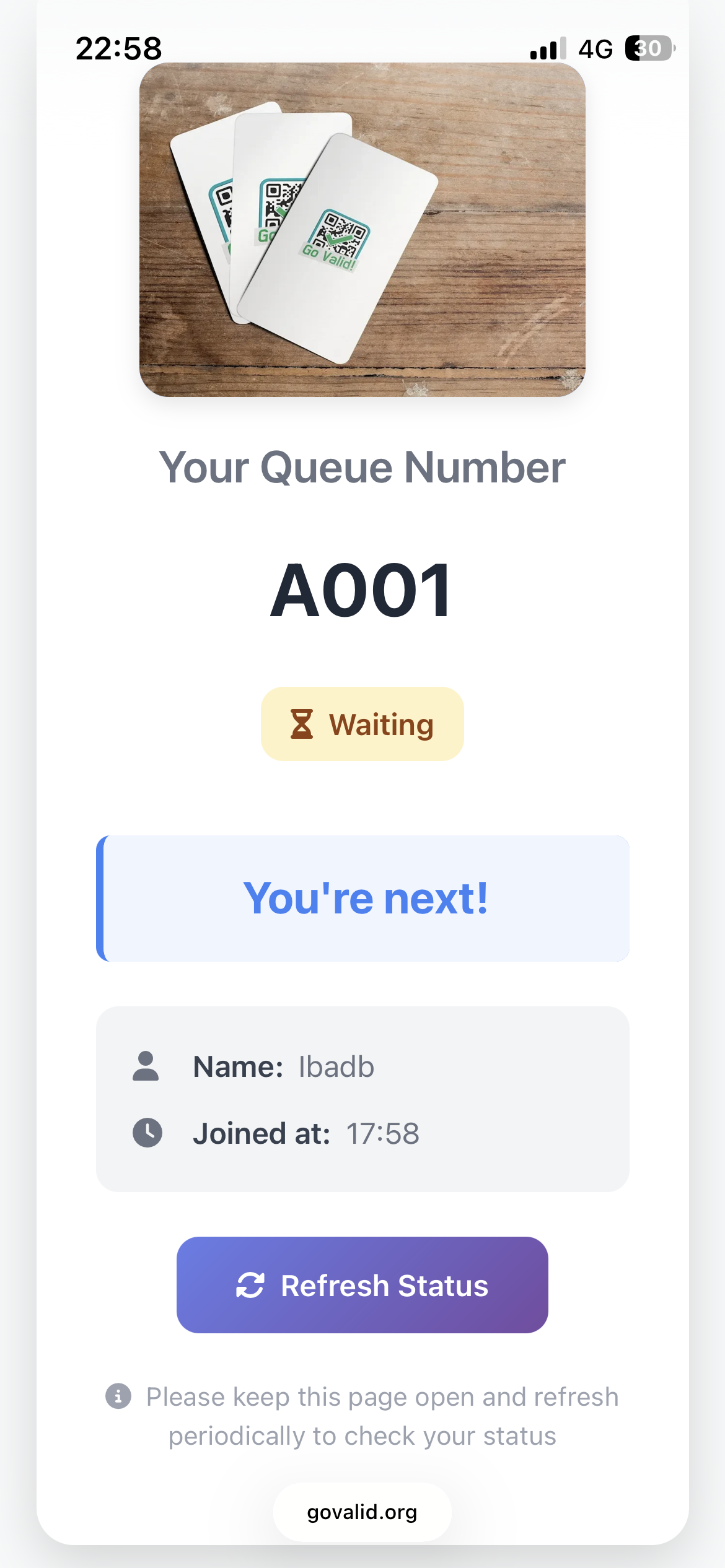
Queue Waiting Status

Waiting in Queue

Your Turn Status

Your Turn - Please Come!

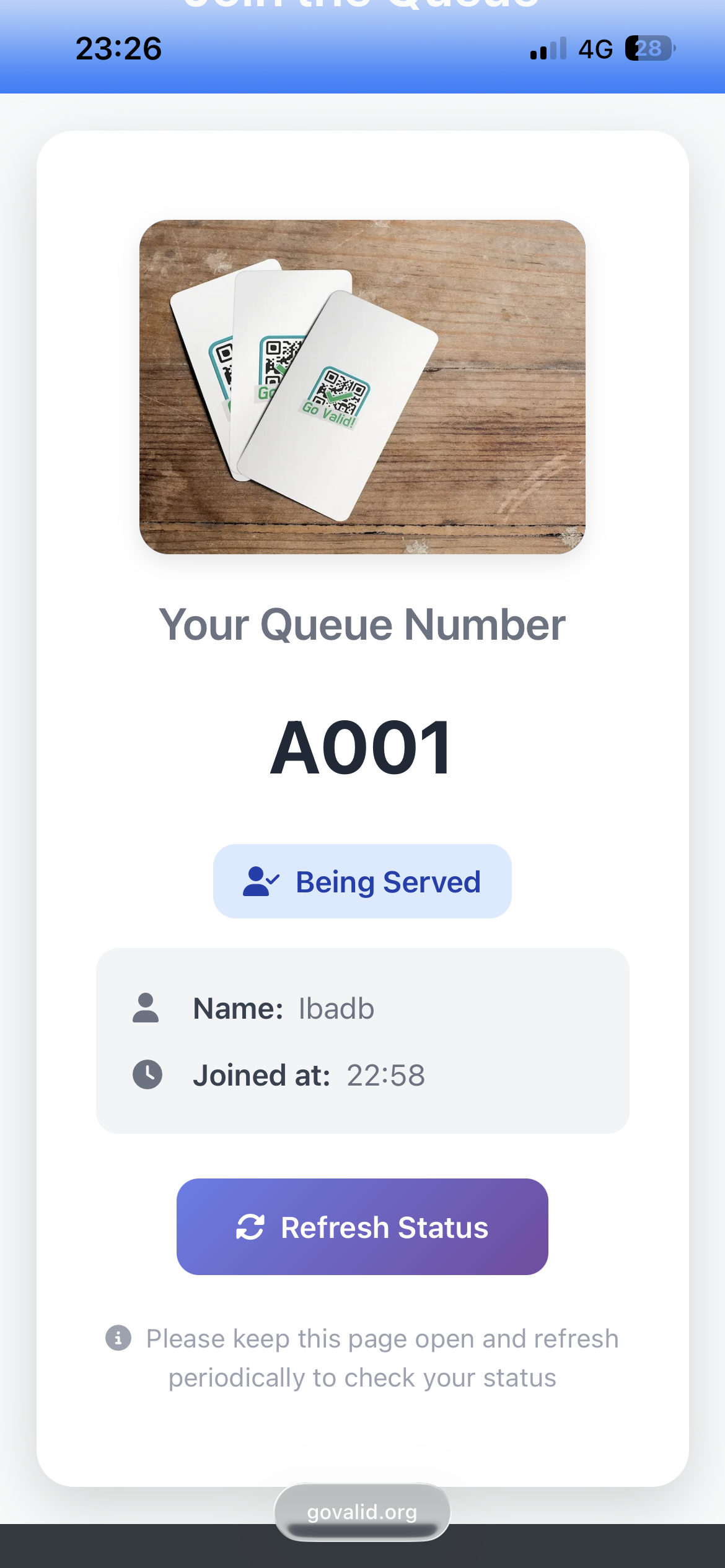
Being Served Status

পরিবেশিত হচ্ছে

এটি কিভাবে কাজ করে

Set up your queue system in minutes

1

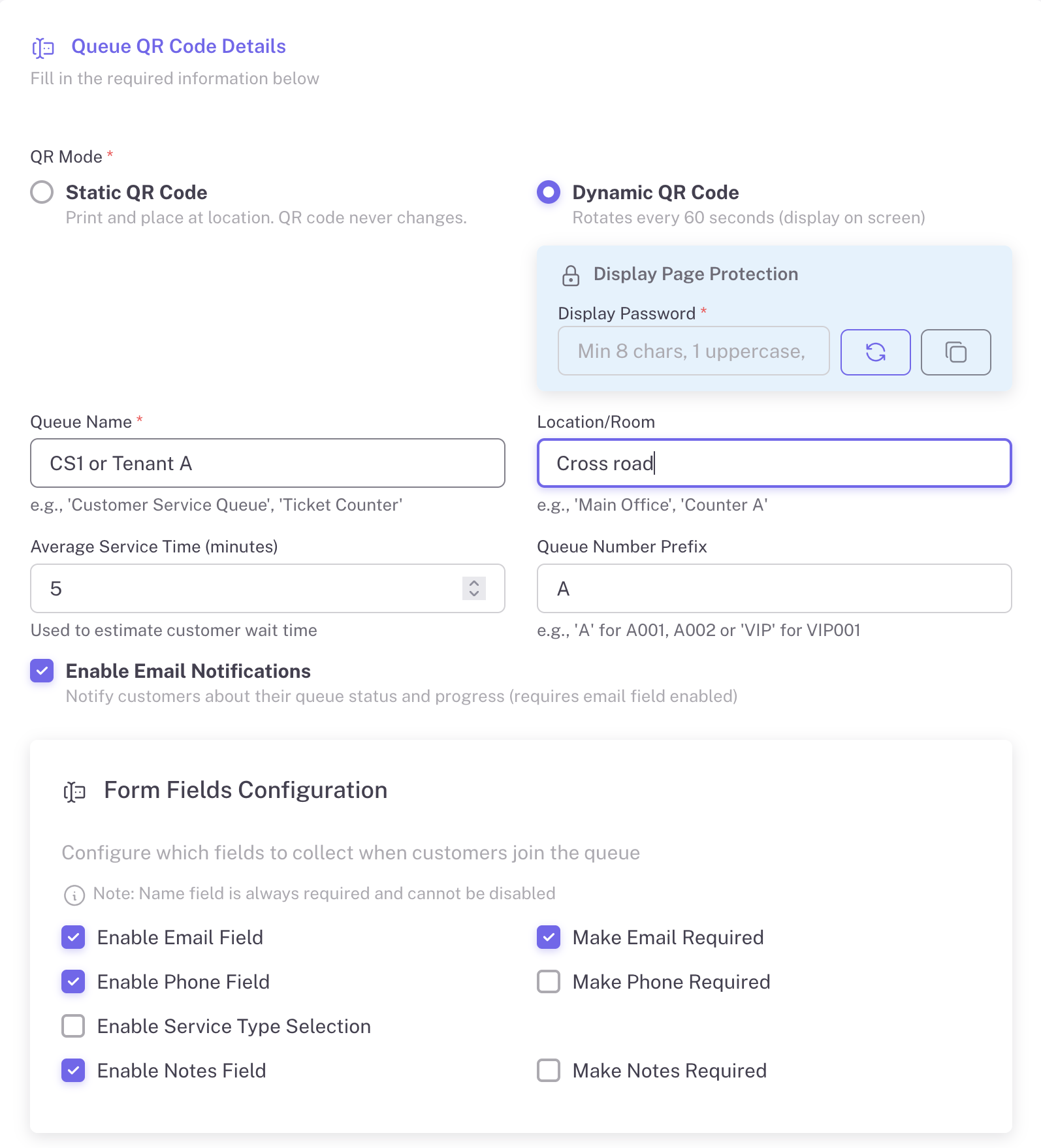
Create Your Queue

Configure your queue with custom settings: queue name, location, average service time, and form fields to collect customer information.

  • Set queue name and location
  • Configure average service time
  • Custom queue number prefix (A, B, VIP)
  • Enable email notifications
  • Collect name, email, phone, notes
Create Queue Form
2

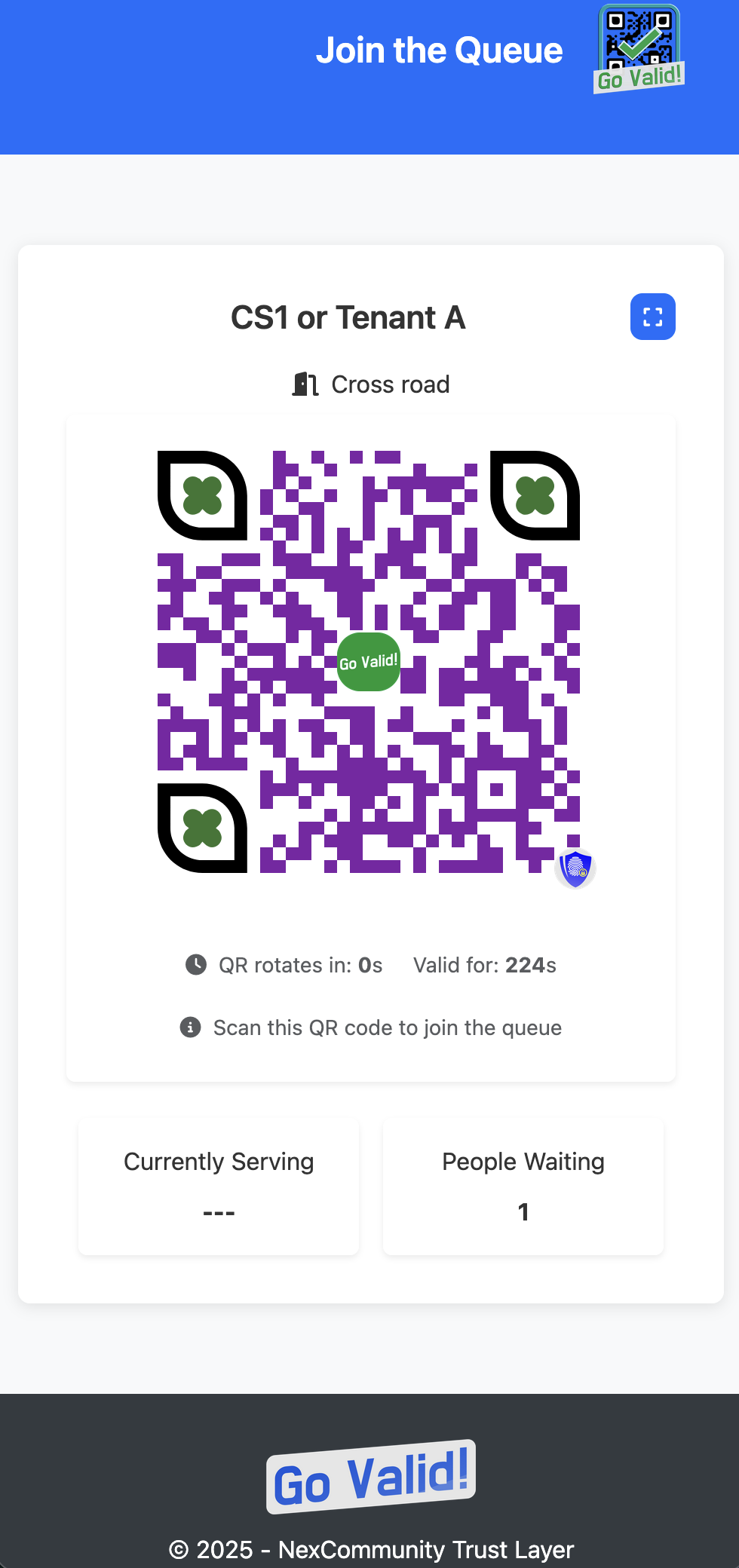
Display the QR Code

Show the QR code on a screen at your service counter. For Dynamic mode, the QR rotates every 60 seconds for security. Display is password-protected.

  • Password-protected display
  • Shows queue name and location
  • Currently serving number
  • People waiting count
  • Works on any screen
পাসওয়ার্ড প্রদর্শন করুন
Queue Display
3

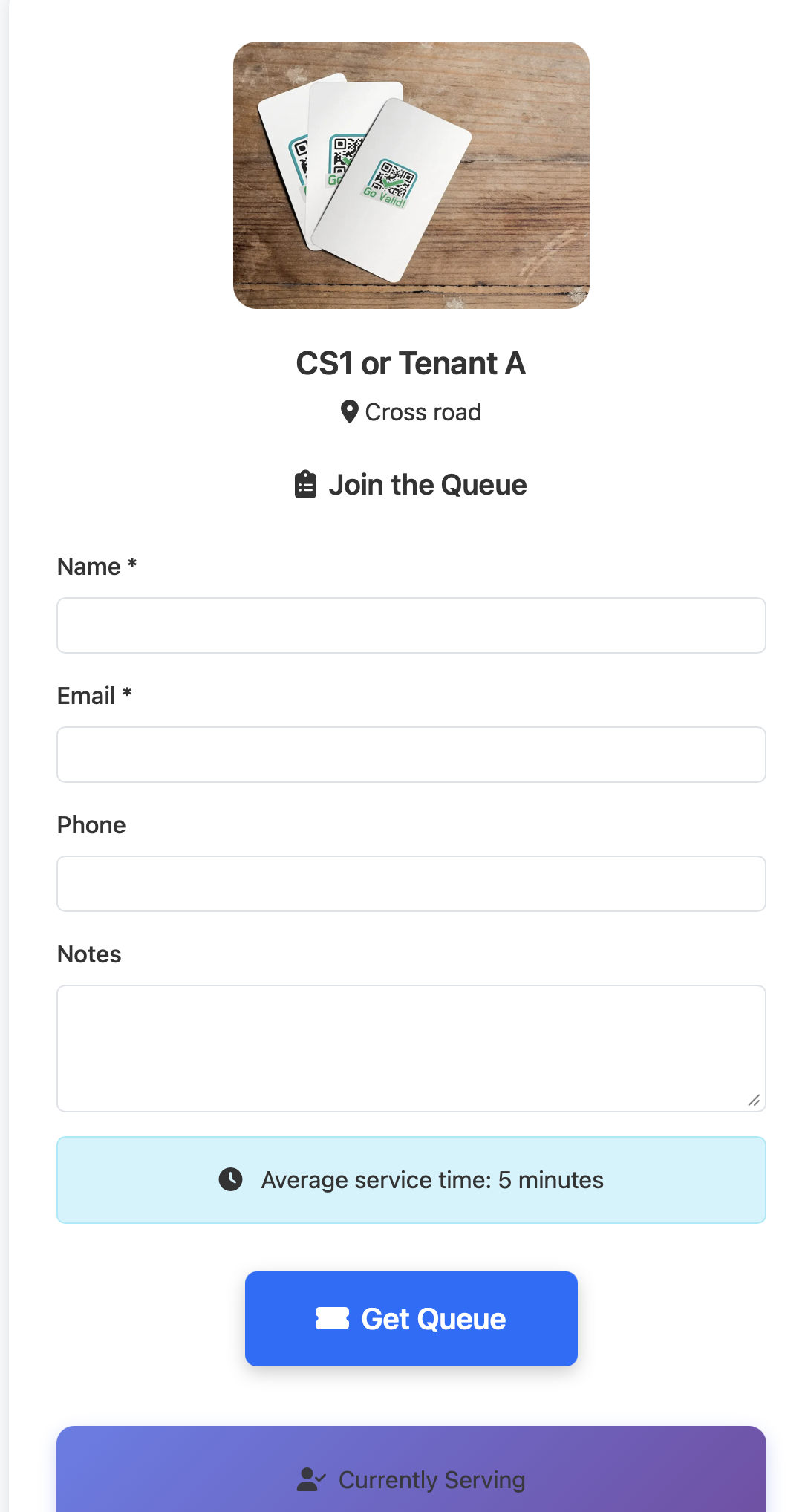
Customers Join the Queue

Customers scan the QR code, fill in their details, and get a queue number instantly. They can see estimated wait time and track their position.

  • Simple join form
  • Shows average service time
  • Instant queue number assignment
  • Real-time status tracking
  • Refresh status button
Join Queue Form
সারি নম্বর
4

Staff Manages the Queue

Staff uses a separate password to access the control panel. One-click actions to call next customer, serve, and mark as complete.

  • Separate staff password
  • Call Next Customer button
  • Serve / Complete actions
  • View waiting, called, serving queues
  • Auto-refresh every 10 seconds
Staff Access
Staff Control
5

Track Analytics & Reports

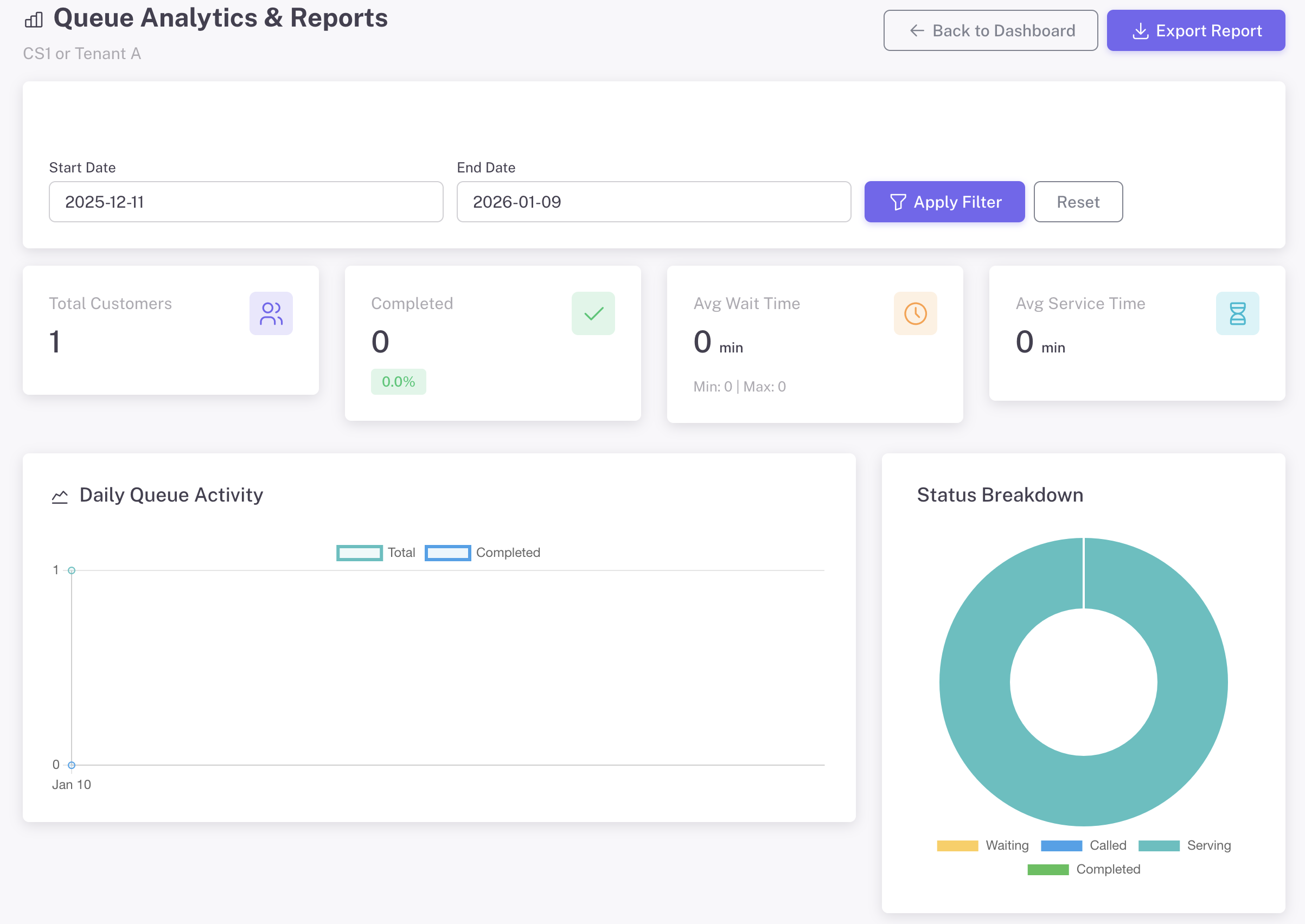
Access comprehensive analytics from the management dashboard. Track daily activity, peak hours, wait times, and export reports.

  • Total customers & completion rate
  • Average wait & service time
  • Daily queue activity chart
  • Peak hours analysis
  • Export reports to Excel
অ্যানালিটিক্স ড্যাশবোর্ড

সম্পূর্ণ কাস্টমাইজেশন

এটি আপনার করুন - আপনার ব্র্যান্ডের সাথে মেলাতে প্রতিটি বিবরণ কাস্টমাইজ করুন

ল্যান্ডিং পেজ ব্র্যান্ডিং

Create a professional queue experience that reflects your brand identity.

  • আপনার কোম্পানির লোগো আপলোড করুন
  • কাস্টম ব্যানার ছবি যোগ করুন
  • ব্যাকগ্রাউন্ড রঙ বা গ্রেডিয়েন্ট সেট করুন
  • টেক্সট এবং বোতামের রঙ কাস্টমাইজ করুন
  • স্বাগত বার্তা এবং নির্দেশনা যোগ করুন

QR কোড স্টাইলিং

অনন্য QR কোড ডিজাইন করুন যা আলাদা হয়ে দাঁড়ায় এবং আপনার ব্র্যান্ডকে শক্তিশালী করে।

  • ফোরগ্রাউন্ড এবং ব্যাকগ্রাউন্ড রঙ বেছে নিন
  • মডিউল আকার নির্বাচন করুন (বর্গ, বিন্দু, গোলাকার)
  • চোখের প্যাটার্ন এবং স্টাইল কাস্টমাইজ করুন
  • QR কোডের কেন্দ্রে আপনার লোগো যোগ করুন
  • ডিজাইন করার সময় লাইভ প্রিভিউ

সমস্ত কাস্টমাইজেশন বিকল্প QR তৈরির ফর্মে রিয়েল-টাইম প্রিভিউ সহ উপলব্ধ

Perfect For

Any business that serves customers

Banks

Customer service

ক্লিনিক

Patient registration

Government

Public services

Restaurants

Table waiting

সেলুন

Appointment queue

রিটেইল

Service counter

Ready to Eliminate Long Queues?

Create your first Instant Queue in under 2 minutes. Free to start, no credit card required.

Explore More Guides

Discover other powerful Instant QR features