Supply Chain Traceability

C-Trace 指南

使用可定制的工作流程模板建立完整的供应链追溯。通过照片证据、GPS验证和基于角色的访问追踪从原材料到成品的每一个步骤。

Why Choose C-Trace?

Complete traceability solution for any industry

行业模板

Pre-built workflow templates for Coffee, Palm Oil, Cosmetics, Garments, and more. Start tracking in minutes.

Role-Based Access

Assign specific roles to workers via QR code or email token. Each person sees only their assigned tasks.

照片证据

Capture photos at each production step. Required media ensures complete visual documentation.

GPS验证

Automatic location capture at each step. Verify where production activities actually happen.

即用型模板

Choose from 8 industry-specific workflow templates or create your own

咖啡豆之旅

10 步骤

棕榈油之旅

9 步骤

化妆品制造

6 步骤

可可豆加工

9 步骤

冷冻食品生产

6 步骤

服装生产

7 步骤

蚂蚁糖生产

7 步骤

自定义工作流

灵活

工作原理

5步向导创建您的追溯系统

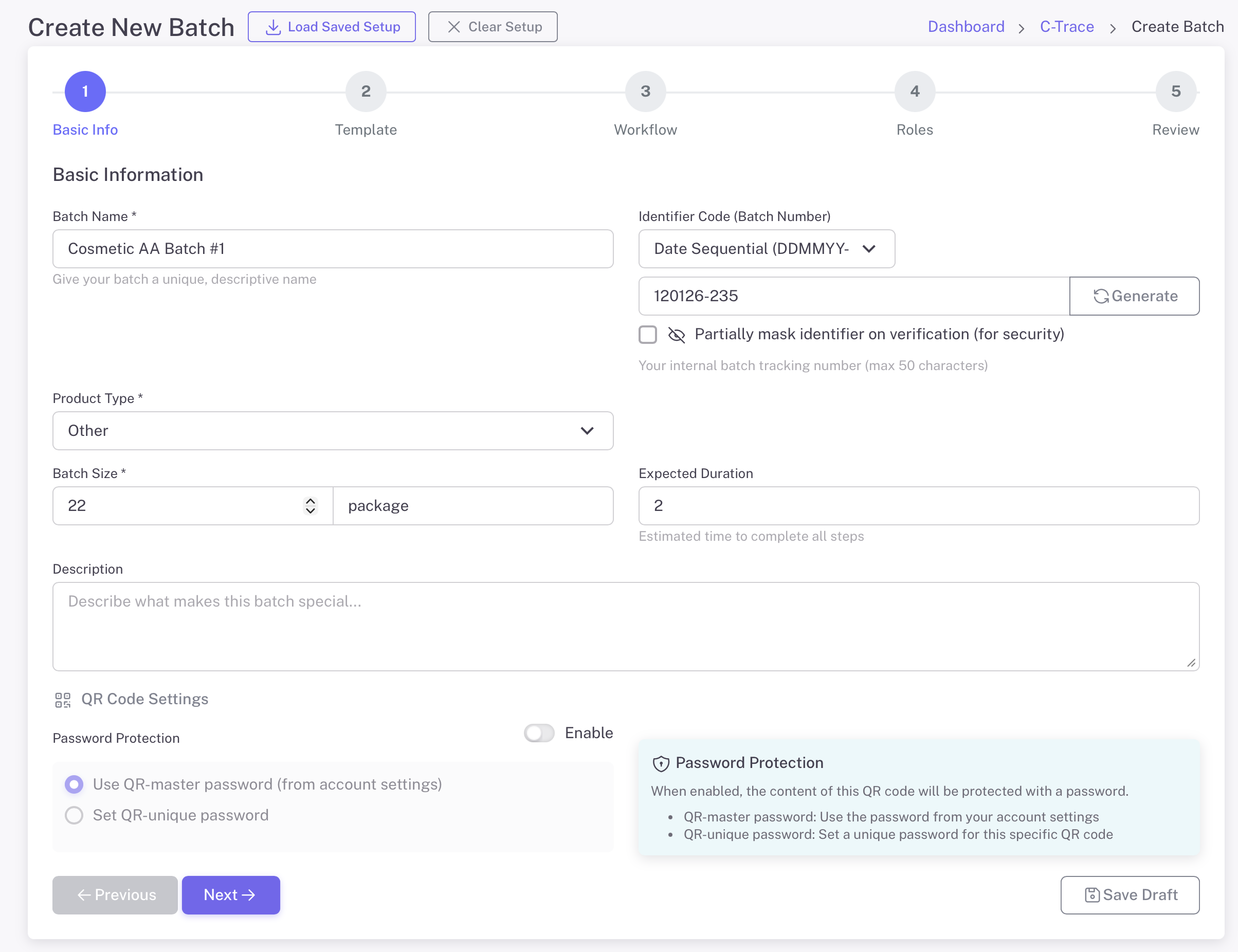
1

输入批次信息

Start by defining your batch with basic information. Give it a name, select the product type, and set the batch size. Generate a unique identifier for tracking.

  • 批次名称和描述
  • Product type selection (Coffee, Cosmetics, etc.)
  • Batch size with unit (kg, package, etc.)
  • Auto-generate unique identifier code
  • Optional password protection
Basic Batch Information
2

选择工作流程模板

Select from pre-built industry templates or create a custom workflow. Each template includes predefined steps tailored to specific production processes.

  • 8个行业特定模板
  • Coffee, Palm Oil, Cosmetics, Garments, and more
  • Each template has optimized workflow steps
  • 独特流程的自定义工作流程选项
  • Templates can be customized after selection
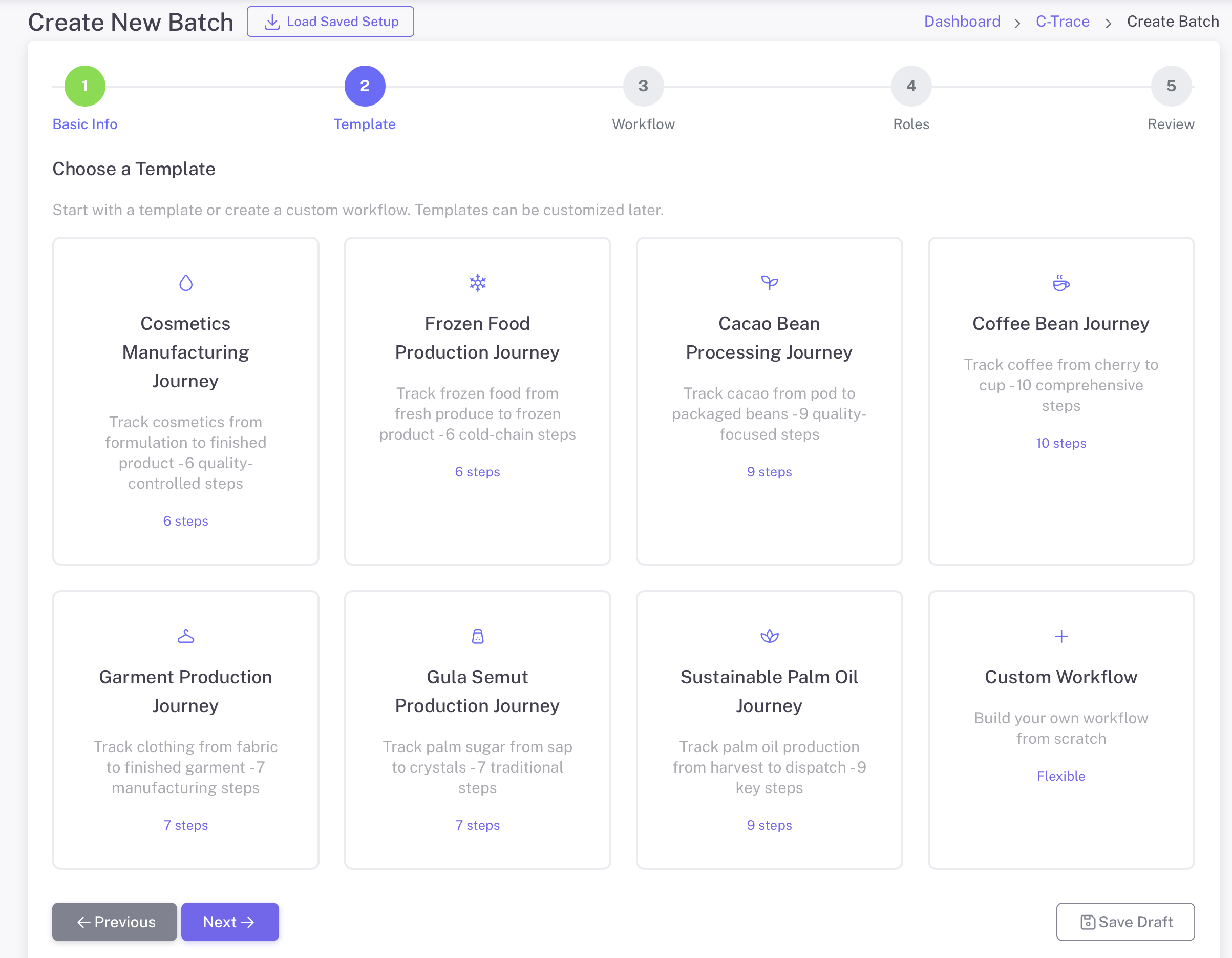
选择模板
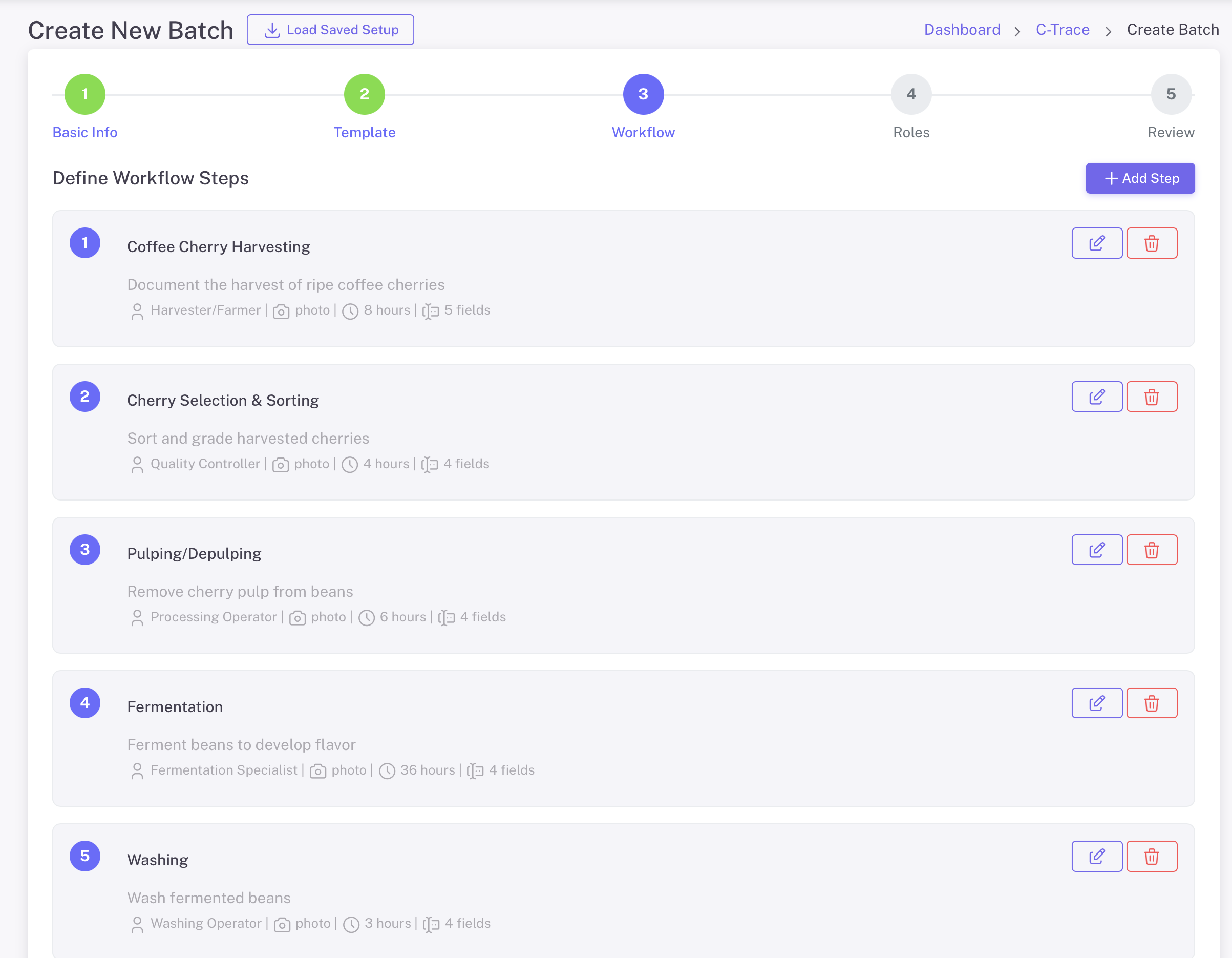
3

定义工作流步骤

Customize each step of your production workflow. Define what data to collect, who is responsible, and what media is required at each stage.

  • Add, edit, or remove workflow steps
  • Assign roles to each step (Harvester, QC, etc.)
  • Set required media: Photo, Voice Note
  • Add custom fields for data collection
  • Set expected duration per step
定义工作流步骤

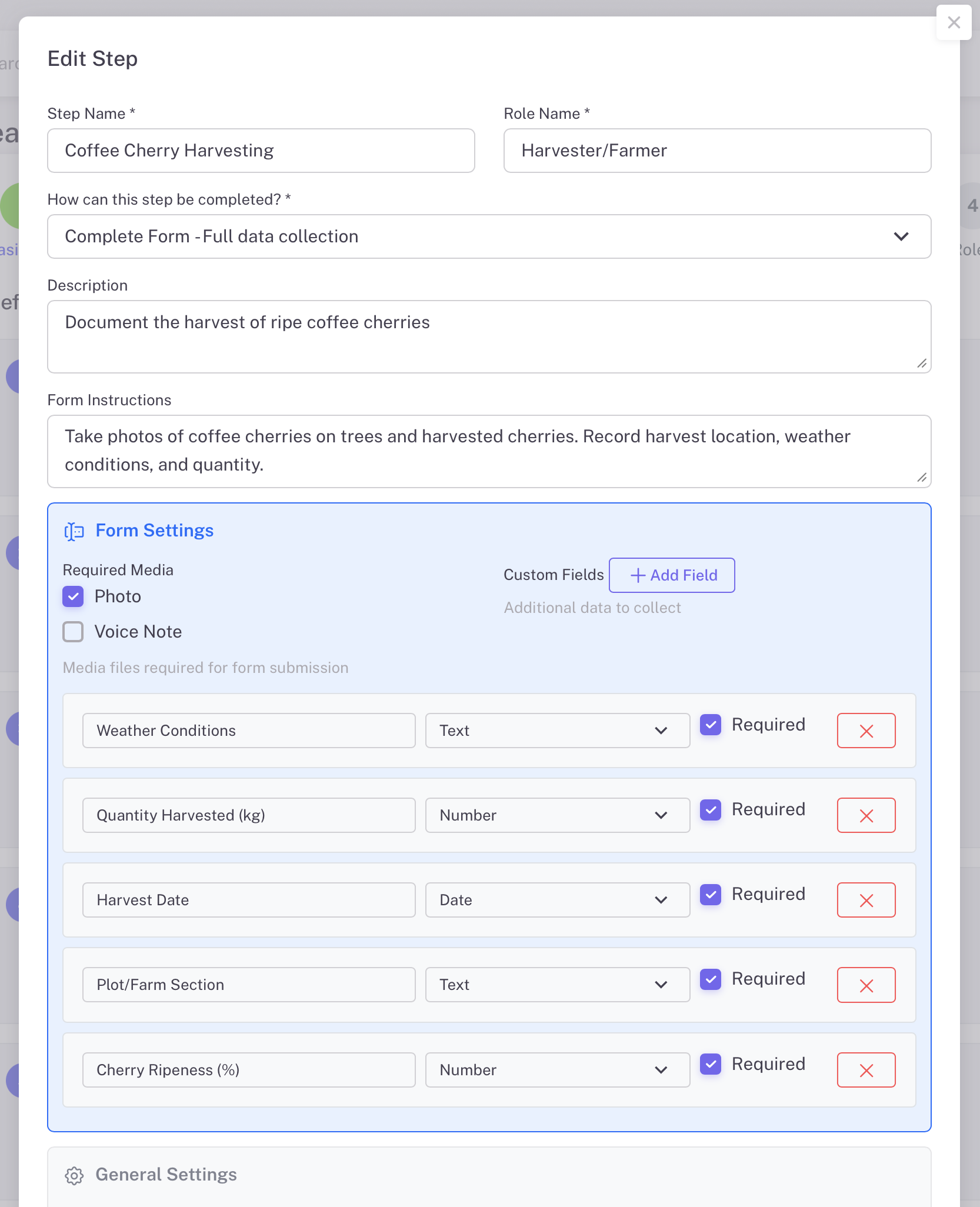
自定义步骤详情

Each workflow step can be fully customized with specific data fields. Define exactly what information workers need to capture at each production stage.

  • Step name and role assignment
  • Description and form instructions
  • Custom fields: Text, Number, Date types
  • Mark fields as required or optional
  • Set step as skippable if needed
Edit Step Details
4

为工人分配角色

Assign specific people to each role in your workflow. Workers can access their tasks via the GoValid mobile app or through email access tokens.

  • User Account / QR Code access via mobile app
  • Email token access for external workers
  • Search and select existing users
  • Mobile app available for iOS and Android
  • Roles can be changed after batch creation
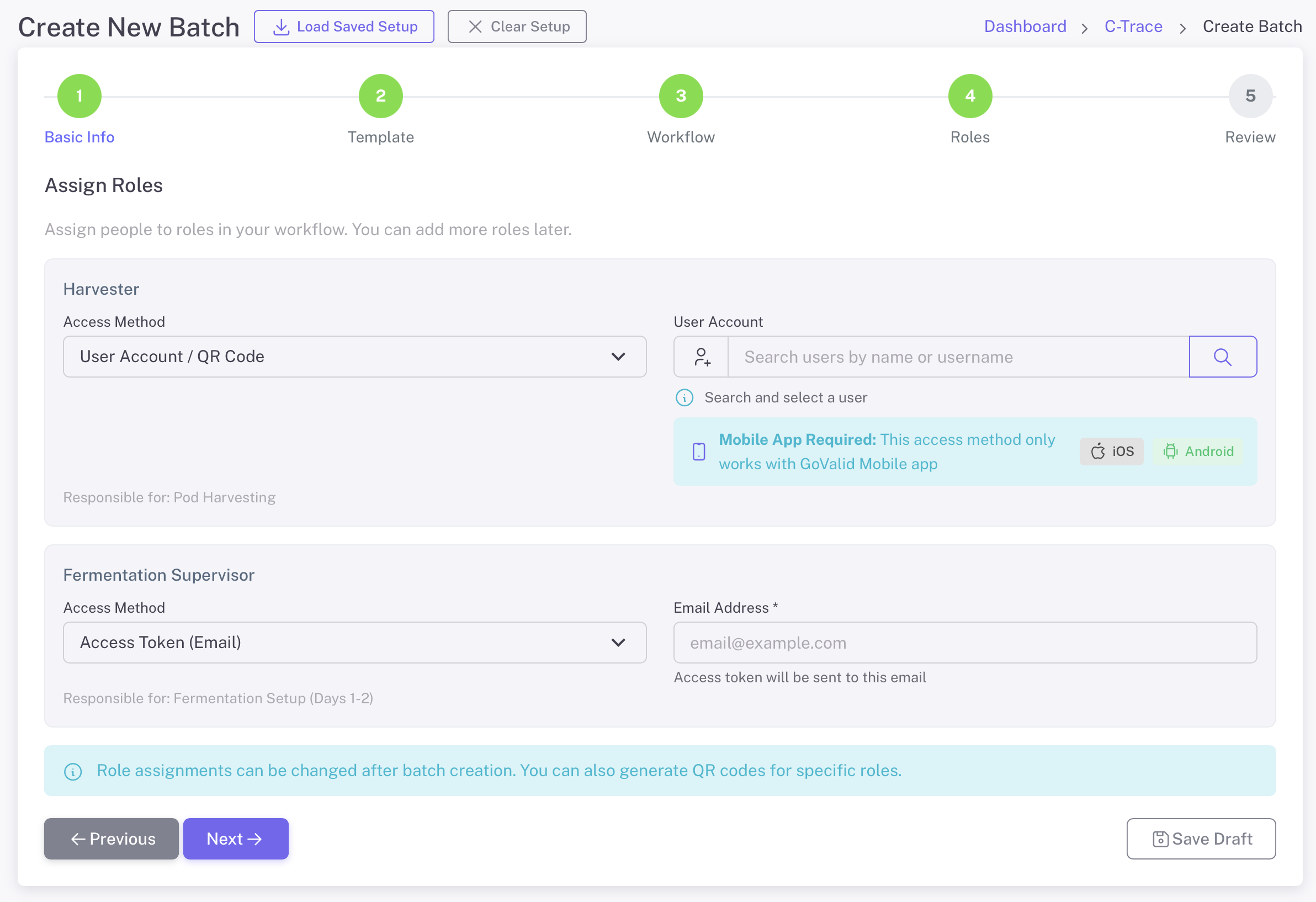
分配角色
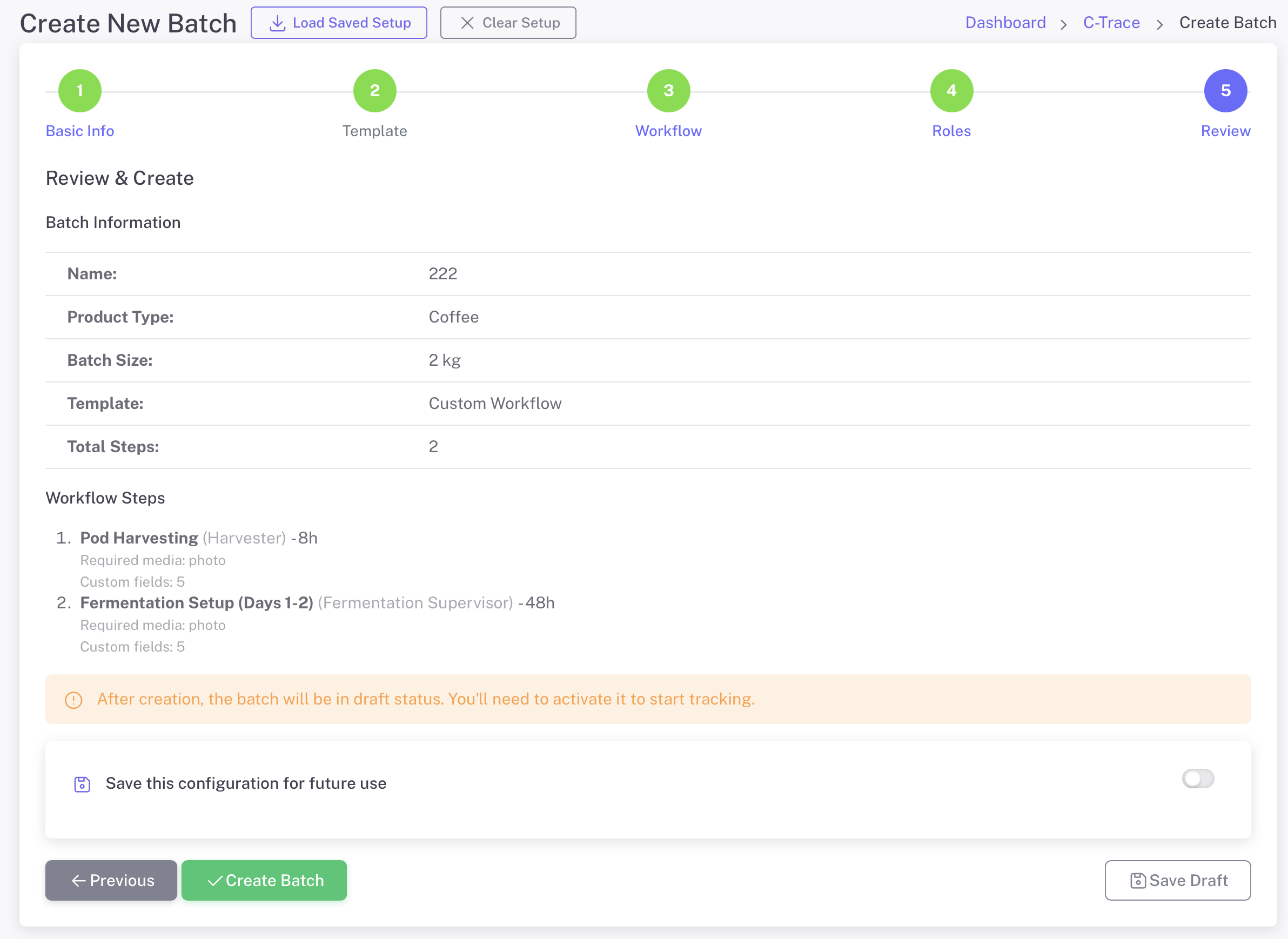
5

审核并创建批次

Review all batch information, workflow steps, and role assignments before creating. Save your configuration as a template for future batches.

  • Summary of batch information
  • Complete workflow steps overview
  • Save configuration for future use
  • Create as draft or activate immediately
  • Edit anytime before activation
Review and Create

Manage Your Batches

Central dashboard to monitor all production batches

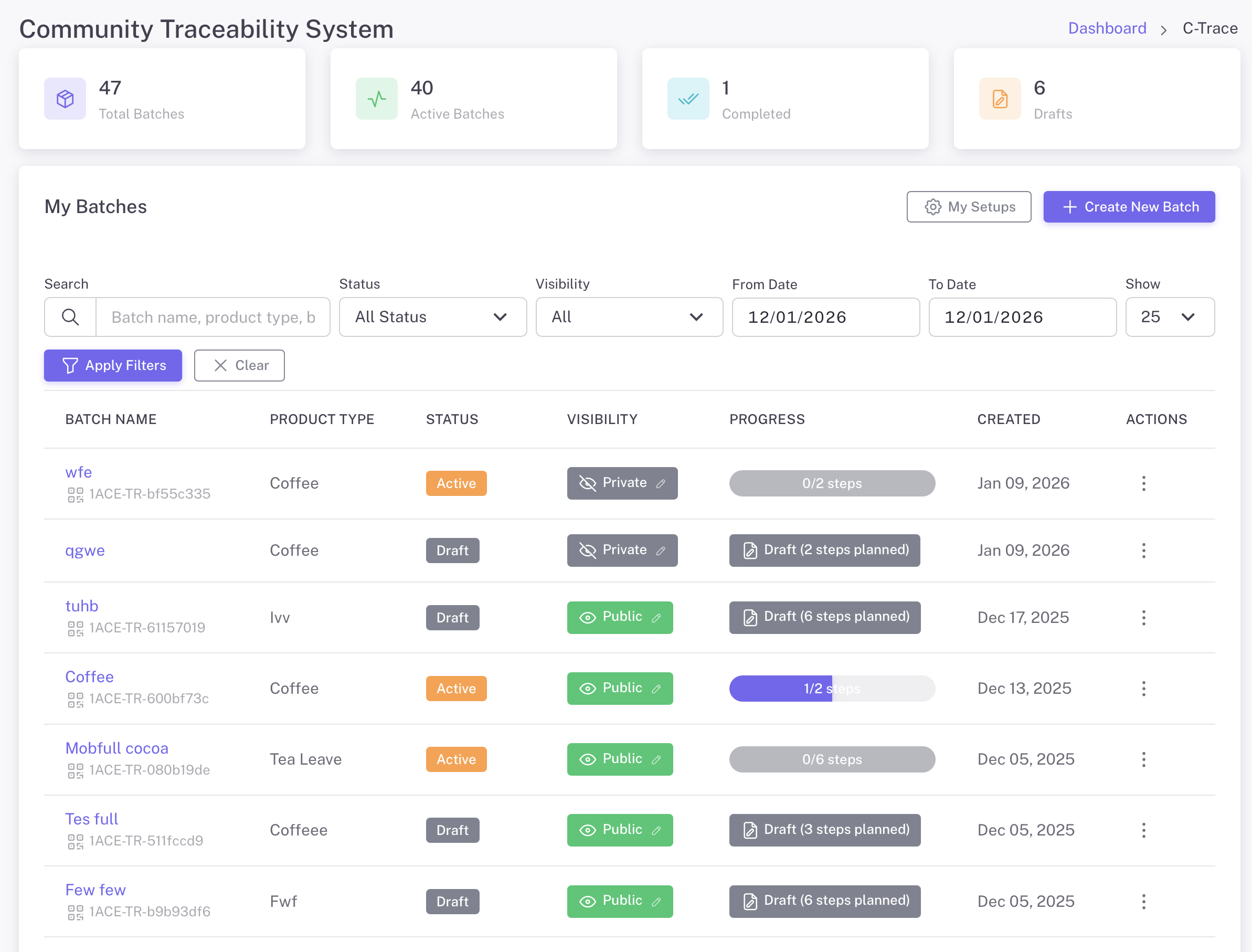
C-Trace仪表板
C-Trace仪表板 - 追踪总批次数、活跃批次、已完成和草稿
筛选和搜索

Find batches by name, product type, status, or date range

Track Progress

See step completion status for each batch at a glance

可见性控制

Set batches as Public or Private based on needs

我的设置

Save and reuse workflow configurations

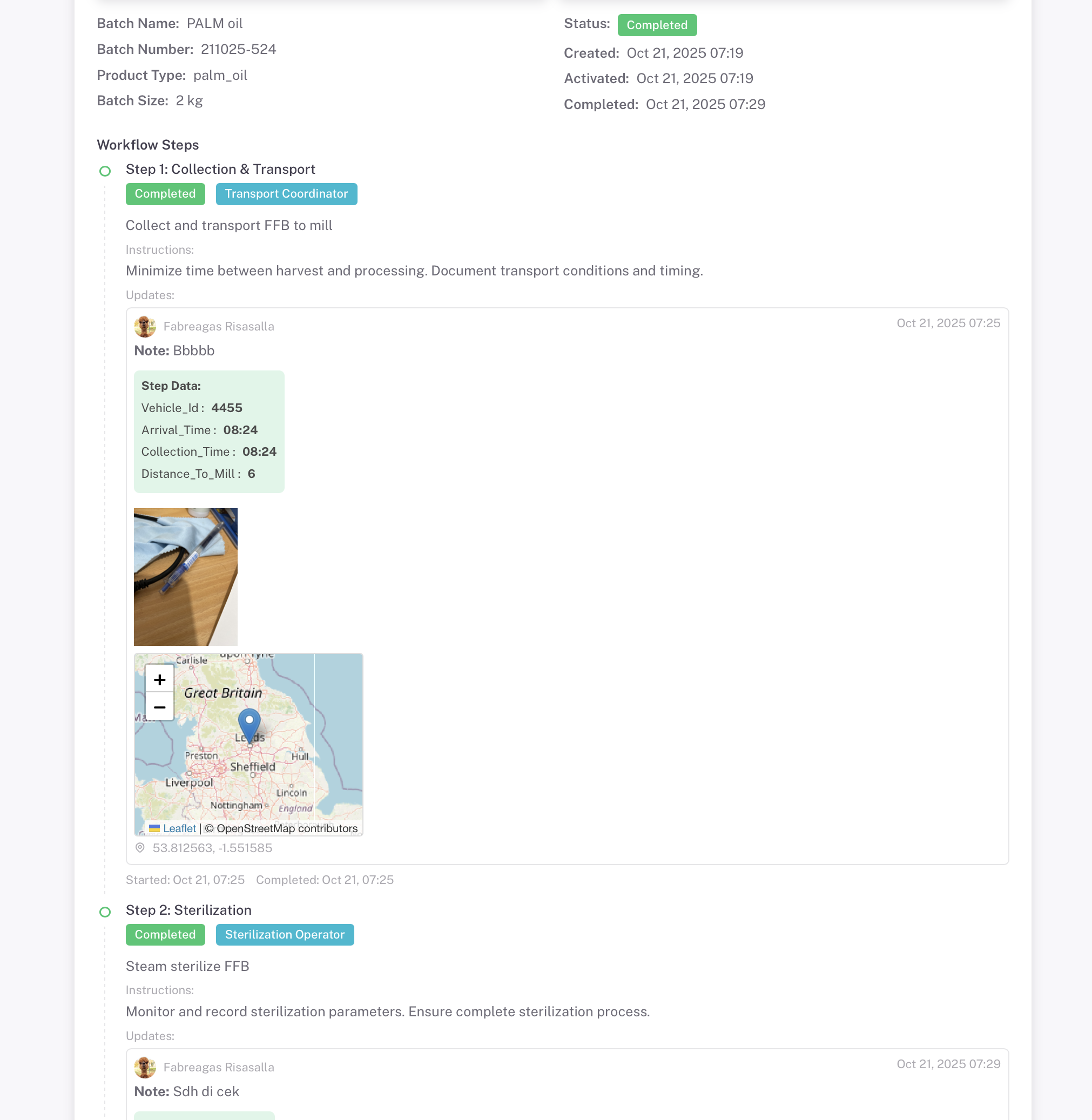
批次详情和二维码

Each batch gets a unique QR code for verification and tracking

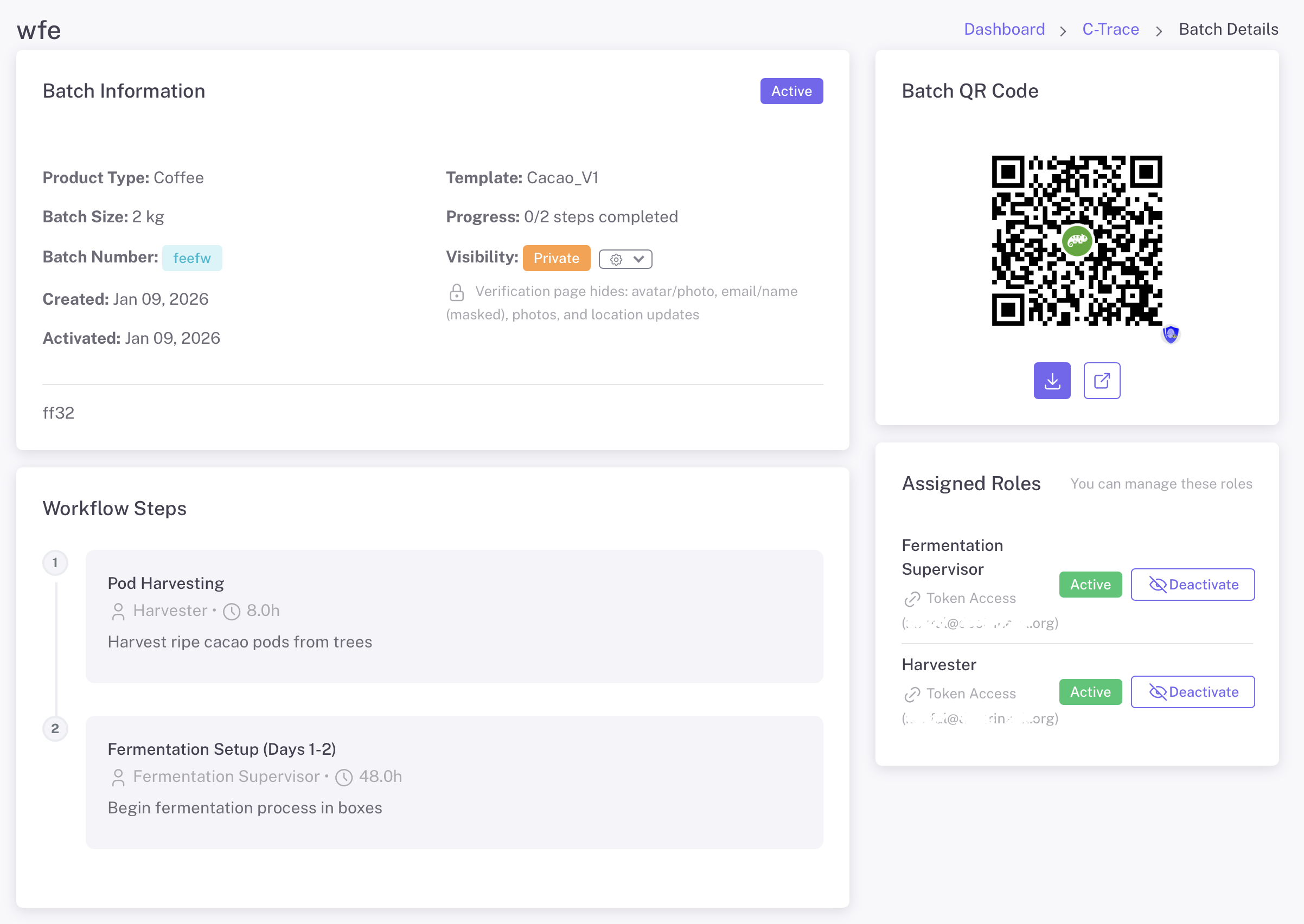
批次详情
批次详情 - 查看批次信息、二维码、工作流程步骤和管理分配的角色

批量二维码

Download and share the batch QR code. Scan to view complete traceability information for the entire production journey.

工作流步骤

View all production steps with assigned roles, expected duration, and completion status. Track progress through the entire workflow.

角色管理

View and manage assigned roles. Activate or deactivate access for workers. Send token access via email for external collaborators.

工人任务管理

Workers see only their assigned tasks with clear instructions

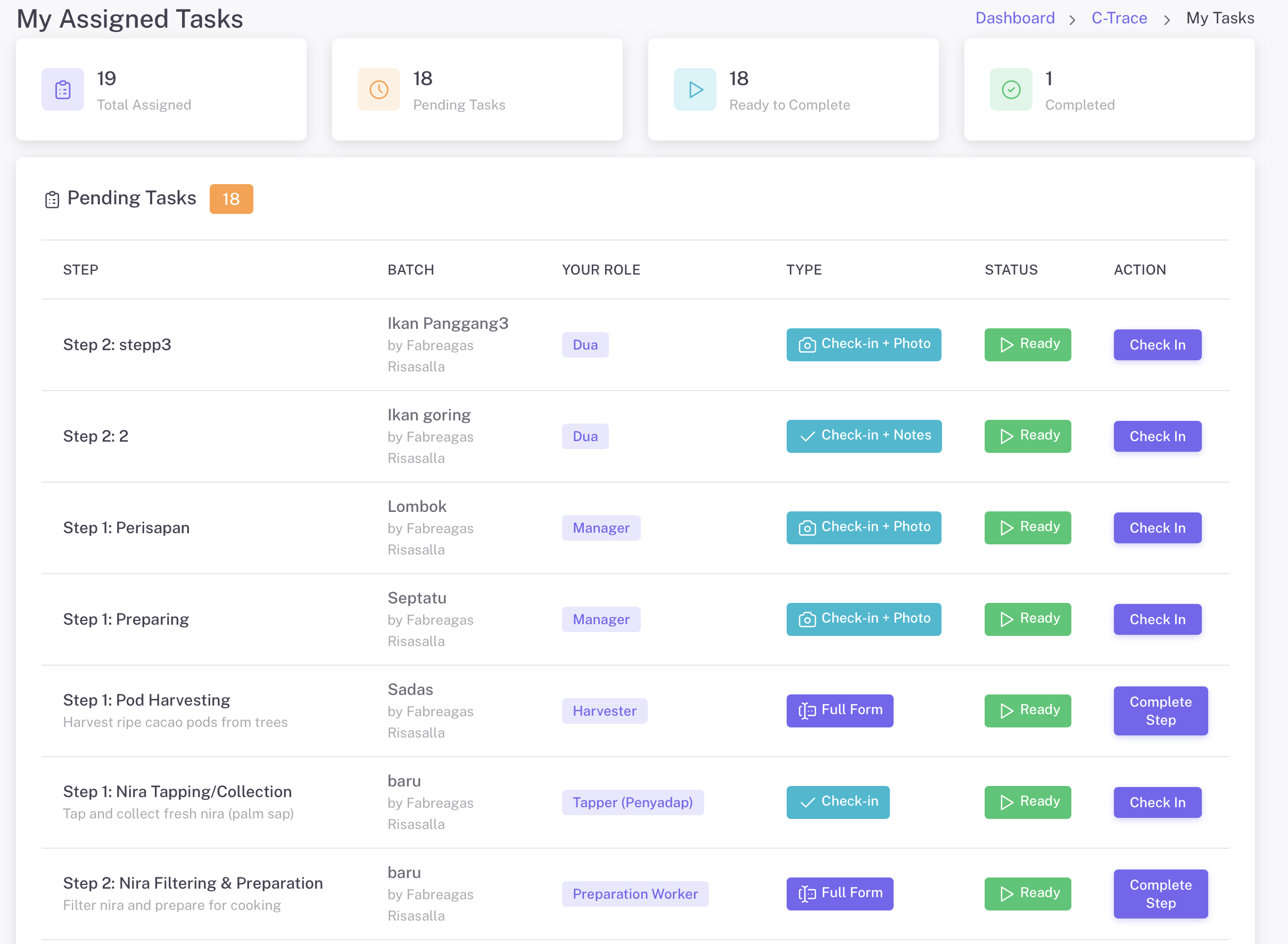
我分配的任务
我的分配任务 - 工人查看他们待处理的任务,包括批次信息、角色、任务类型和状态

Task Types

  • 签到 + 照片 - Simple check-in with photo capture
  • 签到 + 备注 - Check-in with text notes
  • 完整表单 - Complete data collection with custom fields

Mobile Access

  • GoValid mobile app for iOS and Android
  • Scan QR code to access tasks
  • Email token access for external workers
  • Works offline with sync when connected

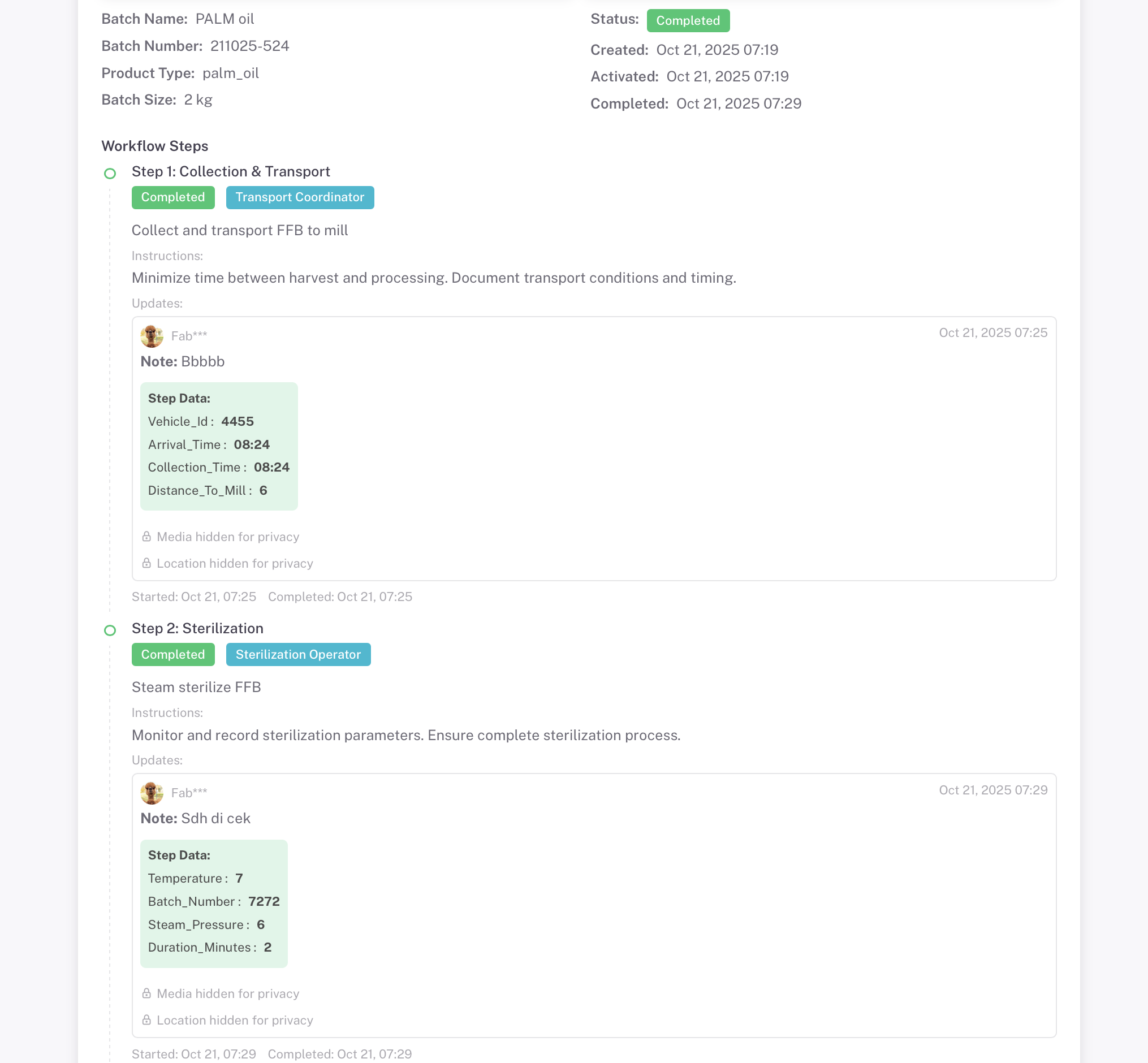
Complete Documentation

Every step captures photo evidence, GPS location, and custom data

隐私模式开启
隐私模式激活 - 媒体和位置已隐藏
媒体和位置数据对公众隐藏
隐私模式关闭
隐私模式未激活 - 完全透明
照片证据和GPS位置完全可见

使用隐私设置控制敏感数据的可见性。根据需要将批次设置为公开或私密

照片证据

Multiple photos per step with timestamps

GPS位置

Exact coordinates with map visualization

时间戳

Start and completion times recorded

附件

Additional documents and files

完美适用于

Traceability solution for any supply chain

咖啡

从樱桃到杯子追踪

棕榈油

可持续采购

Cosmetics

制造质量控制

Cacao

从豆到巧克力之旅

Garments

道德生产

农业

从农场到餐桌

准备建立您的追溯系统了吗?

Create your first batch and start tracking your supply chain in minutes. Choose from industry templates or build your own workflow.

Explore More Guides

Discover other powerful Instant QR features