Supply Chain Traceability

C-Trace Guide

Build complete supply chain traceability with customizable workflow templates. Track every step from raw materials to finished products with photo evidence, GPS verification, and role-based access.

Why Choose C-Trace?

Complete traceability solution for any industry

Industry Templates

Pre-built workflow templates for Coffee, Palm Oil, Cosmetics, Garments, and more. Start tracking in minutes.

Role-Based Access

Assign specific roles to workers via QR code or email token. Each person sees only their assigned tasks.

Photo Evidence

Capture photos at each production step. Required media ensures complete visual documentation.

GPS Verification

Automatic location capture at each step. Verify where production activities actually happen.

Ready-to-Use Templates

Choose from 8 industry-specific workflow templates or create your own

Coffee Bean Journey

10 шаги

Palm Oil Journey

9 шаги

Cosmetics Manufacturing

6 шаги

Cacao Bean Processing

9 шаги

Frozen Food Production

6 шаги

Garment Production

7 шаги

Gula Semut Production

7 шаги

Пользовательский рабочий процесс

Гибкий

Как это работает

5-step wizard to create your traceability system

1

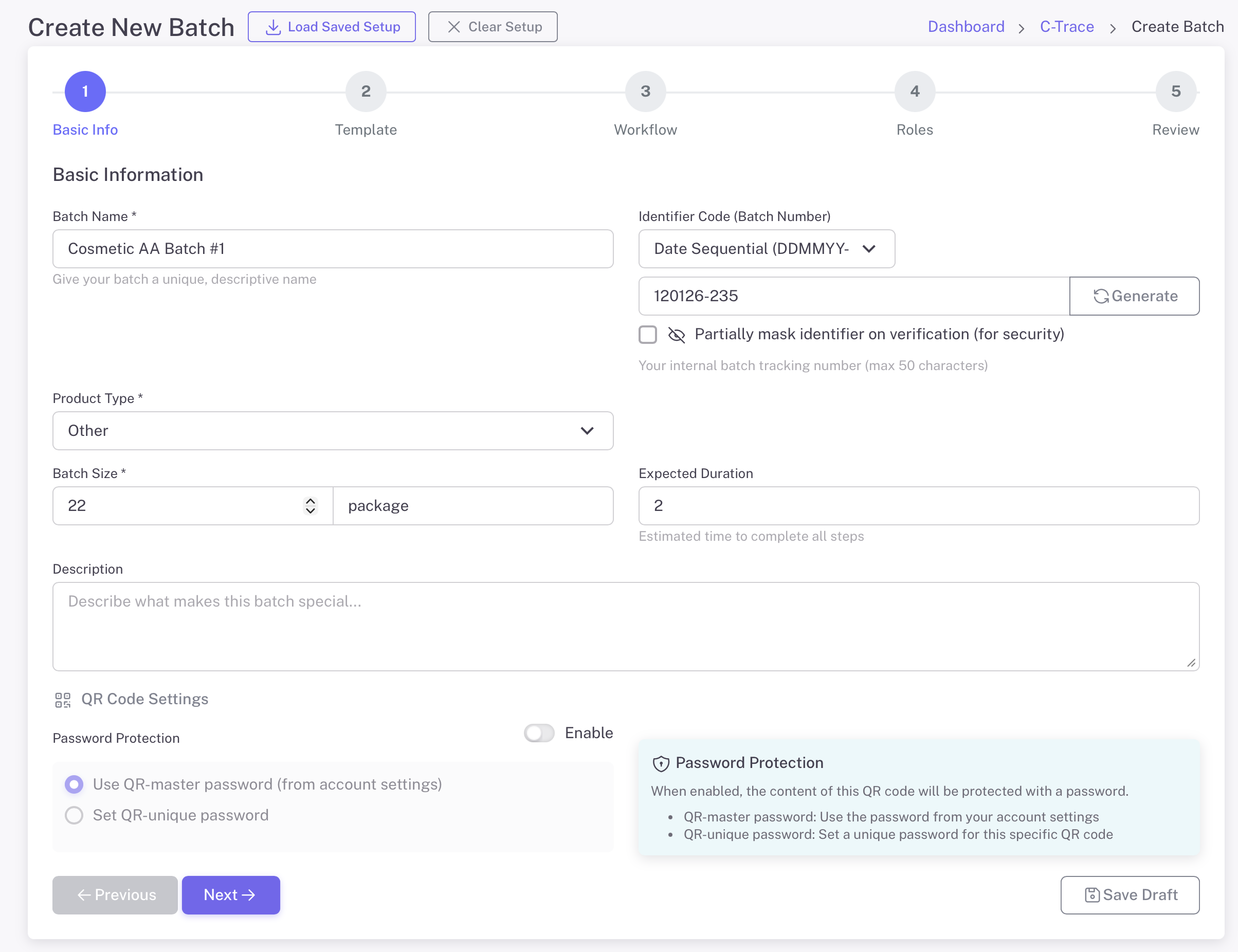
Enter Batch Information

Start by defining your batch with basic information. Give it a name, select the product type, and set the batch size. Generate a unique identifier for tracking.

  • Batch name and description
  • Product type selection (Coffee, Cosmetics, etc.)
  • Batch size with unit (kg, package, etc.)
  • Auto-generate unique identifier code
  • Optional password protection
Basic Batch Information
2

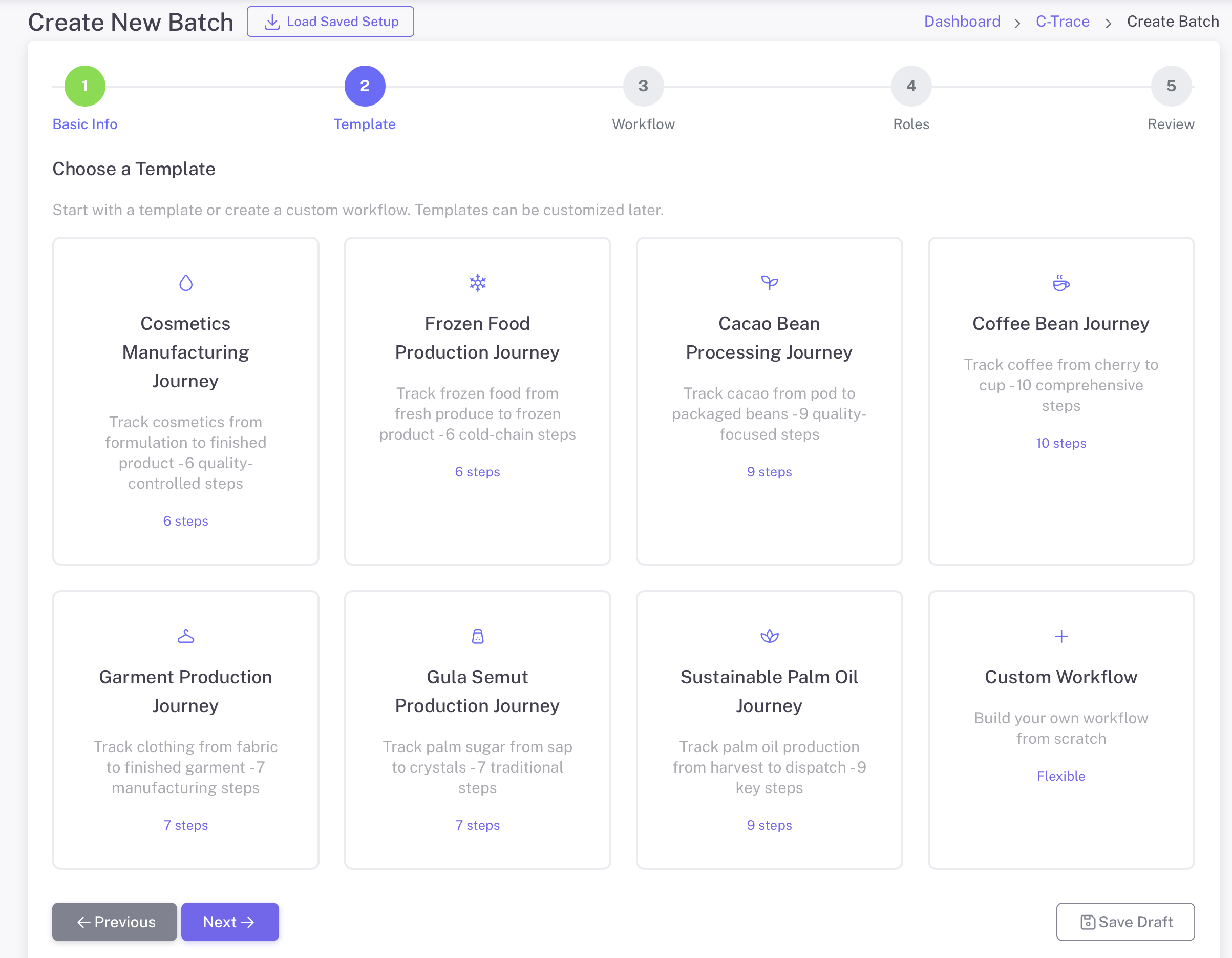
Choose a Workflow Template

Select from pre-built industry templates or create a custom workflow. Each template includes predefined steps tailored to specific production processes.

  • 8 industry-specific templates
  • Coffee, Palm Oil, Cosmetics, Garments, and more
  • Each template has optimized workflow steps
  • Custom Workflow option for unique processes
  • Templates can be customized after selection
Choose Template
3

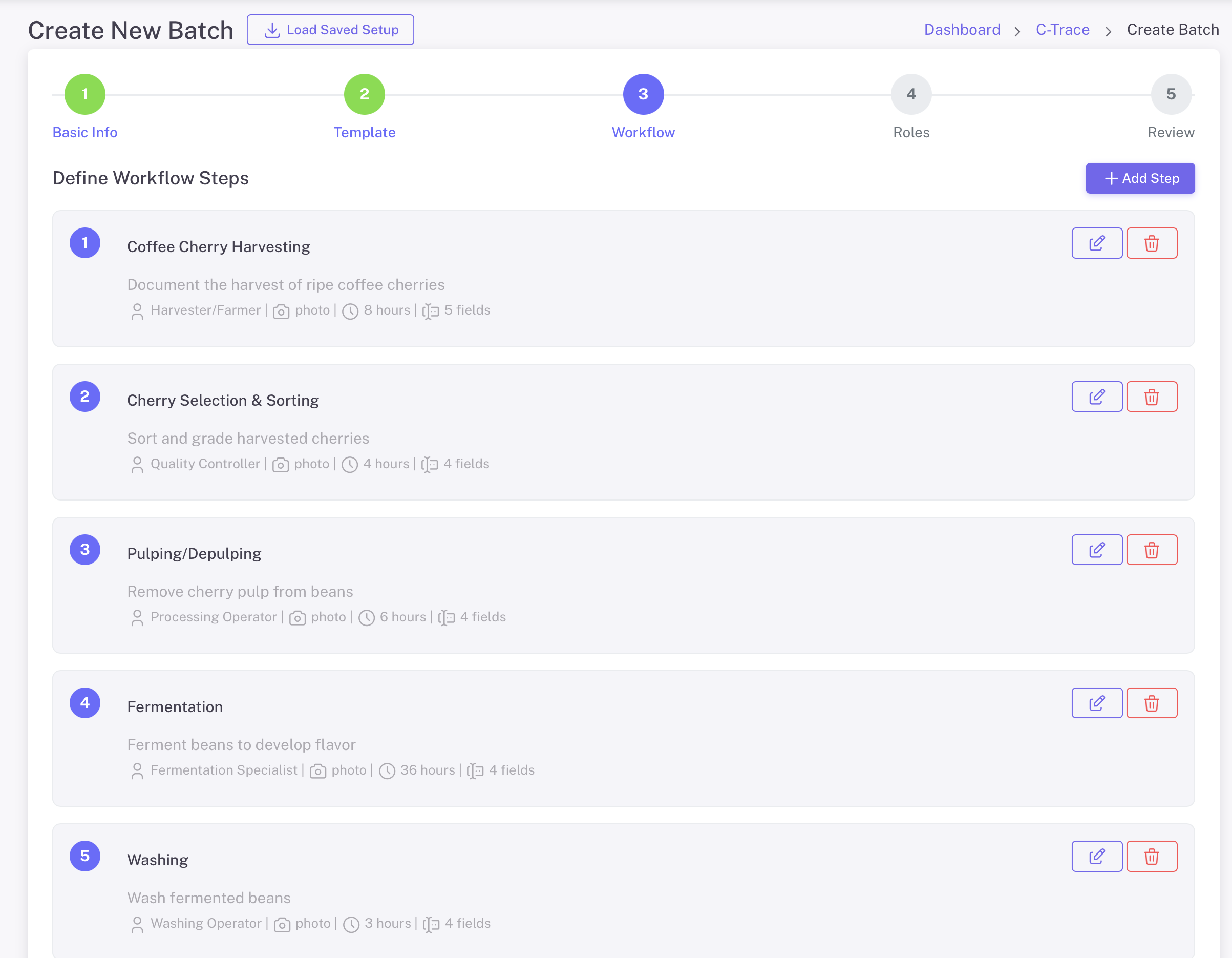
Определите шаги рабочего процесса

Customize each step of your production workflow. Define what data to collect, who is responsible, and what media is required at each stage.

  • Add, edit, or remove workflow steps
  • Assign roles to each step (Harvester, QC, etc.)
  • Set required media: Photo, Voice Note
  • Add custom fields for data collection
  • Set expected duration per step
Определите шаги рабочего процесса

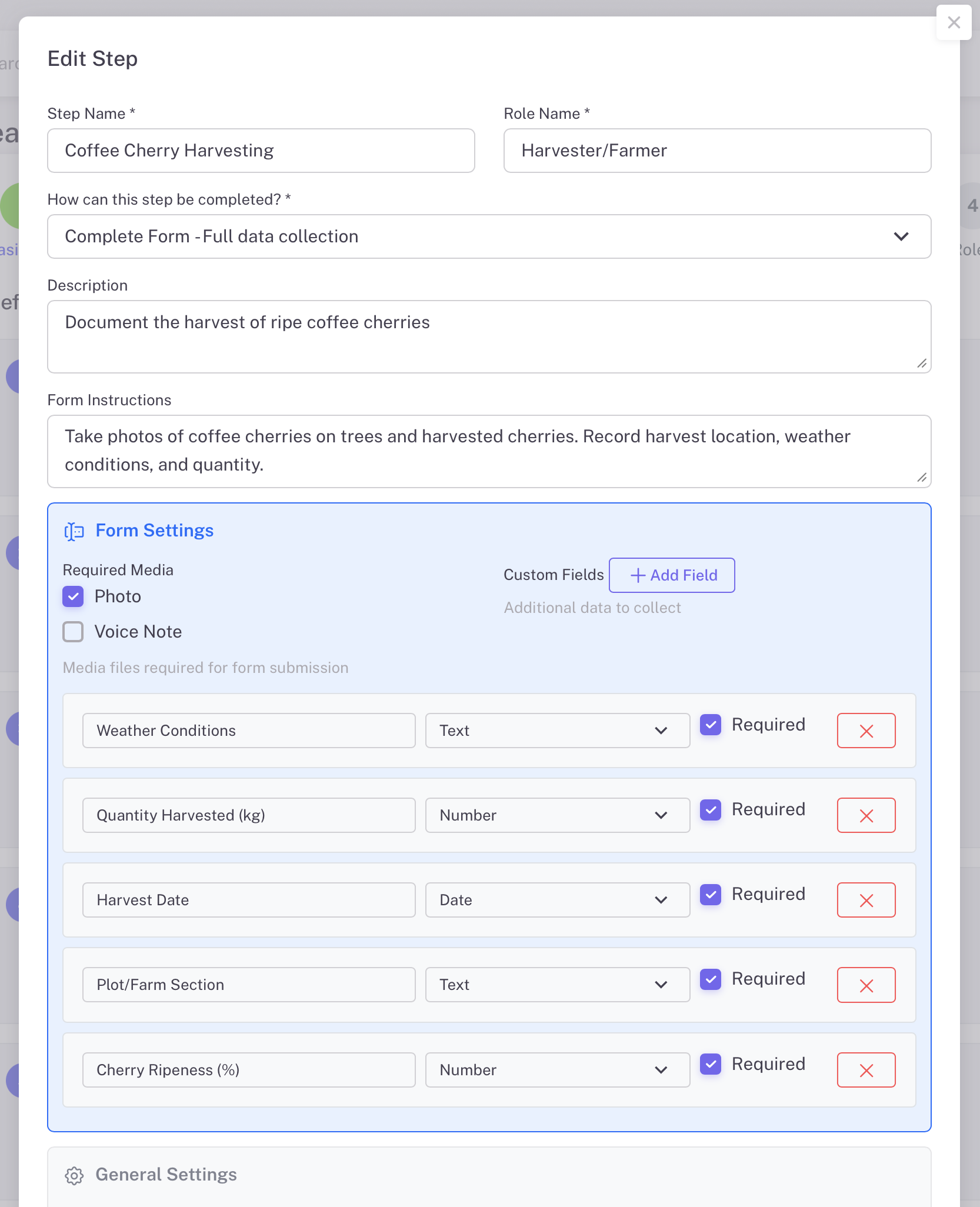
Customize Step Details

Each workflow step can be fully customized with specific data fields. Define exactly what information workers need to capture at each production stage.

  • Step name and role assignment
  • Description and form instructions
  • Custom fields: Text, Number, Date types
  • Mark fields as required or optional
  • Set step as skippable if needed
Edit Step Details
4

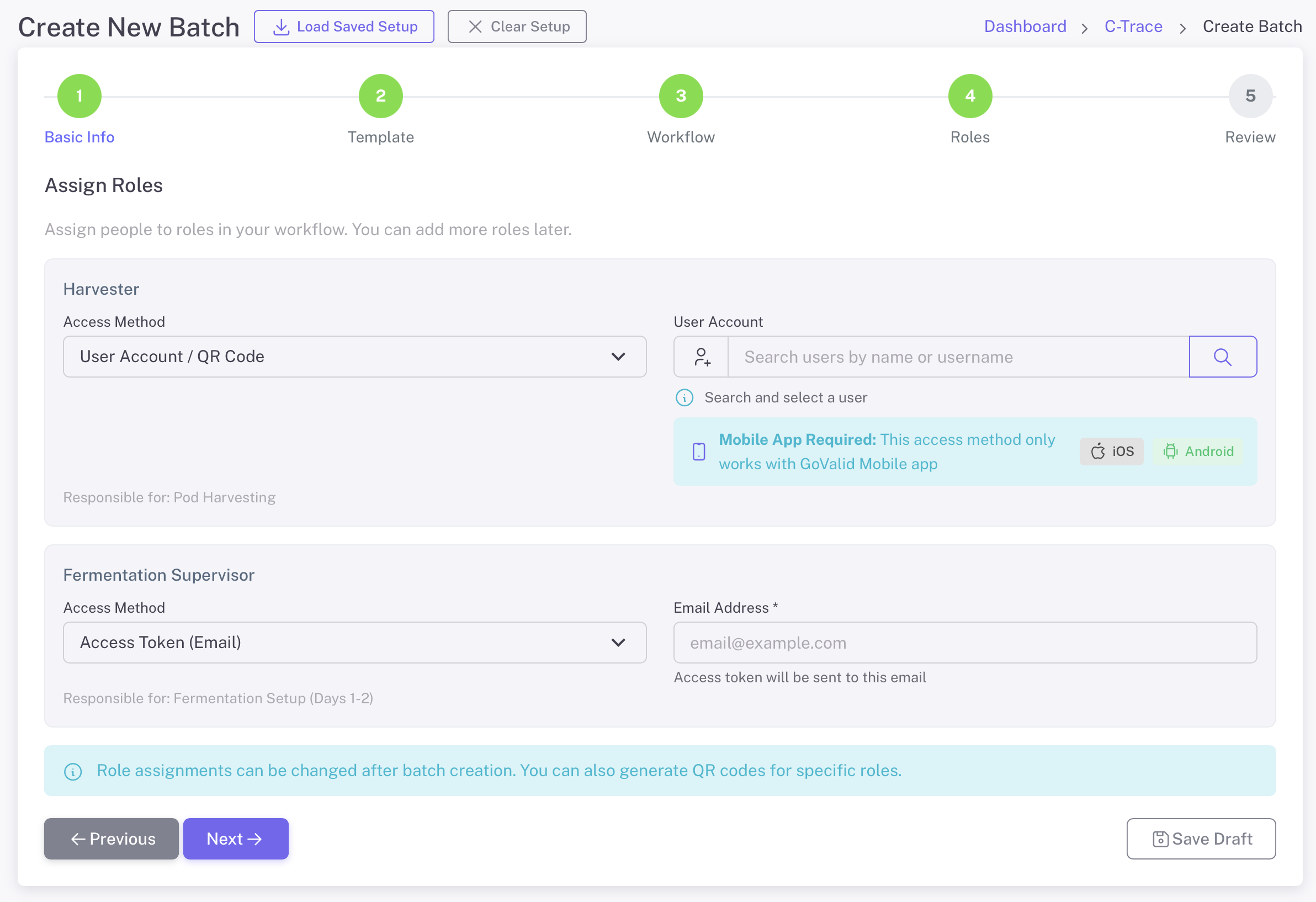
Assign Roles to Workers

Assign specific people to each role in your workflow. Workers can access their tasks via the GoValid mobile app or through email access tokens.

  • User Account / QR Code access via mobile app
  • Email token access for external workers
  • Search and select existing users
  • Mobile app available for iOS and Android
  • Roles can be changed after batch creation
Назначить роли
5

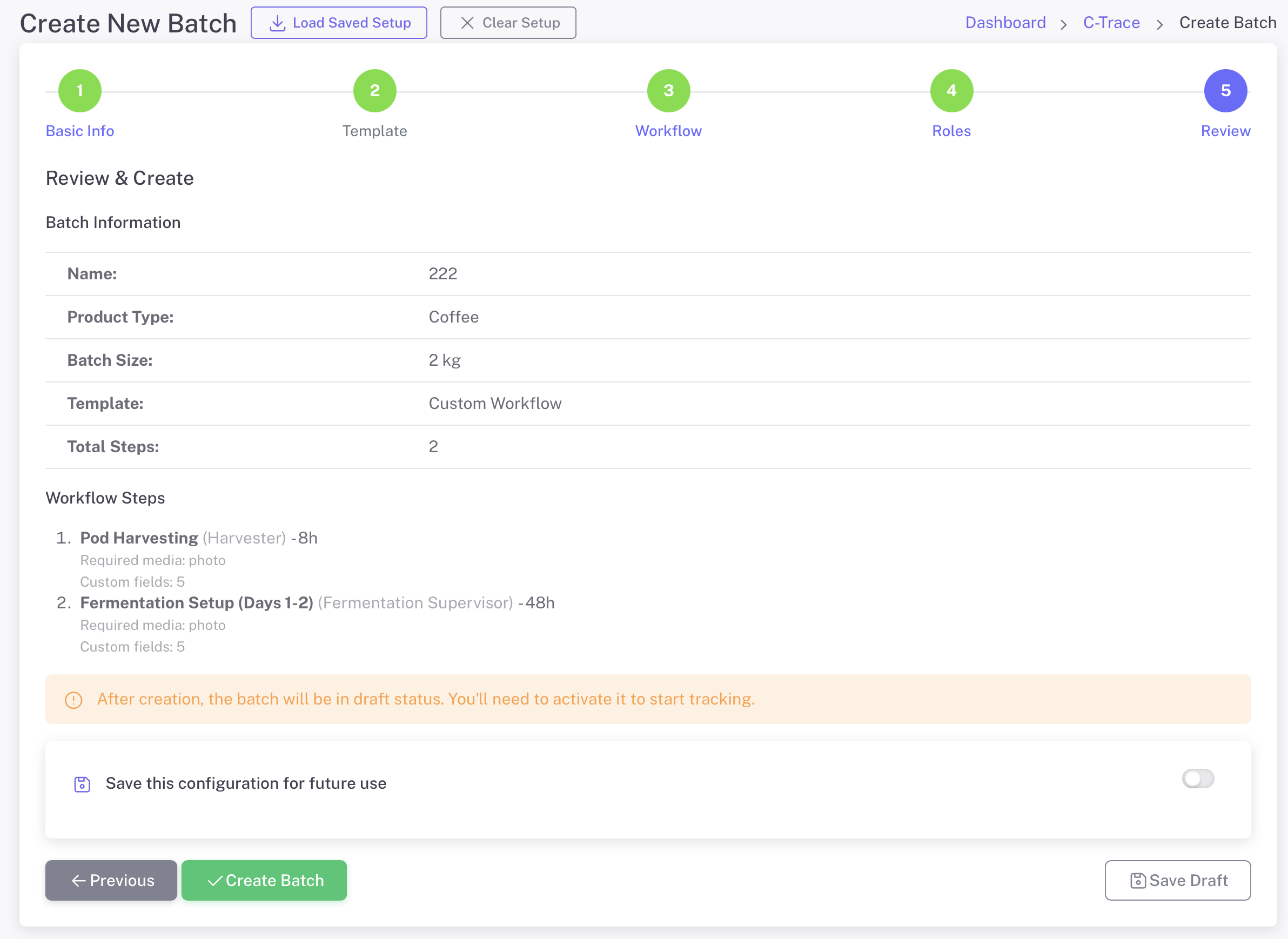
Review & Create Batch

Review all batch information, workflow steps, and role assignments before creating. Save your configuration as a template for future batches.

  • Summary of batch information
  • Complete workflow steps overview
  • Save configuration for future use
  • Create as draft or activate immediately
  • Edit anytime before activation
Review and Create

Manage Your Batches

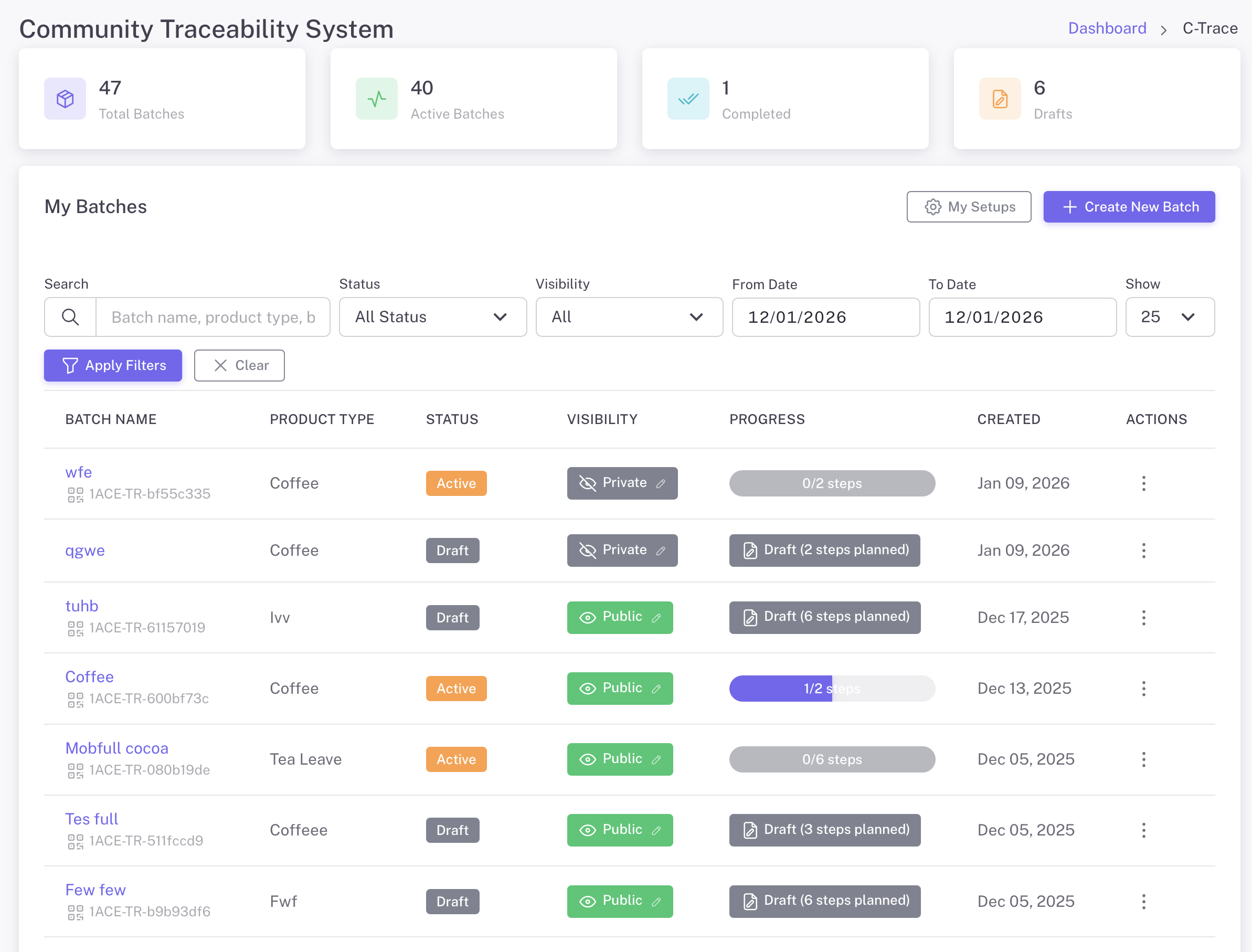
Central dashboard to monitor all production batches

C-Trace Dashboard
C-Trace Dashboard - Track total batches, active batches, completed, and drafts
Фильтр и поиск

Find batches by name, product type, status, or date range

Track Progress

See step completion status for each batch at a glance

Visibility Control

Set batches as Public or Private based on needs

Мои настройки

Save and reuse workflow configurations

Batch Details & QR Code

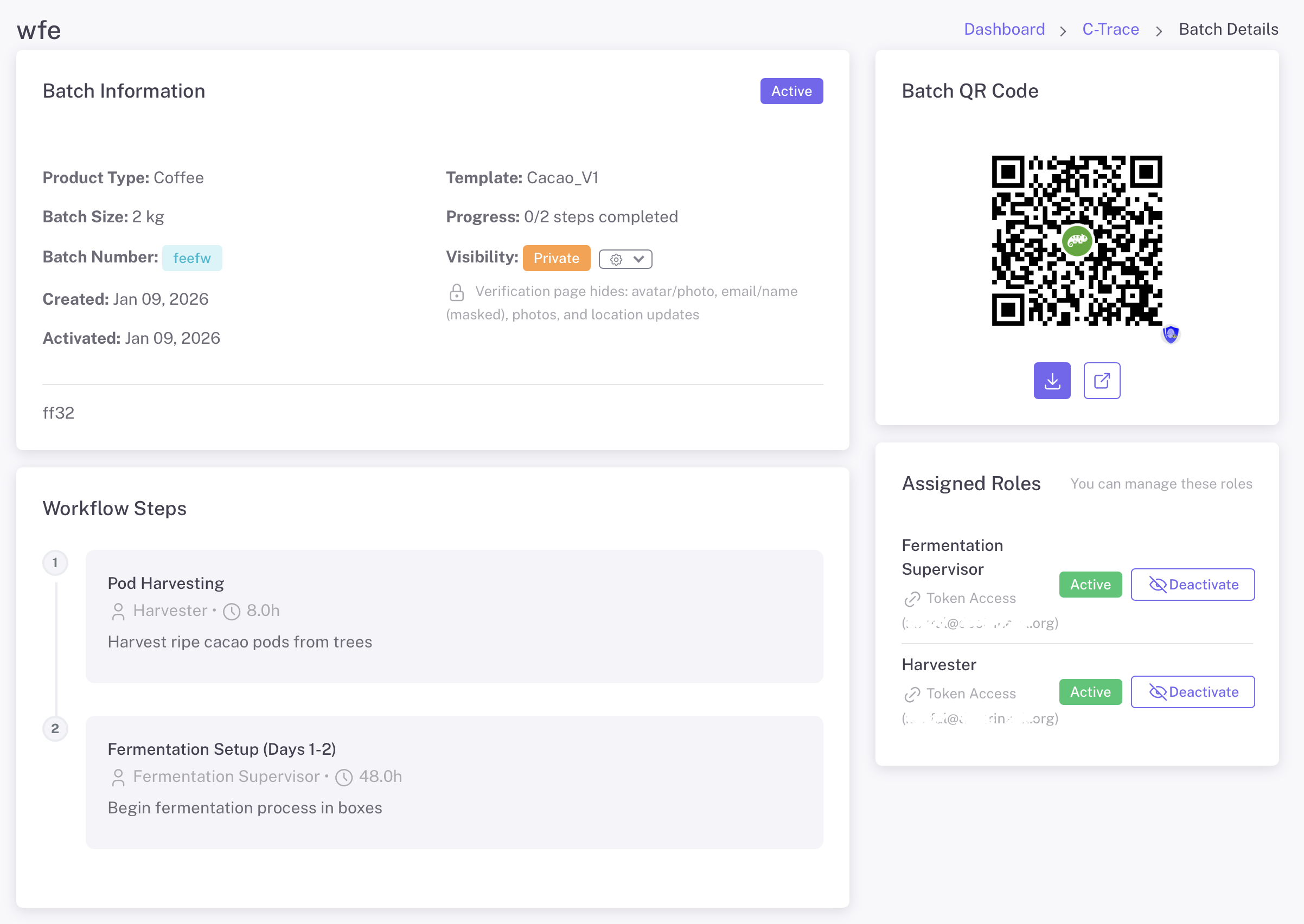
Each batch gets a unique QR code for verification and tracking

Batch Details
Batch Details - View batch info, QR code, workflow steps, and manage assigned roles

Batch QR Code

Download and share the batch QR code. Scan to view complete traceability information for the entire production journey.

Этапы рабочего процесса

View all production steps with assigned roles, expected duration, and completion status. Track progress through the entire workflow.

Role Management

View and manage assigned roles. Activate or deactivate access for workers. Send token access via email for external collaborators.

Worker Task Management

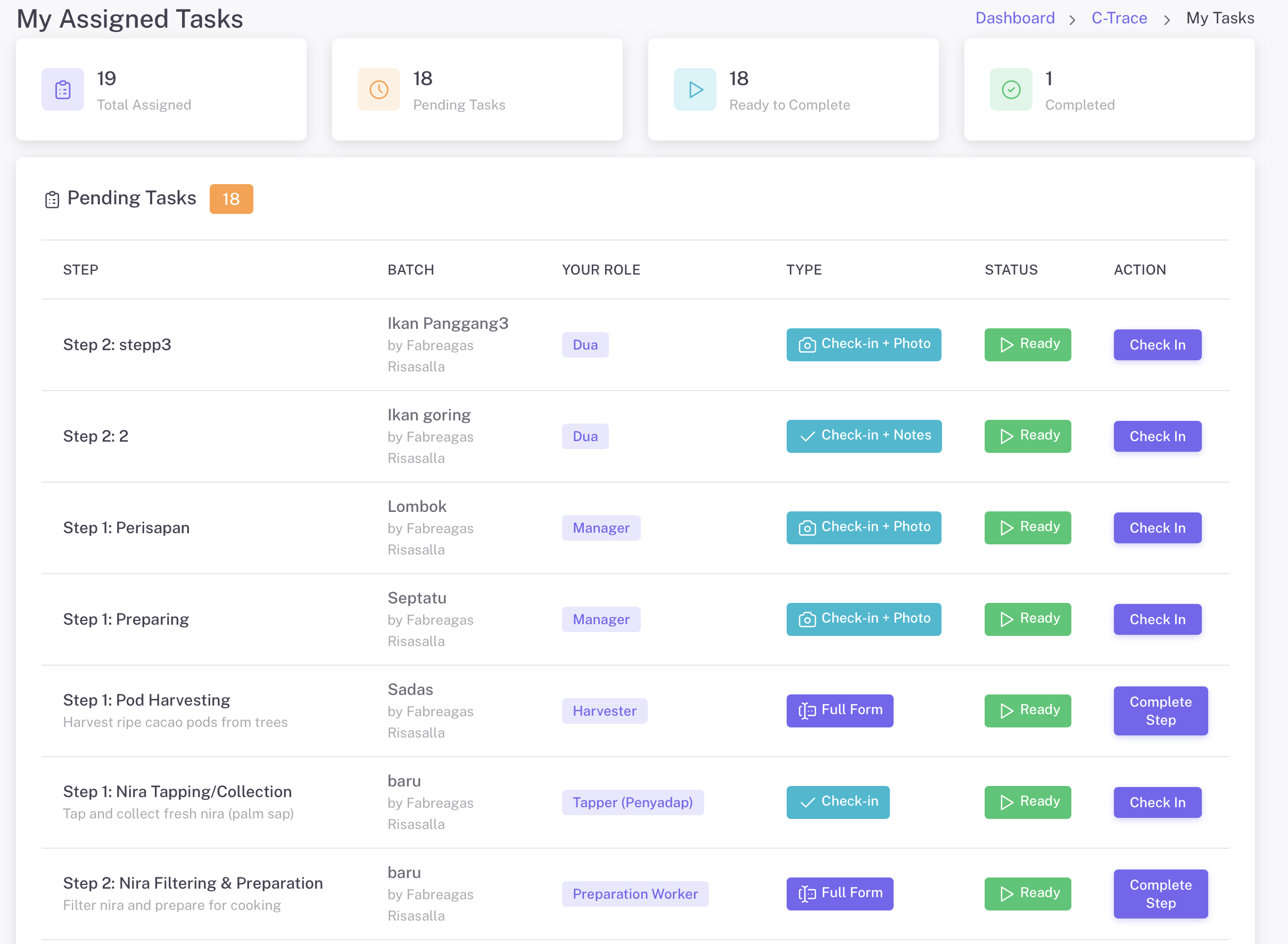
Workers see only their assigned tasks with clear instructions

Мои назначенные задачи
My Assigned Tasks - Workers see their pending tasks with batch info, role, task type, and status

Task Types

  • Заезд + Фото - Simple check-in with photo capture
  • Регистрация + Примечания - Check-in with text notes
  • Полная форма - Complete data collection with custom fields

Mobile Access

  • GoValid mobile app for iOS and Android
  • Scan QR code to access tasks
  • Email token access for external workers
  • Works offline with sync when connected

Complete Documentation

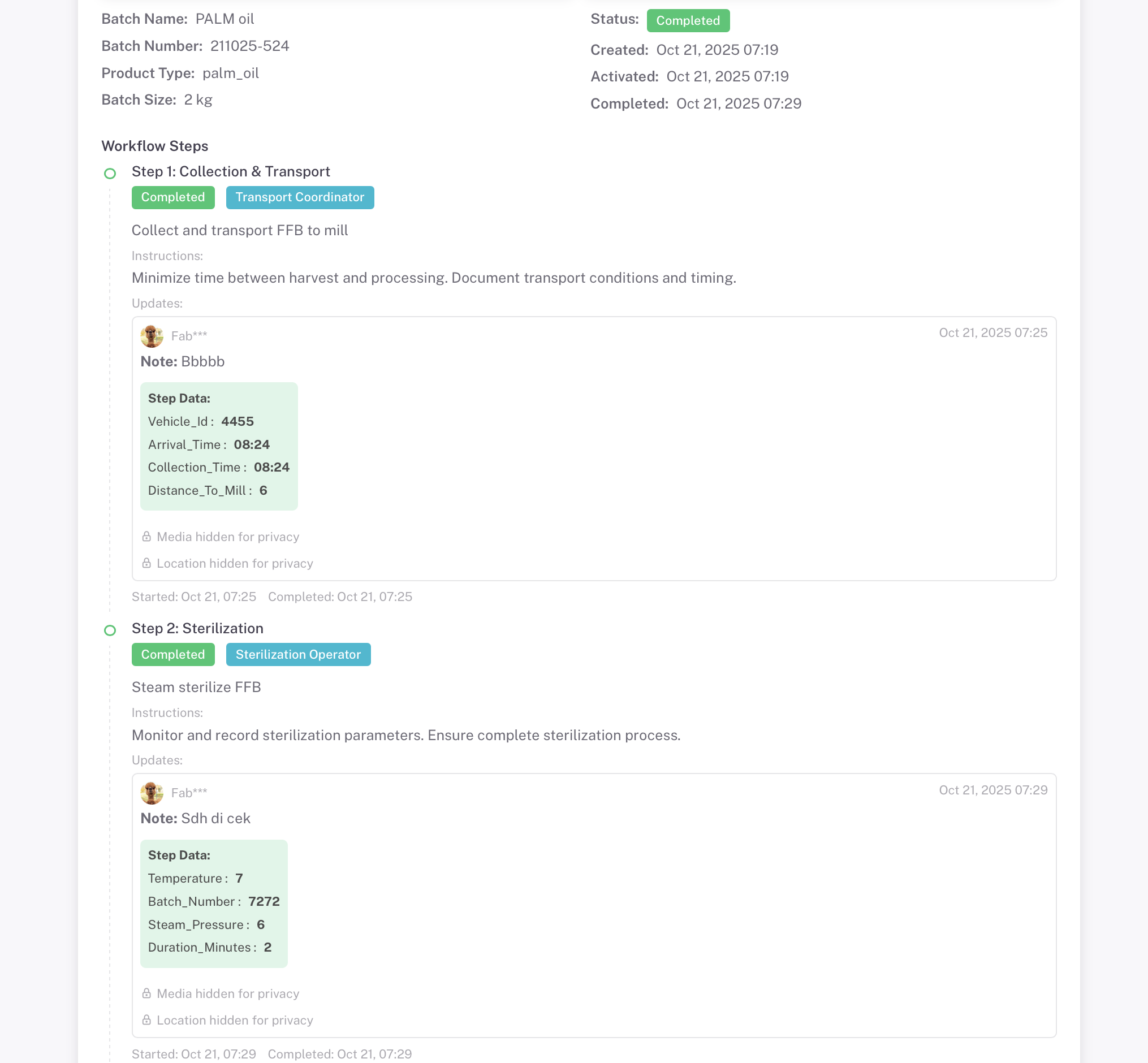
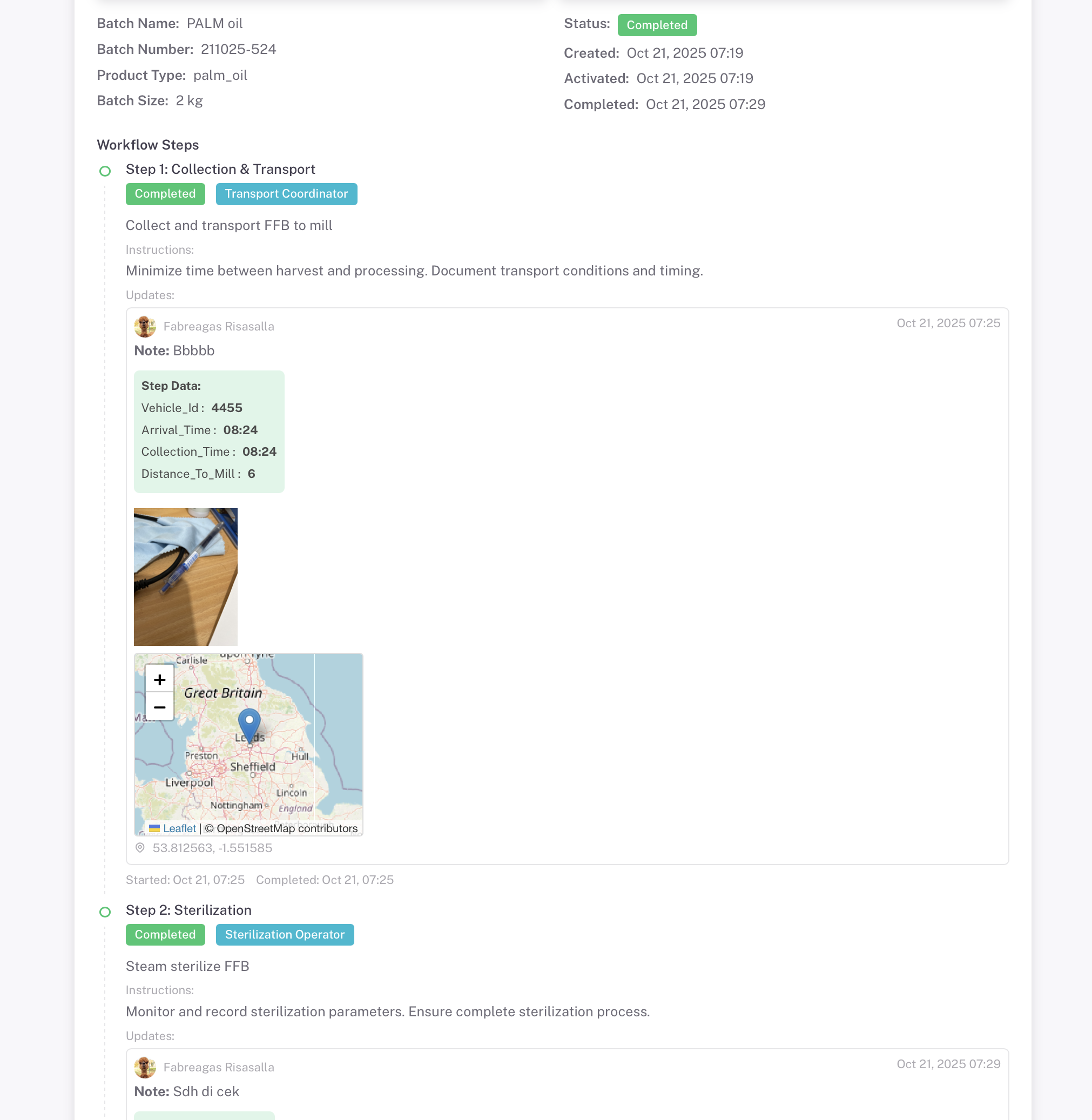
Every step captures photo evidence, GPS location, and custom data

Privacy Mode ON
Privacy Mode Active - Media and Location Hidden
Media and location data hidden from public view
Privacy Mode OFF
Privacy Mode Inactive - Full Transparency
Photo evidence and GPS location fully visible

Control visibility of sensitive data with privacy settings. Set batches as Public or Private based on needs

Photo Evidence

Multiple photos per step with timestamps

GPS-местоположение

Exact coordinates with map visualization

Временные метки

Start and completion times recorded

Вложения

Additional documents and files

Идеально для

Traceability solution for any supply chain

Кофе

Cherry to cup tracking

Пальмовое масло

Sustainable sourcing

Cosmetics

Manufacturing QC

Cacao

Bean to bar journey

Garments

Ethical production

Agriculture

Farm to table

Ready to Build Your Traceability System?

Create your first batch and start tracking your supply chain in minutes. Choose from industry templates or build your own workflow.

Explore More Guides

Discover other powerful Instant QR features