サプライチェーンの可視性

#-#-#-#-# django.po (Django Project) #-#-#-#-# Cトレース #-#-#-#-# django.po (Django Project) #-#-#-#-# C-Trace

Build complete supply chain traceability with customizable workflow templates. Track every step from raw materials to finished products with photo evidence, GPS verification, and role-based access.

なぜインスタントキューを選ぶのか?

完全な取引履歴が保持される

フォームテンプレート

Pre-built workflow templates for Coffee, Palm Oil, Cosmetics, Garments, and more. Start tracking in minutes.

はい(ロールベースのアクセス)

Assign specific roles to workers via QR code or email token. Each person sees only their assigned tasks.

写真証拠

Capture photos at each production step. Required media ensures complete visual documentation.

OTP検証

Automatic location capture at each step. Verify where production activities actually happen.

テンプレートを使用

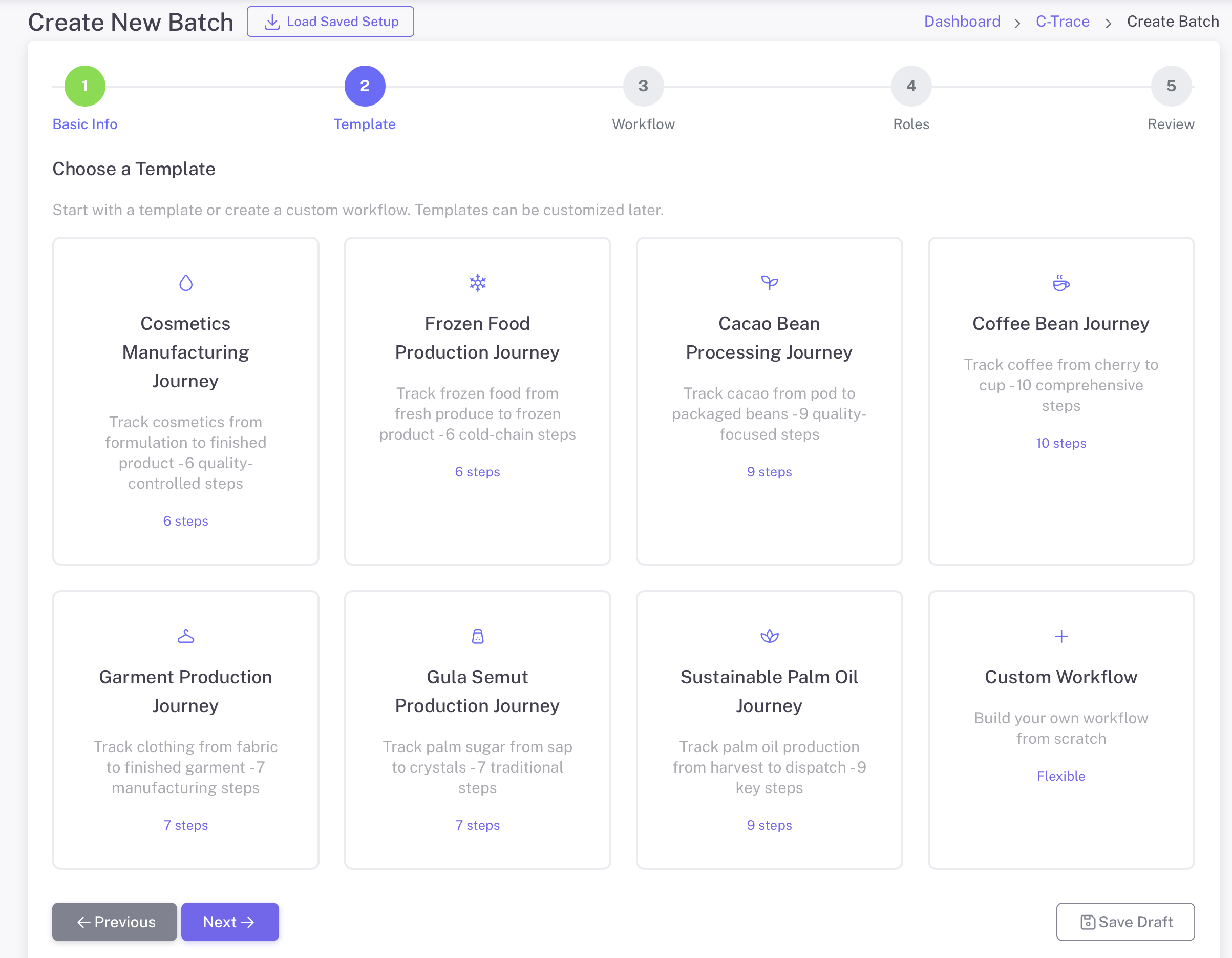
Choose from 8 industry-specific workflow templates or create your own

コーヒー

10 手順

パーム油

9 手順

製造

6 手順

バッチ処理

9 手順

食品

6 手順

酸素生成

7 手順

本番

7 手順

カスタムワークフロー

柔軟

仕組み

トレーサビリティのための製造日

1

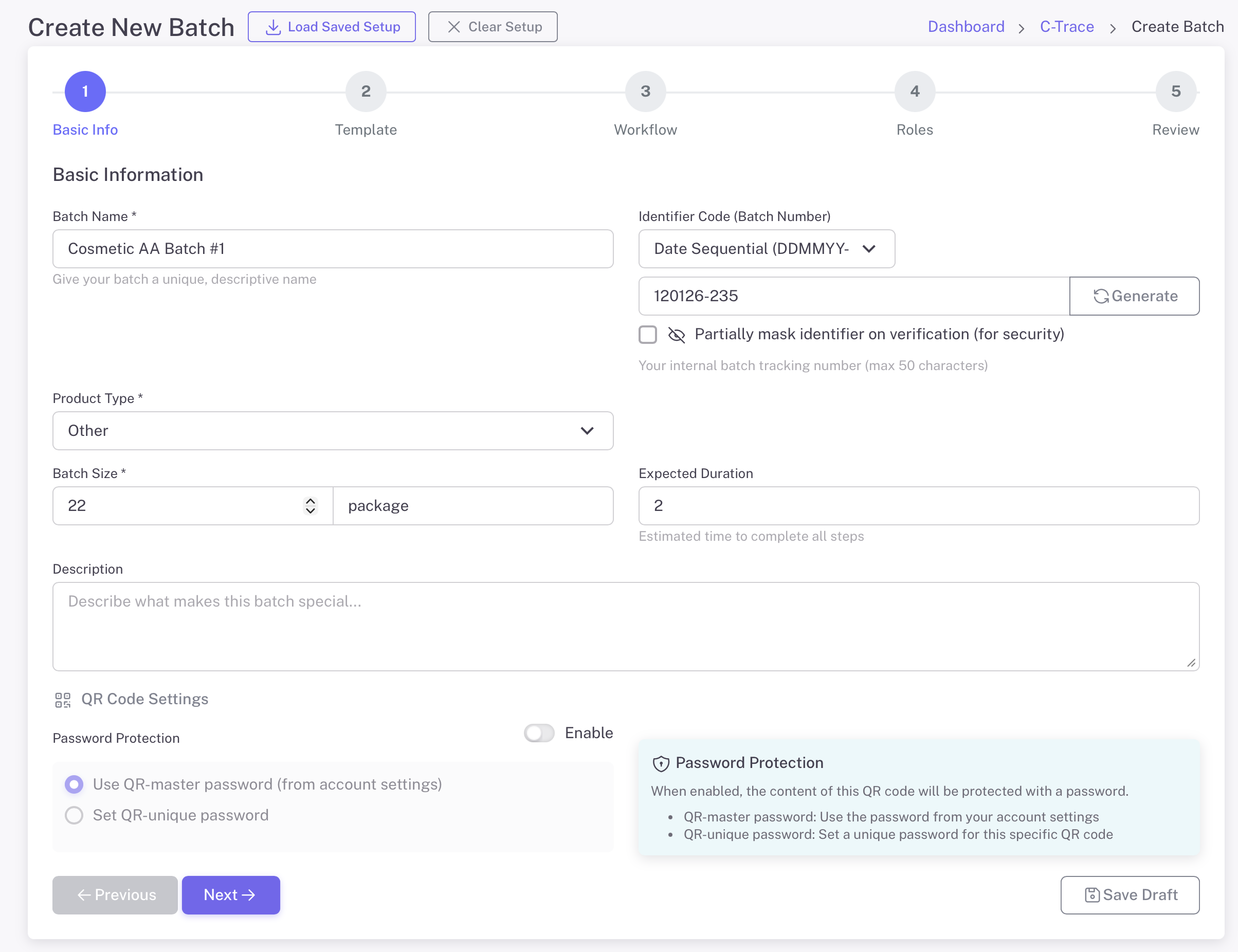
バッチ情報

Start by defining your batch with basic information. Give it a name, select the product type, and set the batch size. Generate a unique identifier for tracking.

  • バッチ名と説明
  • Product type selection (Coffee, Cosmetics, etc.)
  • Batch size with unit (kg, package, etc.)
  • 数値識別子を自動生成
  • オプションのパスワード保護:
バッチ情報
2

テンプレートを選択

Select from pre-built industry templates or create a custom workflow. Each template includes predefined steps tailored to specific production processes.

  • 特定の人だけ
  • Coffee, Palm Oil, Cosmetics, Garments, and more
  • ワークフローのステップを確認してカスタマイズする
  • Custom Workflow option for unique processes
  • フィールドタイプは作成後に変更できません
テンプレートを選択
3

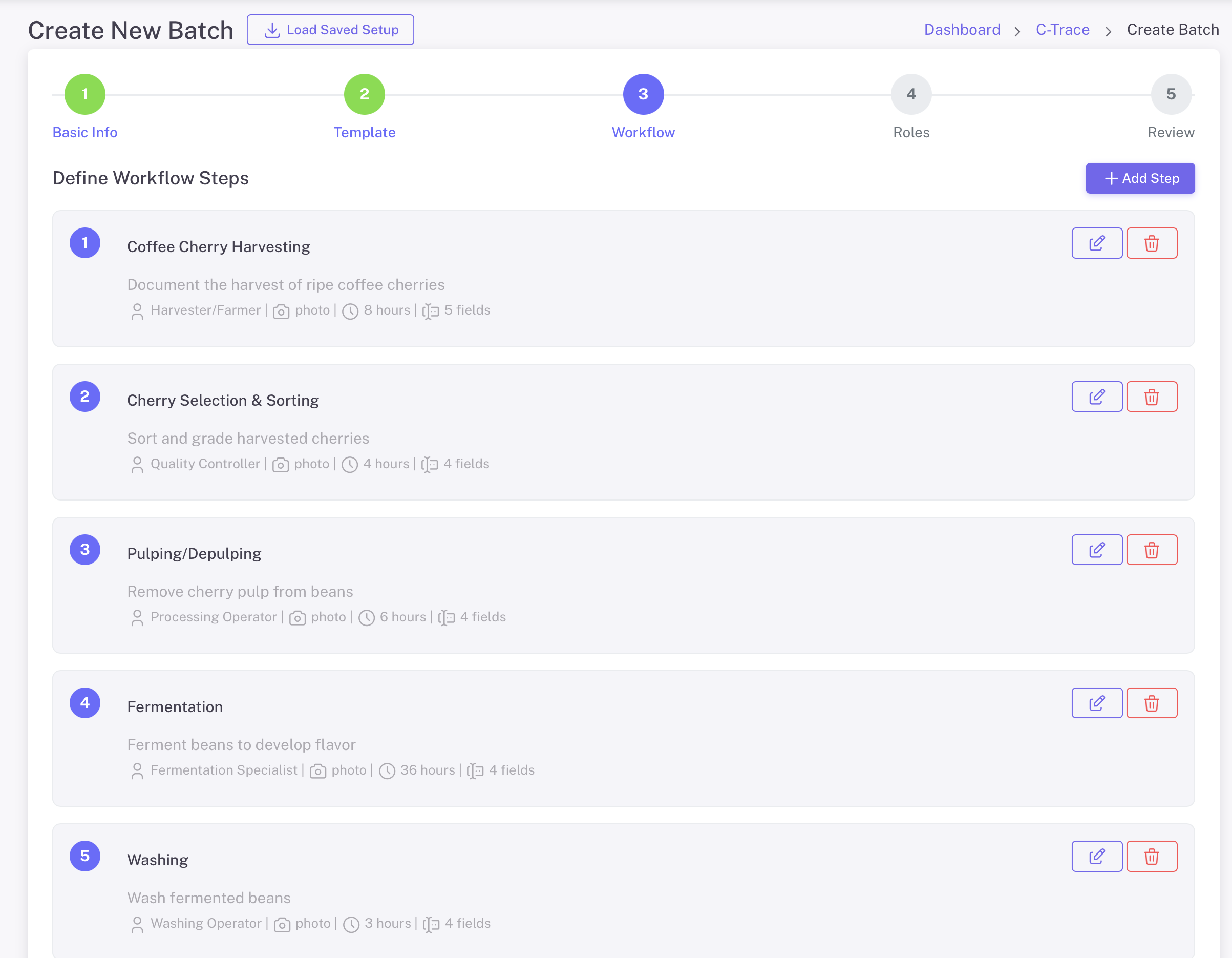
ワークフローステップの定義

Customize each step of your production workflow. Define what data to collect, who is responsible, and what media is required at each stage.

  • (ワークフロー手順の前):
  • Assign roles to each step (Harvester, QC, etc.)
  • Set required media: Photo, Voice Note
  • 最初のデータ収集
  • 予想所要時間
ワークフローステップの定義

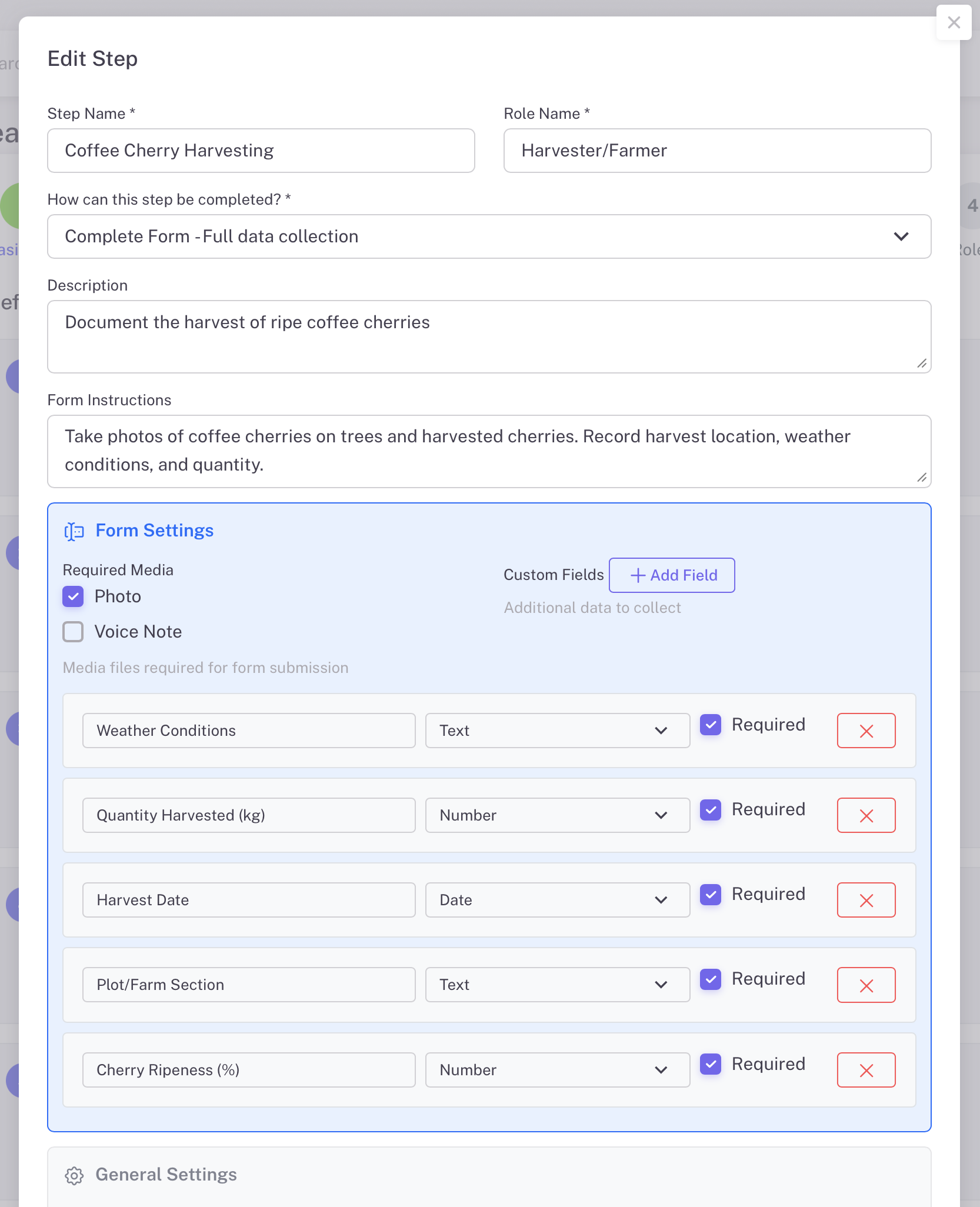
サイト詳細を表示

Each workflow step can be fully customized with specific data fields. Define exactly what information workers need to capture at each production stage.

  • ステップ4 - 役割の割り当て:
  • 説明とオプションのメモ
  • Custom fields: Text, Number, Date types
  • フォーム送信に必要なメディアファイル
  • Set step as skippable if needed
サイト詳細を表示
4

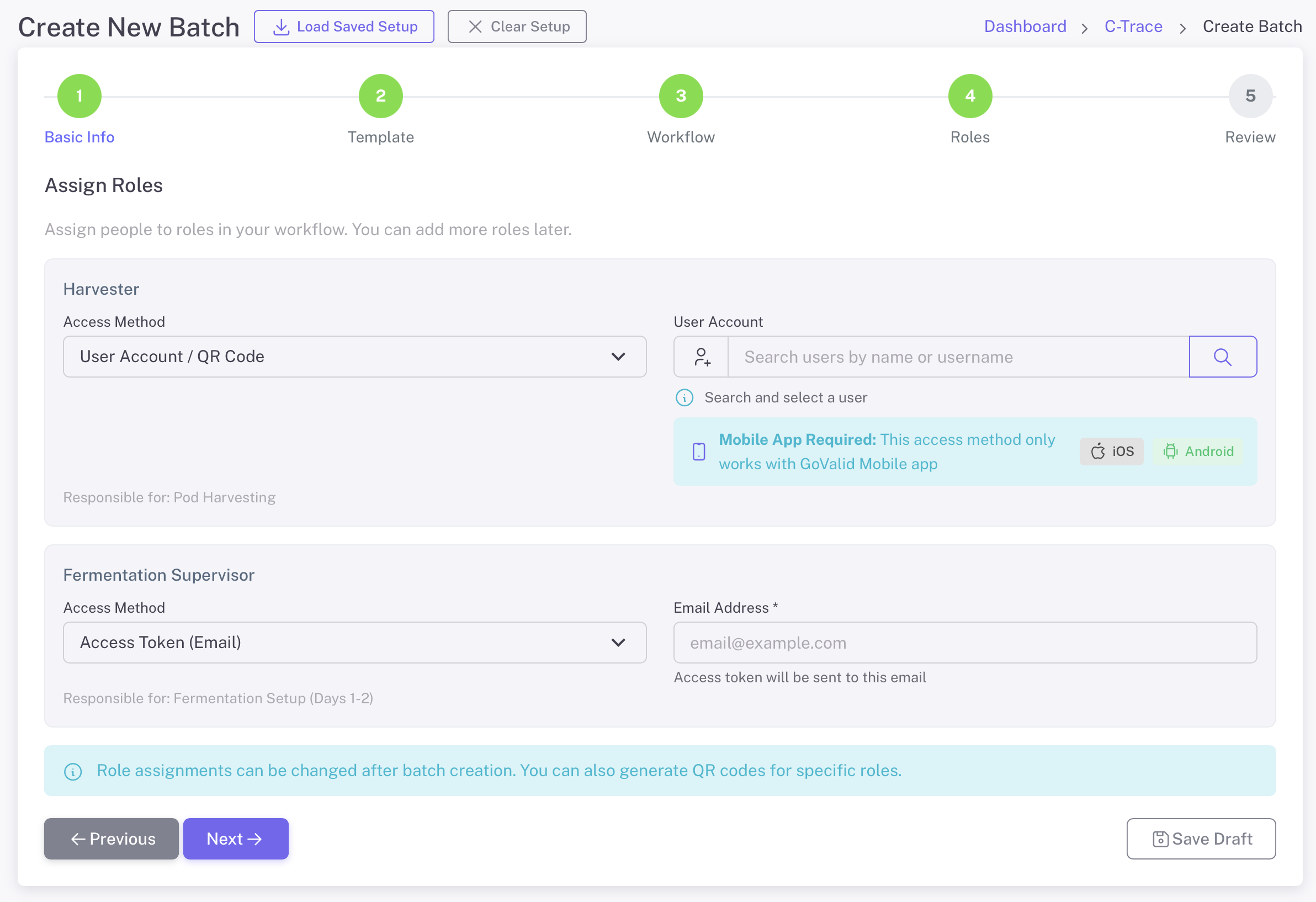
役割の割り当て

Assign specific people to each role in your workflow. Workers can access their tasks via the GoValid mobile app or through email access tokens.

  • ユーザーアカウント / QRコード
  • 2. メールトークン(外部協力者向け)
  • ユーザーを検索して選択する
  • モバイル: iOS および Android 向けの Office Mobile アプリ
  • フィールドタイプは作成後に変更できません
役割の割り当て
5

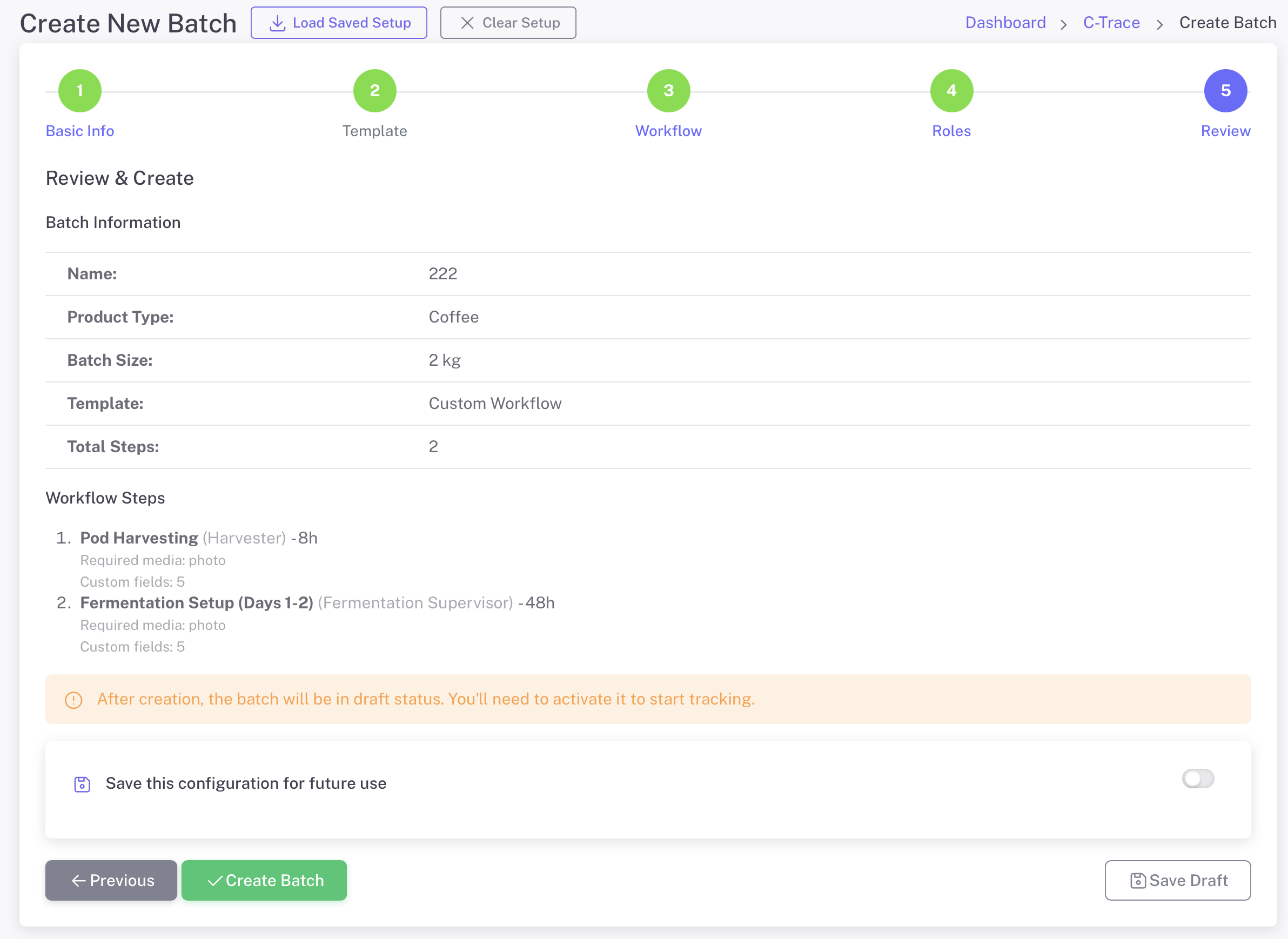
レビューと作成

ワークフローのステップとロールの割り当ては、将来のバッチのために保存されます

  • バッチ情報
  • 完全なワークフローテンプレートと手順
  • この設定を将来使用するために保存します
  • すぐに有効化
  • メンバー情報の編集
レビューと作成

プランを管理する

季節限定商品

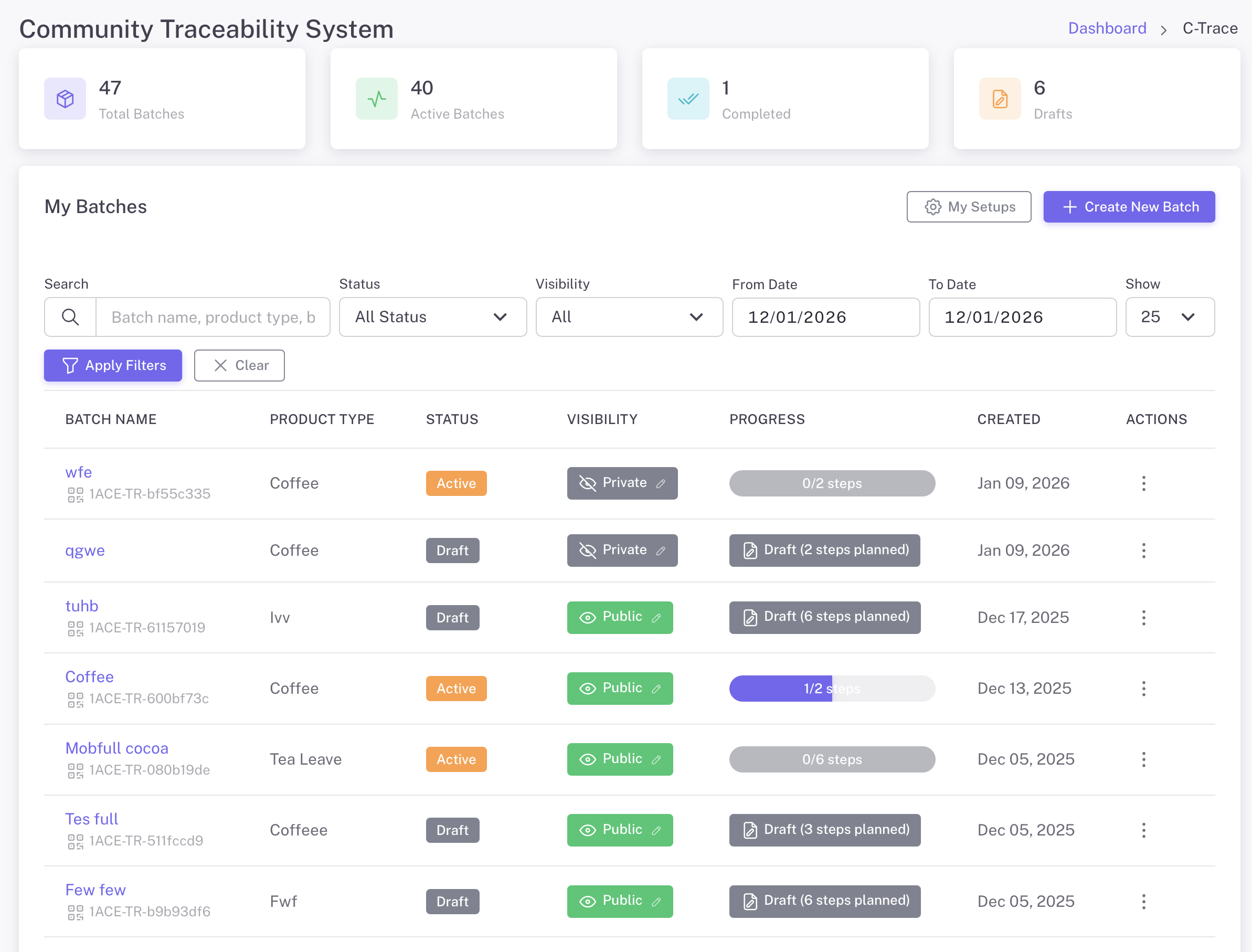
C-Traceダッシュボード
統計情報を表示: 合計バッチ数、アクティブなバッチ数、完了したステップ数、保留中のステップ数
フィルターと検索

バッチ名、製品タイプ、バッチ番号...

プロジェクトの進捗状況

See step completion status for each batch at a glance

ディスプレイコントロール

Set batches as Public or Private based on needs

私の設定

設定を保存

バッチの詳細

各PDFには個別の追跡機能を備えた固有のQRコードが付与されます

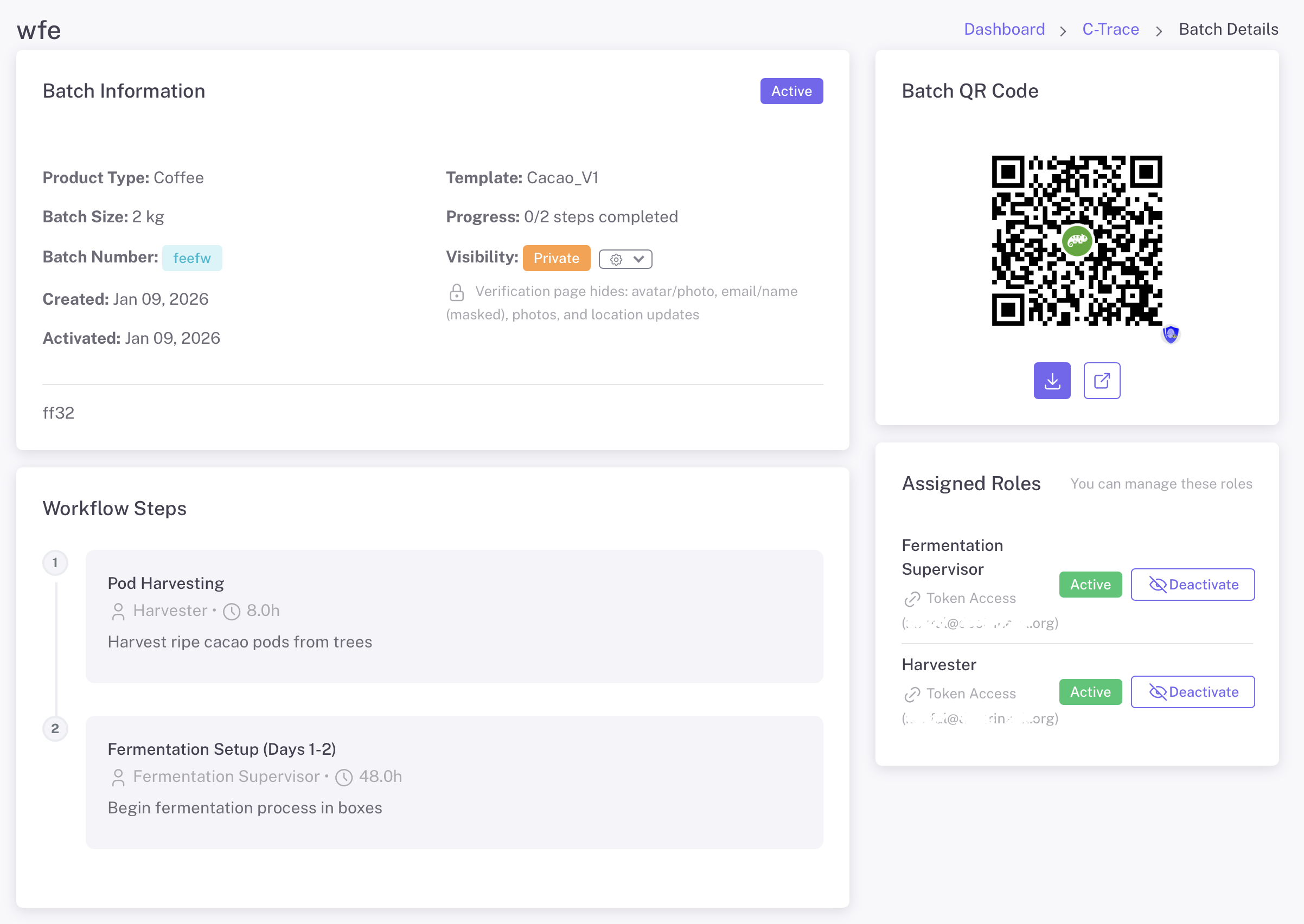
バッチの詳細
Batch Details - View batch info, QR code, workflow steps, and manage assigned roles

バッチQRコード

Download and share the batch QR code. Scan to view complete traceability information for the entire production journey.

ワークフローの手順

View all production steps with assigned roles, expected duration, and completion status. Track progress through the entire workflow.

役割管理

View and manage assigned roles. Activate or deactivate access for workers. Send token access via email for external collaborators.

ユーザーリスク管理

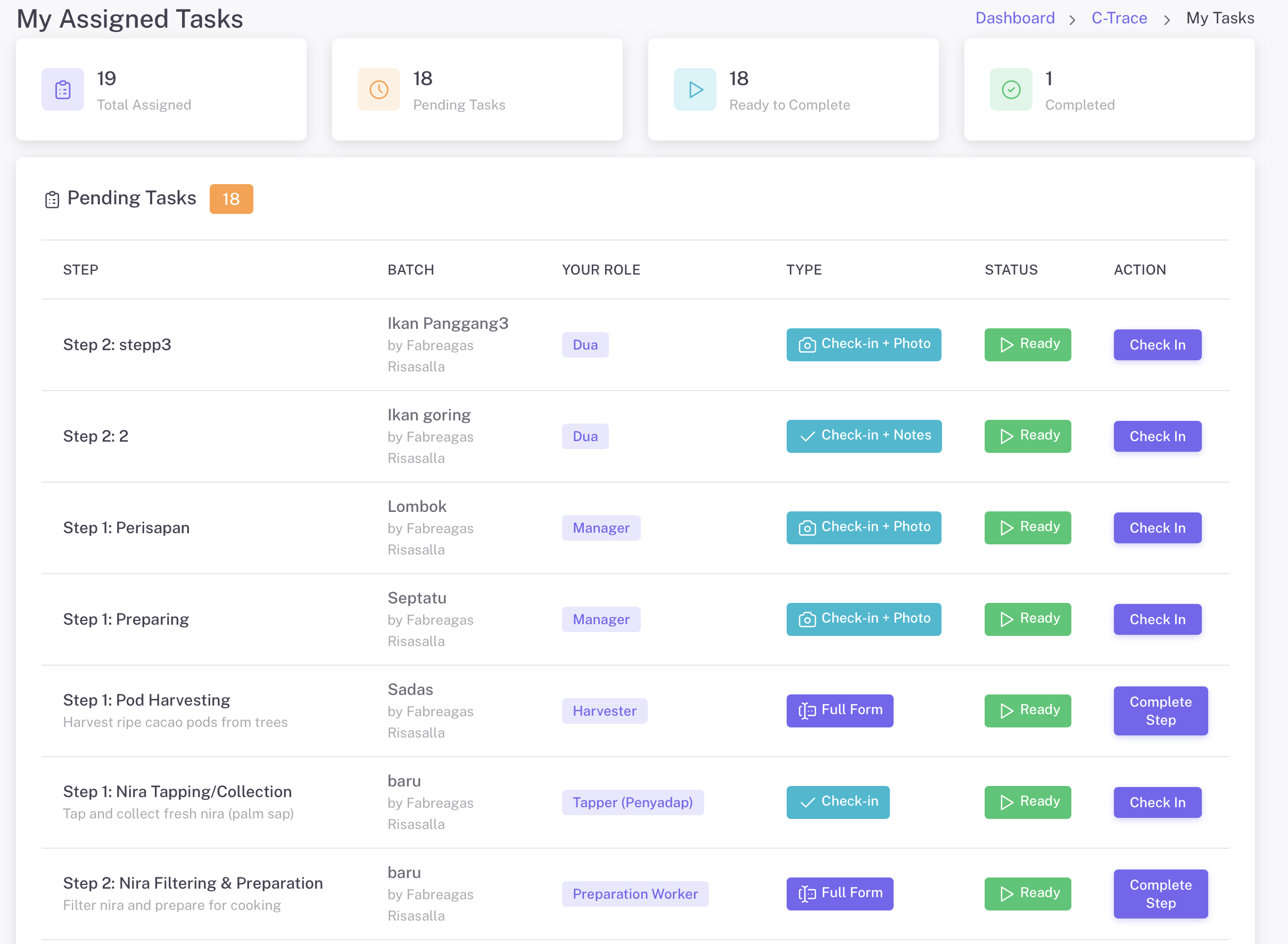
Workers see only their assigned tasks with clear instructions

割り当てられたタスク
My Assigned Tasks - Workers see their pending tasks with batch info, role, task type, and status

チケットタイプ

  • チェックイン + 写真 - 写真でチェックイン
  • チェックイン + メモ - メモでチェックイン
  • フルフォーム - 完全なデータ収集プロトコル

モバイルアプリ

  • モバイル: iOS および Android 向けの Office Mobile アプリ
  • QRコードをスキャンして支払います
  • 2. メールトークン(外部協力者向け)
  • オフラインで写真撮影可能(接続時に同期)

コンプライアンス文書

木の写真、樹齢、GPS 位置情報、QR コードを表示します

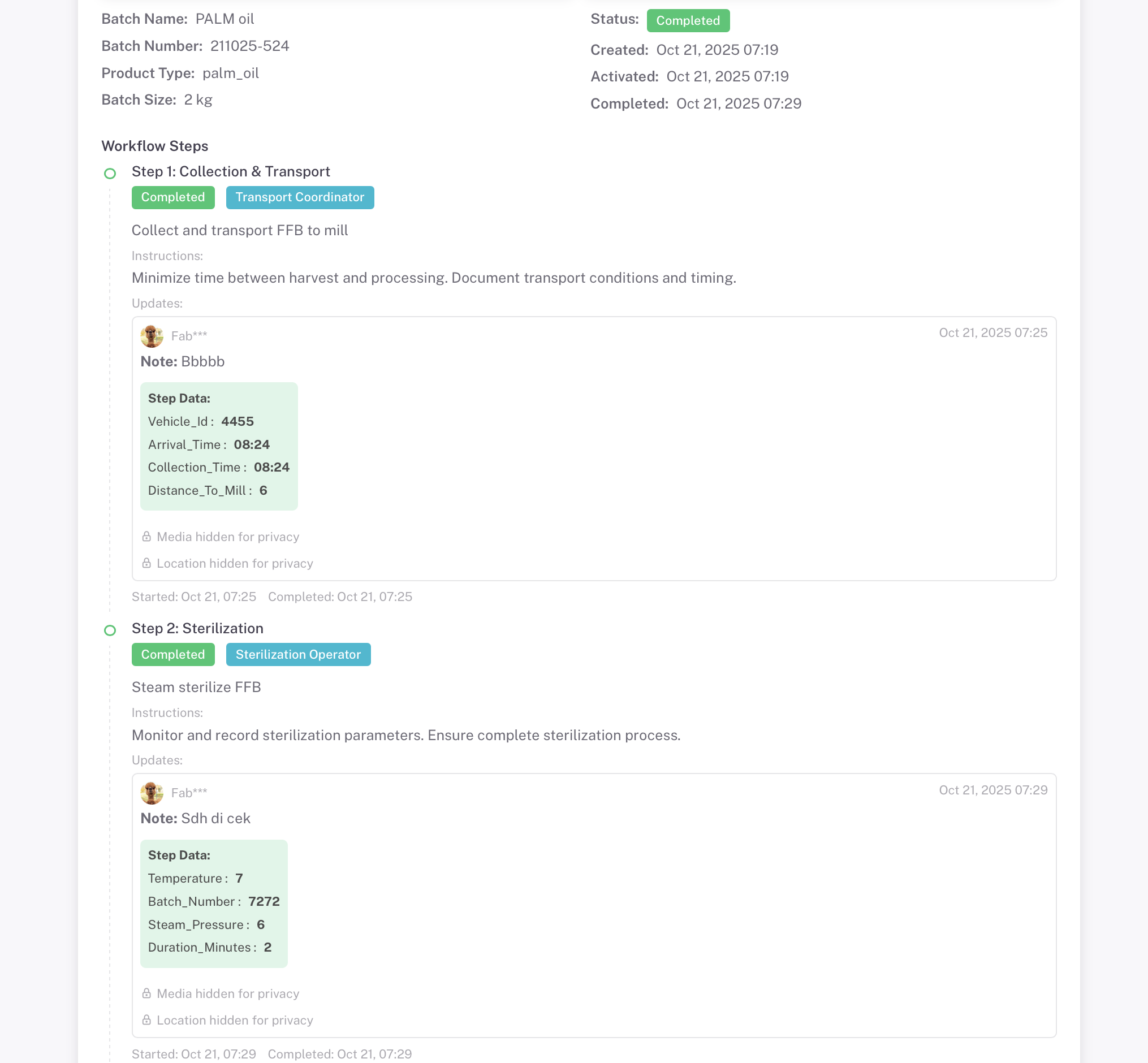
プライバシーに関する注意:
Privacy Mode Active - Media and Location Hidden
Media and location data hidden from public view
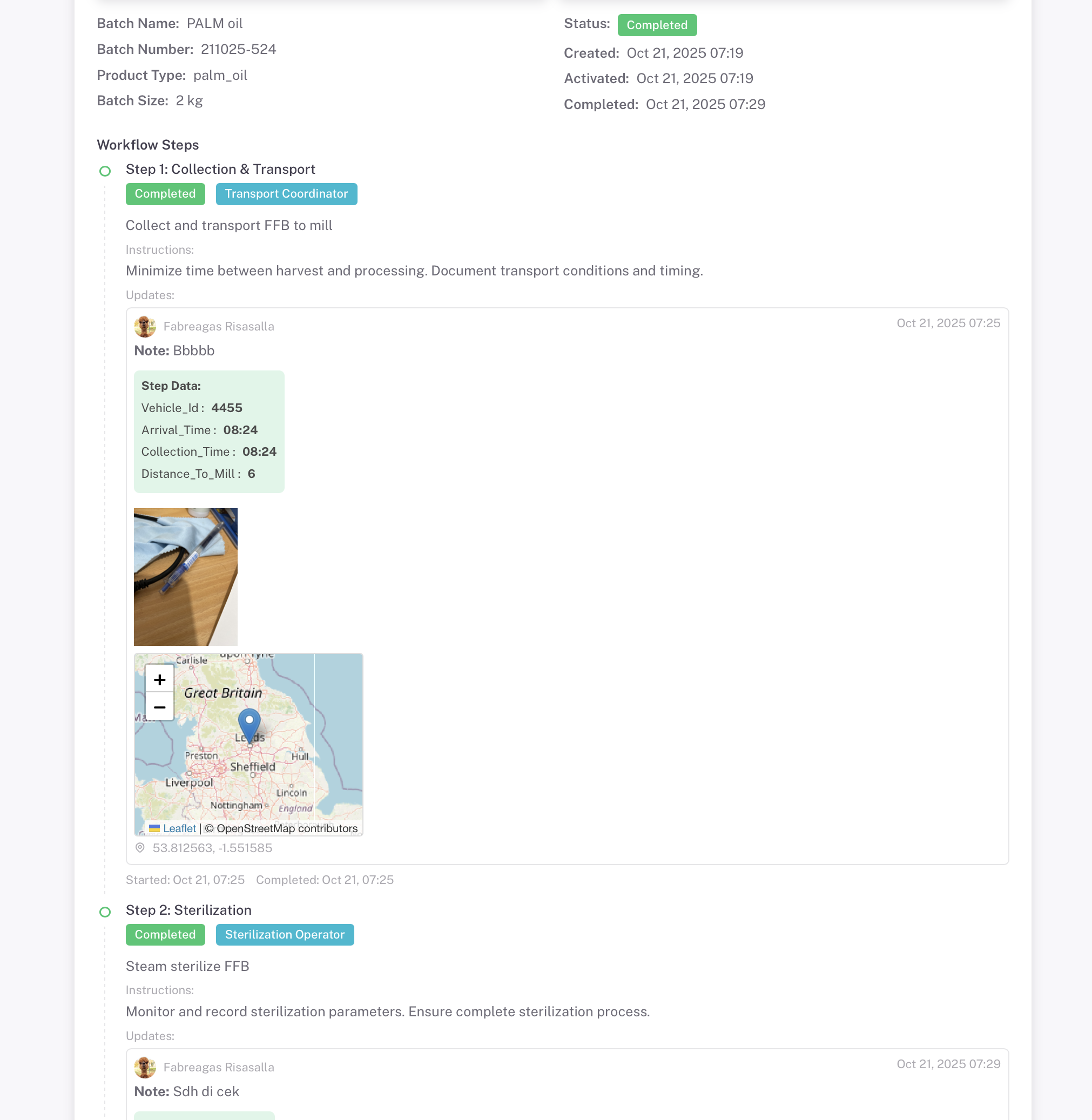
プライバシーに関する注意:
Privacy Mode Inactive - Full Transparency
すべての写真、文書、GPS位置情報が表示されます

Control visibility of sensitive data with privacy settings. Set batches as Public or Private based on needs

写真証拠

写真、地図、タイムスタンプが含まれています

GPS位置情報

説明付きのGPS座標

タイムスタンプ

作成日と完了日

添付ファイル

一般的な文書やファイルの場合

最適な用途:

#-#-#-#-# django.po (Django Project) #-#-#-#-# 炭素トレーサビリティとサプライチェーンの追跡 #-#-#-#-# django.po (Django Project) #-#-#-#-# 炭素トレーサビリティとサプライチェーン追跡

コーヒー

バージョン管理追跡

パーム油

持続可能な農業

物流

製造

Cacao

もっと知りたいですか?

決済

バイオガス生産

農業

農家ログの詳細

RFID動物トレーサビリティ

Create your first batch and start tracking your supply chain in minutes. Choose from industry templates or build your own workflow.

Explore More Guides

Discover other powerful Instant QR features