आपूर्ति श्रृंखला दृश्यता

C-Trace

Build complete supply chain traceability with customizable workflow templates. Track every step from raw materials to finished products with photo evidence, GPS verification, and role-based access.

इंस्टेंट क्यू क्यों चुनें?

किसी भी उद्योग के लिए बहुमुखी चेक-इन समाधान

रिपोर्ट टेम्पलेट

Pre-built workflow templates for Coffee, Palm Oil, Cosmetics, Garments, and more. Start tracking in minutes.

हां (भूमिका-आधारित पहुंच)

Assign specific roles to workers via QR code or email token. Each person sees only their assigned tasks.

फोटो साक्ष्य

Capture photos at each production step. Required media ensures complete visual documentation.

GPS सत्यापन

Automatic location capture at each step. Verify where production activities actually happen.

टेम्पलेट का उपयोग करें

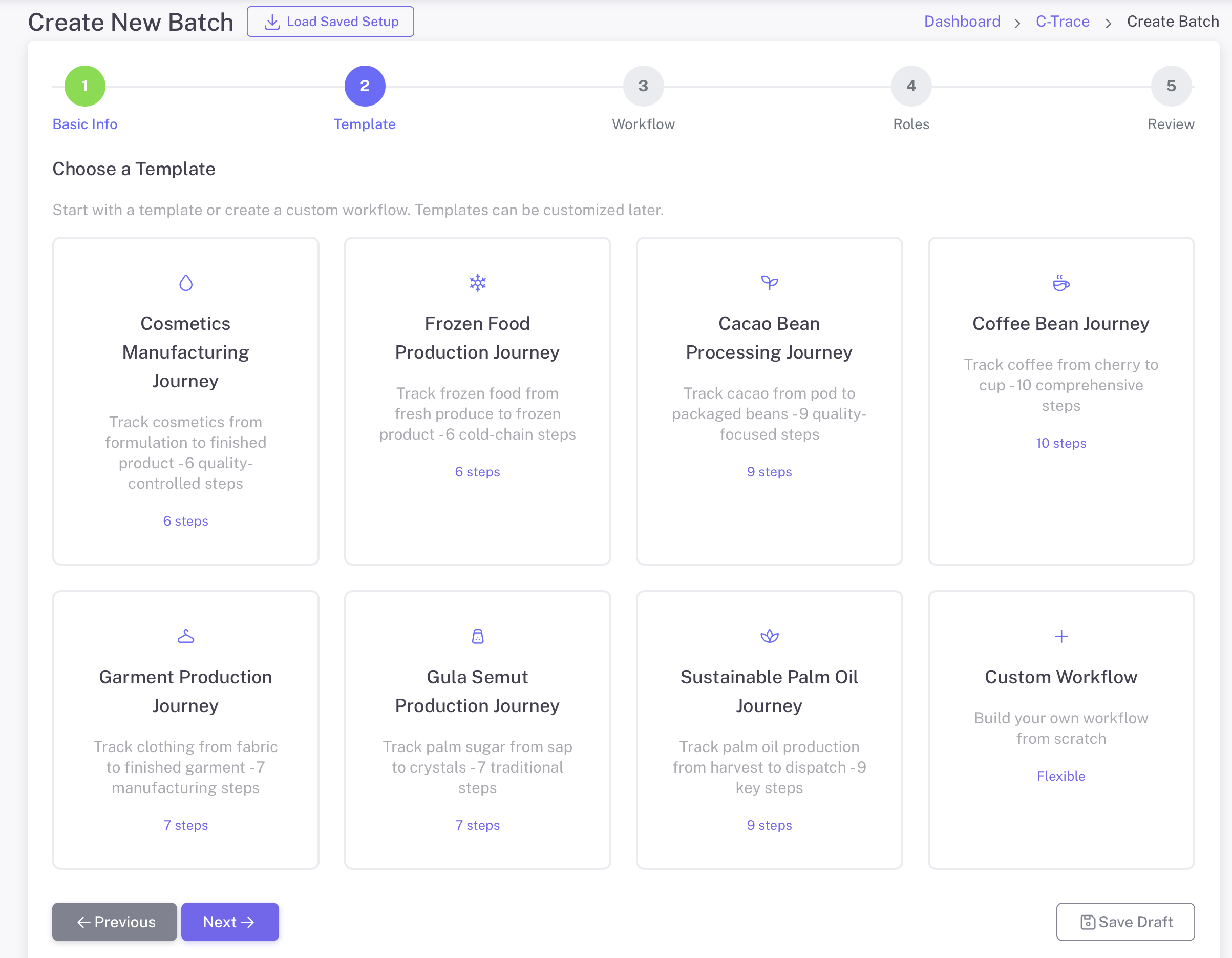
Choose from 8 industry-specific workflow templates or create your own

कॉफी

10 चरण

ताड़ का तेल

9 चरण

विनिर्माण

6 चरण

बैच प्रोसेसिंग

9 चरण

खाद्य उत्पाद

6 चरण

ऑक्सीजन उत्पादन

7 चरण

प्रोडक्शन

7 चरण

Custom Workflow

लचीला

यह कैसे काम करता है

ट्रेसेबिलिटी के लिए किसान गतिविधि रिकॉर्ड करें

1

स्टेटिक जानकारी

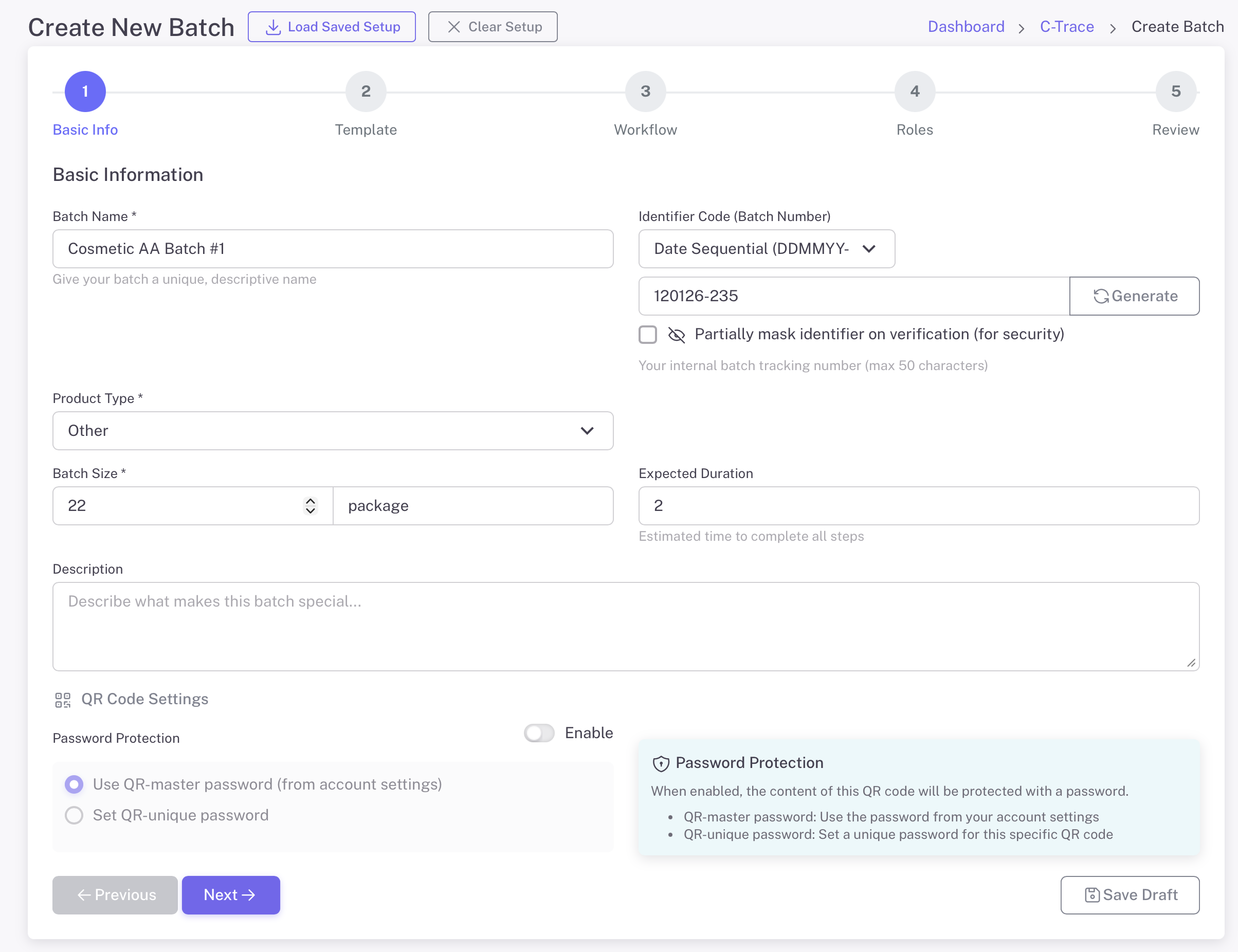
Start by defining your batch with basic information. Give it a name, select the product type, and set the batch size. Generate a unique identifier for tracking.

  • Batch name and description
  • Product type selection (Coffee, Cosmetics, etc.)
  • Batch size with unit (kg, package, etc.)
  • स्वचालित संख्यात्मक पहचानकर्ता जनरेट करें
  • वैकल्पिक पासवर्ड सुरक्षा:
मूल जानकारी
2

एक टेम्पलेट चुनें

Select from pre-built industry templates or create a custom workflow. Each template includes predefined steps tailored to specific production processes.

  • केवल विशिष्ट लोग
  • Coffee, Palm Oil, Cosmetics, Garments, and more
  • Each template has optimized workflow steps
  • Custom Workflow option for unique processes
  • निर्माण के बाद फ़ील्ड प्रकार नहीं बदला जा सकता
टेम्पलेट चुनें
3

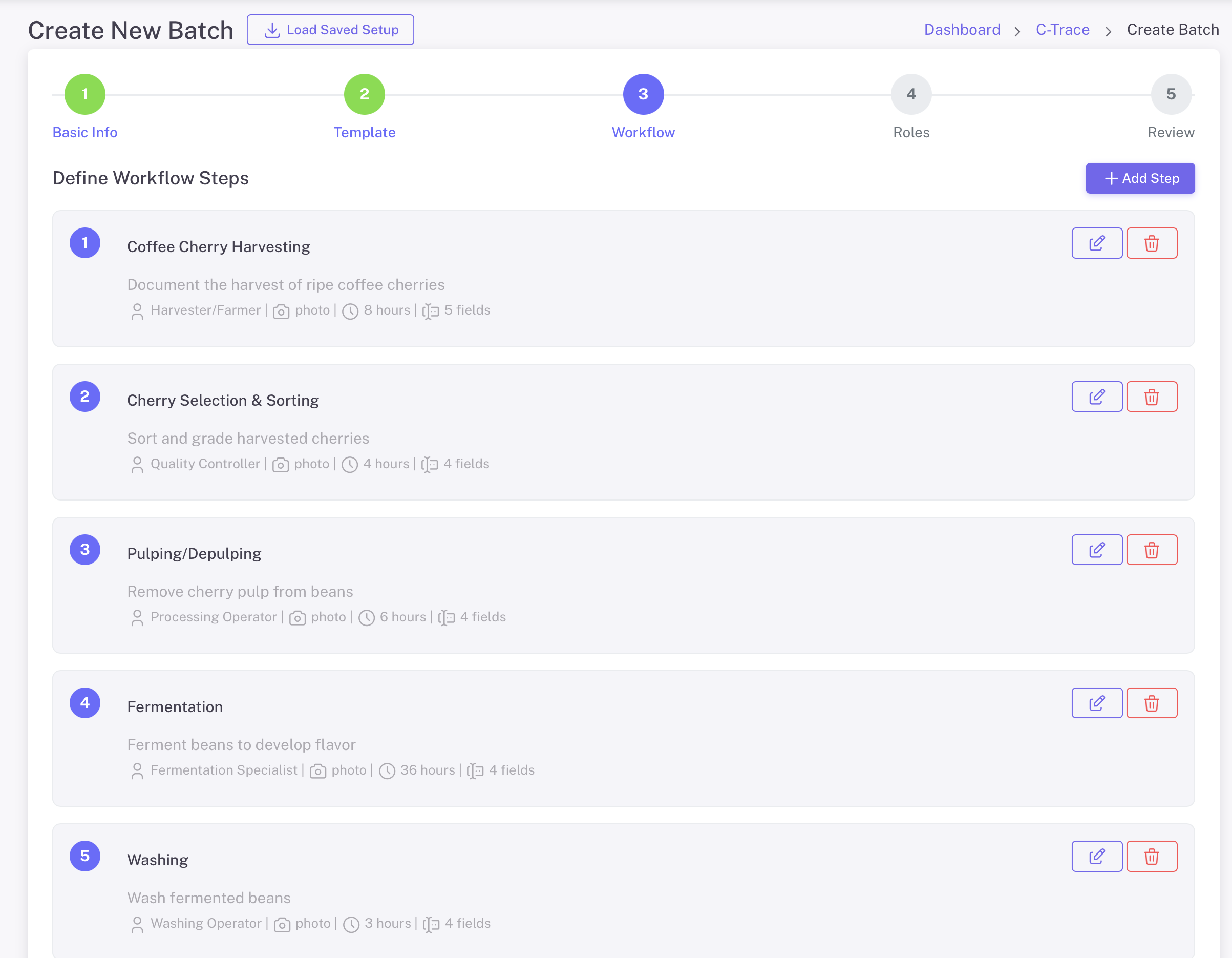
Define Workflow Steps

Customize each step of your production workflow. Define what data to collect, who is responsible, and what media is required at each stage.

  • Add, edit, or remove workflow steps
  • Assign roles to each step (Harvester, QC, etc.)
  • Set required media: Photo, Voice Note
  • पहला डेटा संग्रह
  • अपेक्षित अवधि
Define Workflow Steps

साइट विवरण देखें

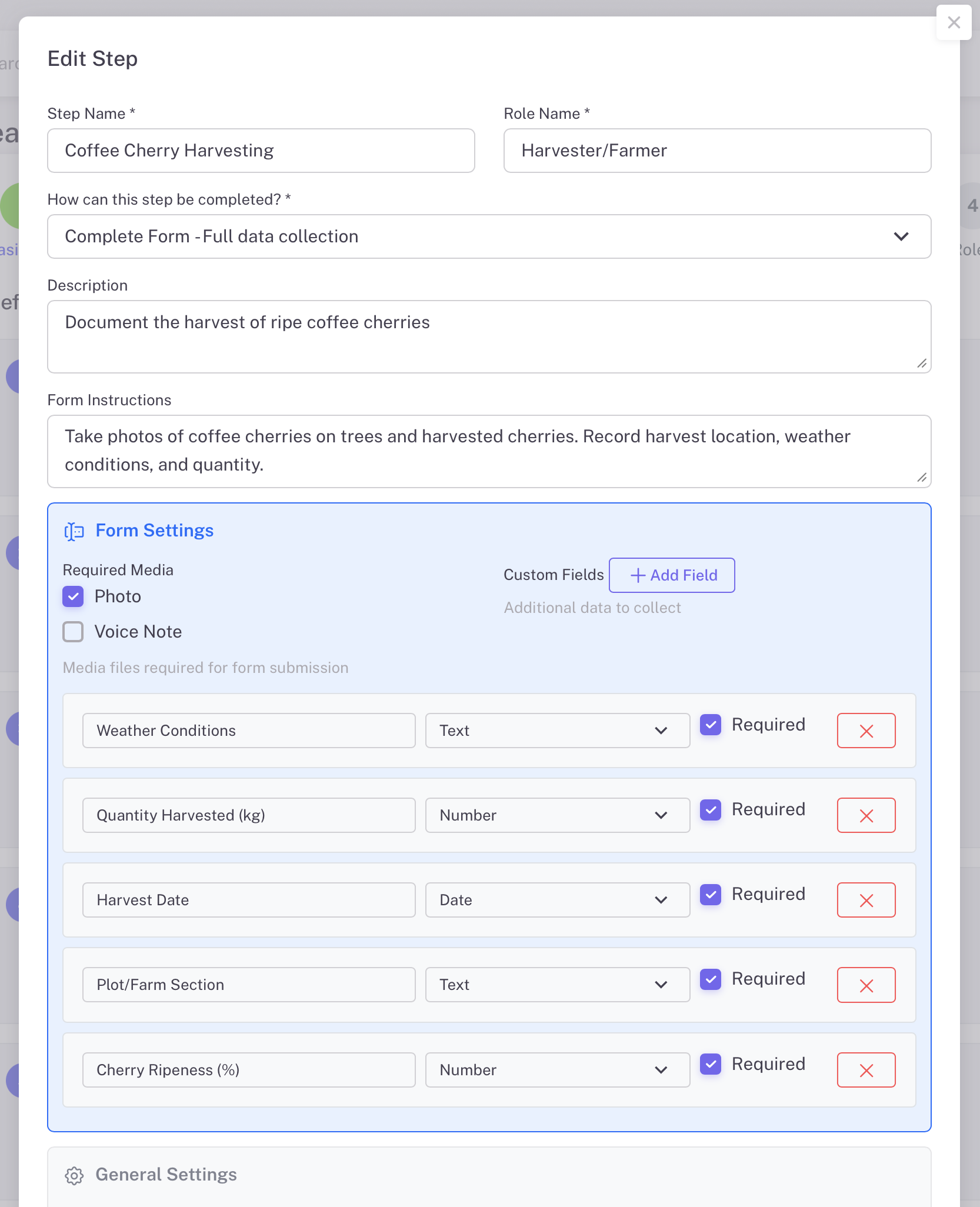
Each workflow step can be fully customized with specific data fields. Define exactly what information workers need to capture at each production stage.

  • चरण 4 - भूमिका असाइनमेंट:
  • विवरण और वैकल्पिक नोट्स
  • Custom fields: Text, Number, Date types
  • फॉर्म सबमिशन के लिए आवश्यक मीडिया फ़ाइलें
  • Set step as skippable if needed
साइट विवरण देखें
4

भूमिकाएं असाइन करें

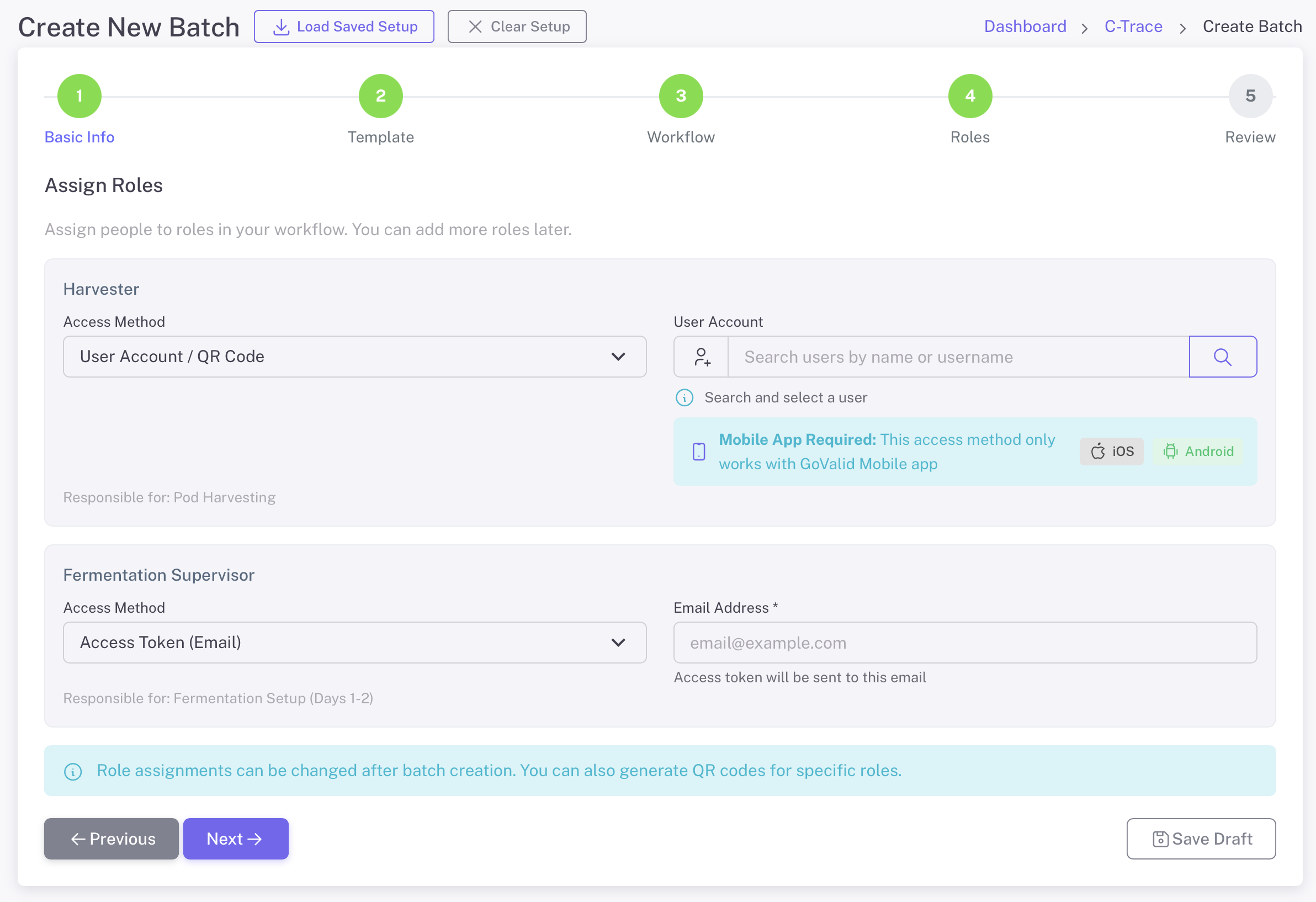
Assign specific people to each role in your workflow. Workers can access their tasks via the GoValid mobile app or through email access tokens.

  • उपयोगकर्ता खाता / क्यूआर कोड
  • 2. ईमेल टोकन (बाहरी सहयोगियों के लिए)
  • उपयोगकर्ता खोजें और चुनें
  • मोबाइल: iOS और Android के लिए Office Mobile ऐप्स
  • निर्माण के बाद फ़ील्ड प्रकार नहीं बदला जा सकता
भूमिकाएं असाइन करें
5

समीक्षा करें और बनाएं

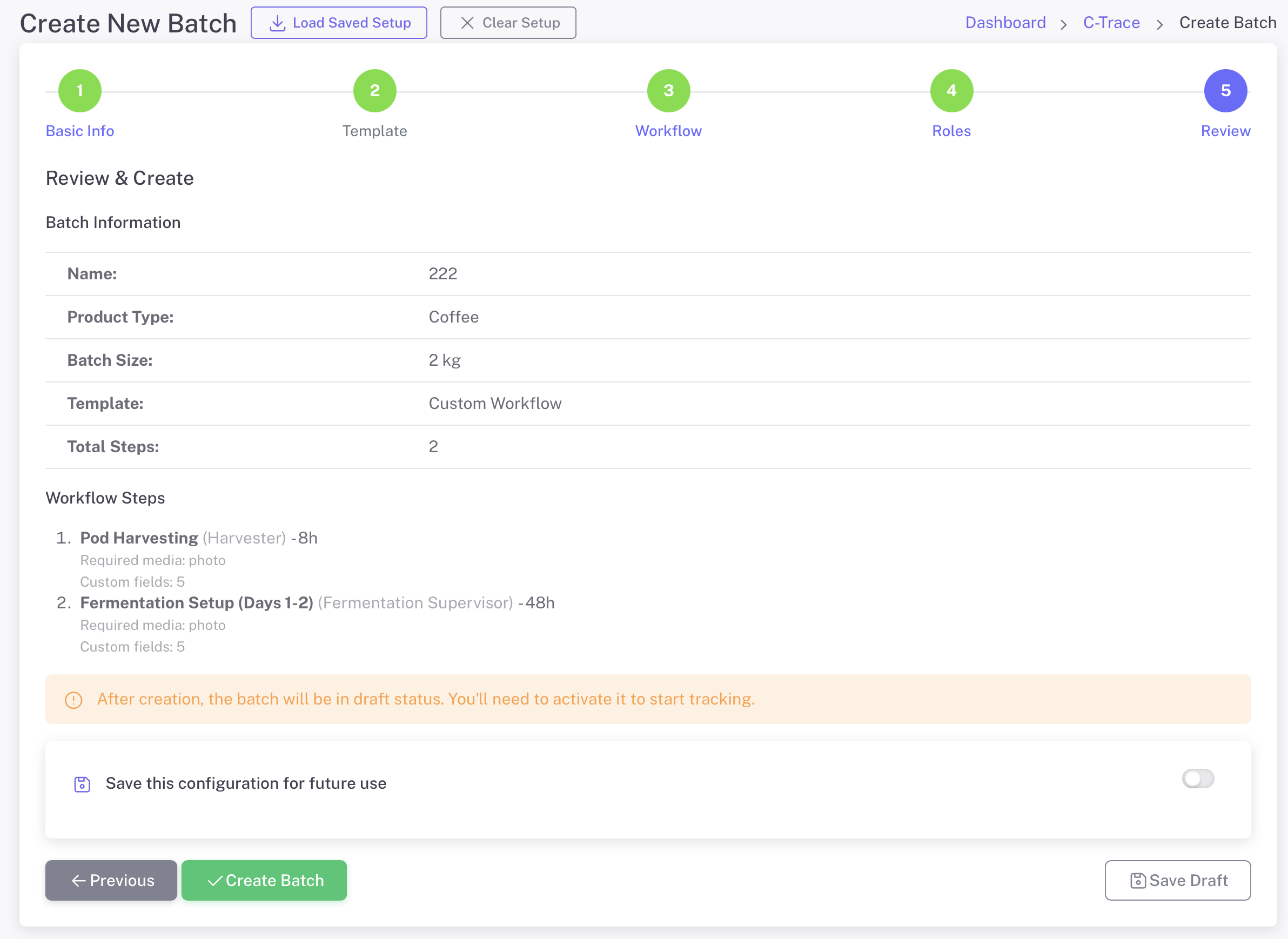
Review all batch information, workflow steps, and role assignments before creating. Save your configuration as a template for future batches.

  • स्टेटिक जानकारी
  • पहले पिछले चरण पूर्ण करें
  • भविष्य के उपयोग के लिए यह कॉन्फ़िगरेशन सहेजें
  • तुरंत सक्रिय करें
  • सदस्य जानकारी संपादित करें
समीक्षा करें और बनाएं

अपनी योजना प्रबंधित करें

मौसमी उत्पाद बैच

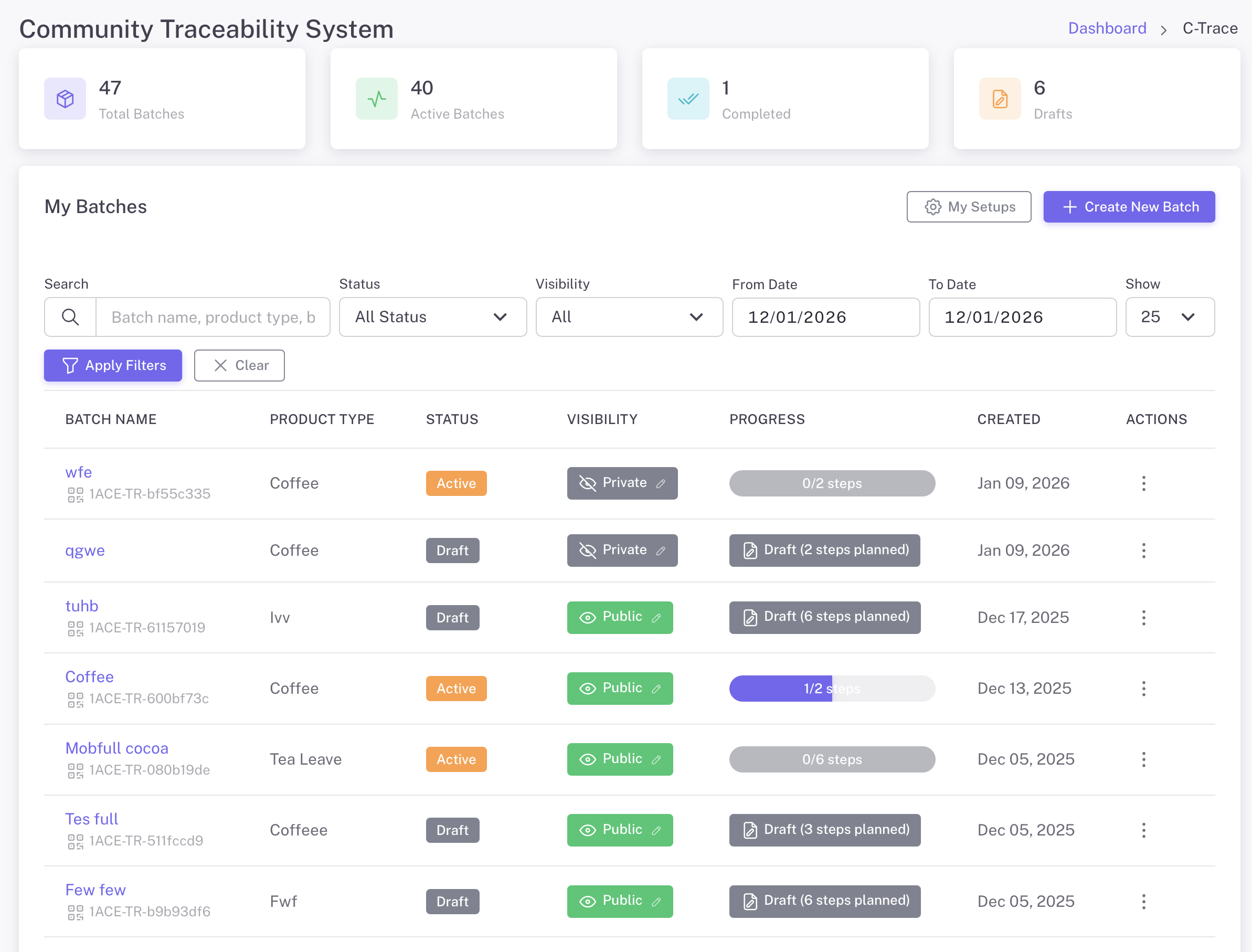
सी-टिकट डैशबोर्ड
C-Trace Dashboard - Track total batches, active batches, completed, and drafts
फ़िल्टर और खोज

Find batches by name, product type, status, or date range

परियोजना प्रगति

See step completion status for each batch at a glance

डिस्प्ले कंट्रोल

Set batches as Public or Private based on needs

मेरे सेटअप

कॉन्फ़िगरेशन सहेजें

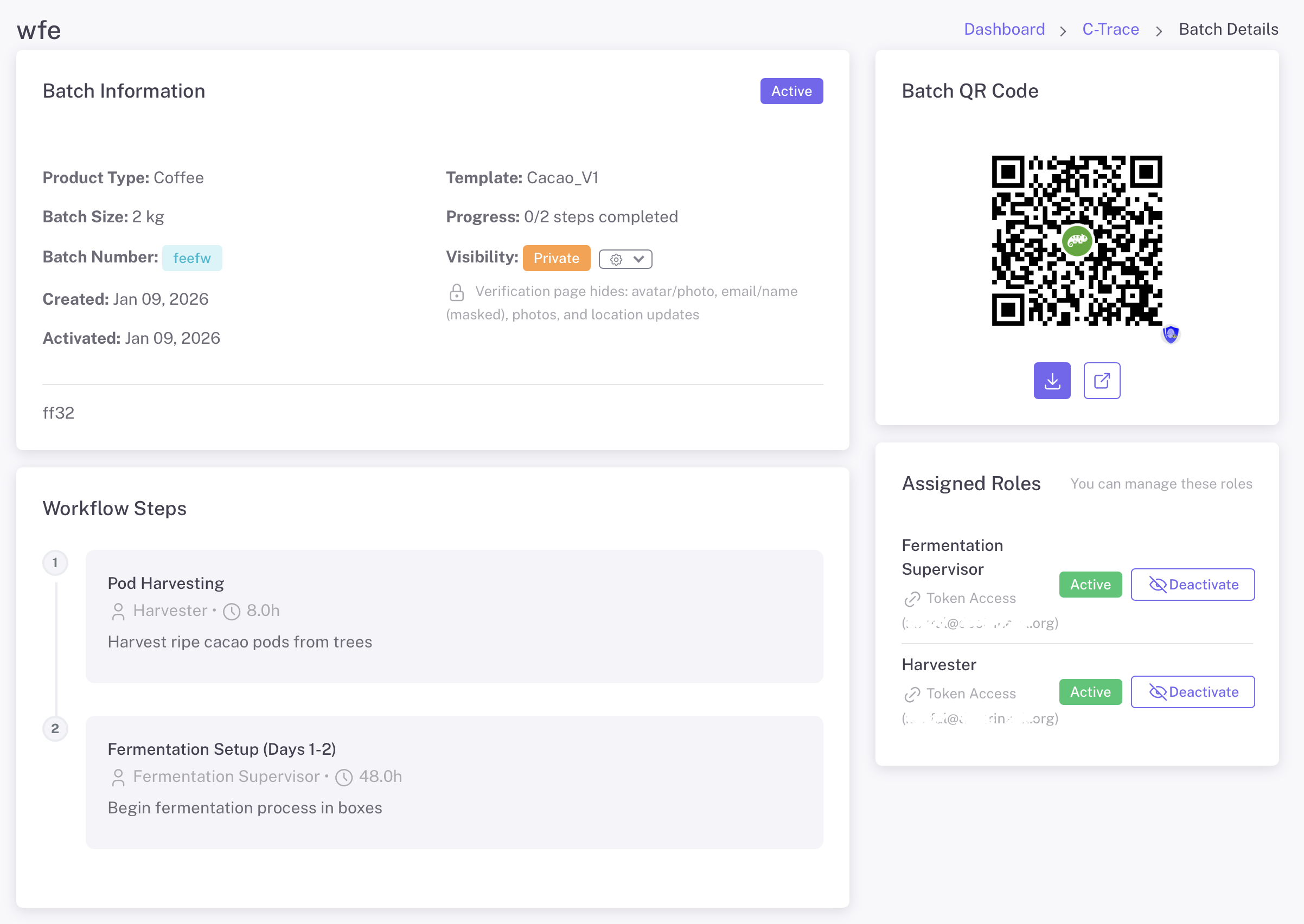
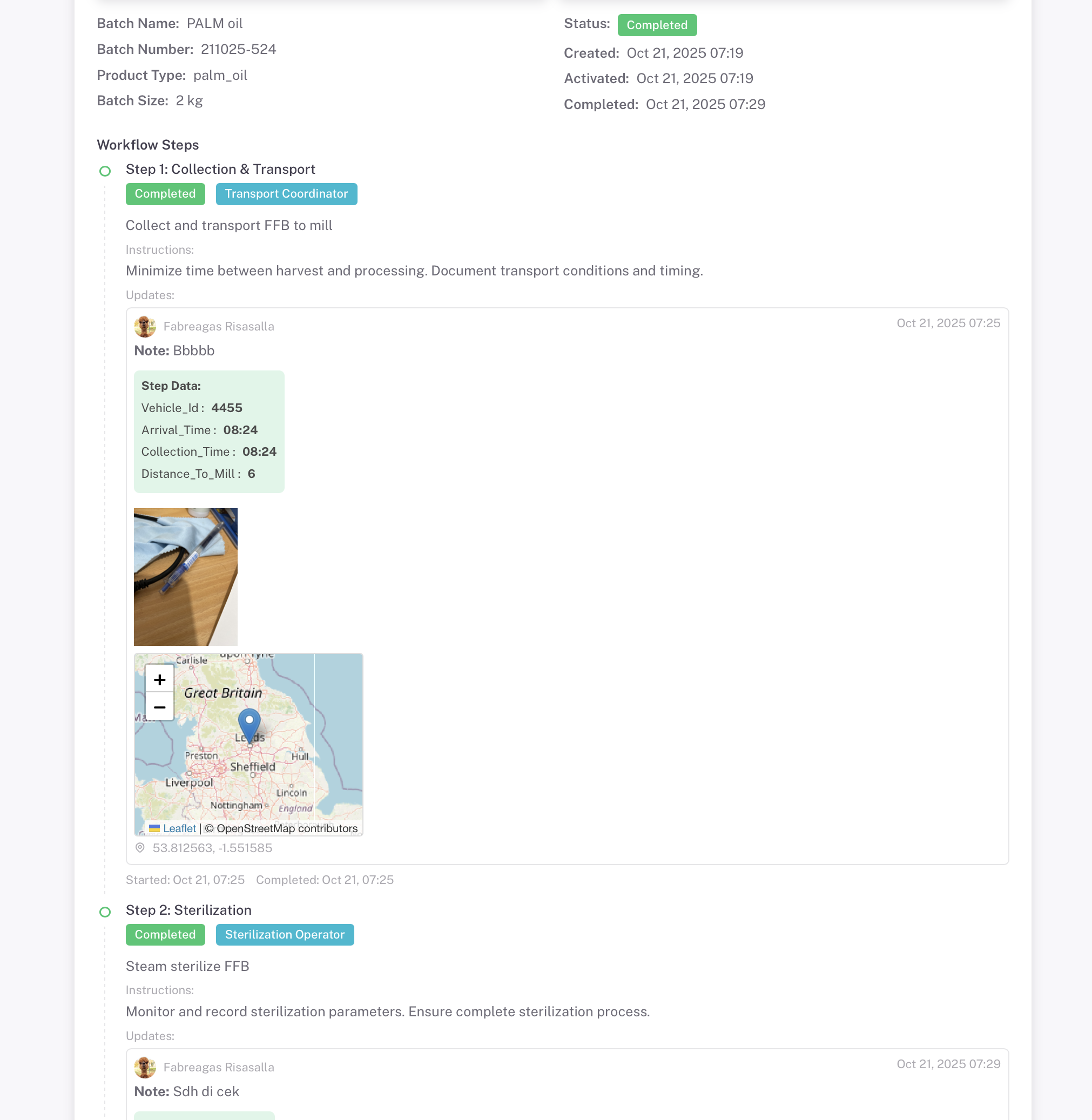
बैच विवरण

Each batch gets a unique QR code for verification and tracking

बैच विवरण
Batch Details - View batch info, QR code, workflow steps, and manage assigned roles

Batch QR Code

Download and share the batch QR code. Scan to view complete traceability information for the entire production journey.

वर्कफ़्लो चरण

View all production steps with assigned roles, expected duration, and completion status. Track progress through the entire workflow.

भूमिका प्रबंधन

View and manage assigned roles. Activate or deactivate access for workers. Send token access via email for external collaborators.

उपयोगकर्ता जोखिम प्रबंधन

Workers see only their assigned tasks with clear instructions

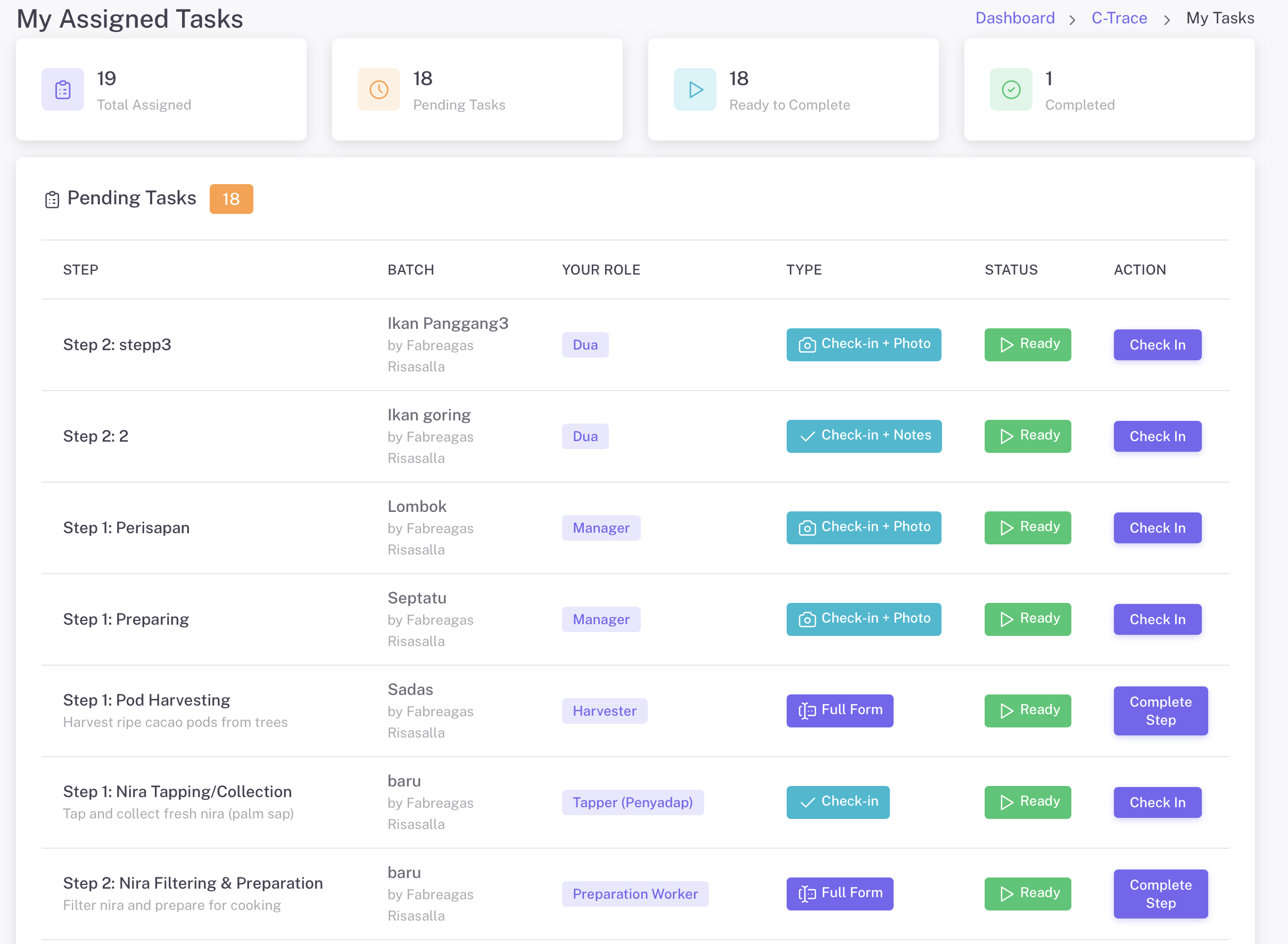
मेरे असाइन किए गए कार्य
My Assigned Tasks - Workers see their pending tasks with batch info, role, task type, and status

टिकट प्रकार

  • चेक-इन + फ़ोटो - फ़ोटो के साथ चेक-इन
  • चेक-इन + नोट्स - नोट्स के साथ चेक-इन
  • पूर्ण फॉर्म - संपूर्ण डेटा संग्रह प्रोटोकॉल

मोबाइल ऐप्स

  • मोबाइल: iOS और Android के लिए Office Mobile ऐप्स
  • भुगतान करने के लिए क्यूआर कोड स्कैन करें
  • 2. ईमेल टोकन (बाहरी सहयोगियों के लिए)
  • फ़ोटो कैप्चर के लिए ऑफ़लाइन काम करता है (कनेक्ट होने पर सिंक)

संपूर्ण दस्तावेज़ीकरण

फ़ोटो, दस्तावेज़, GPS स्थान, और टाइमस्टैम्प के साथ अपडेट रिकॉर्ड करें

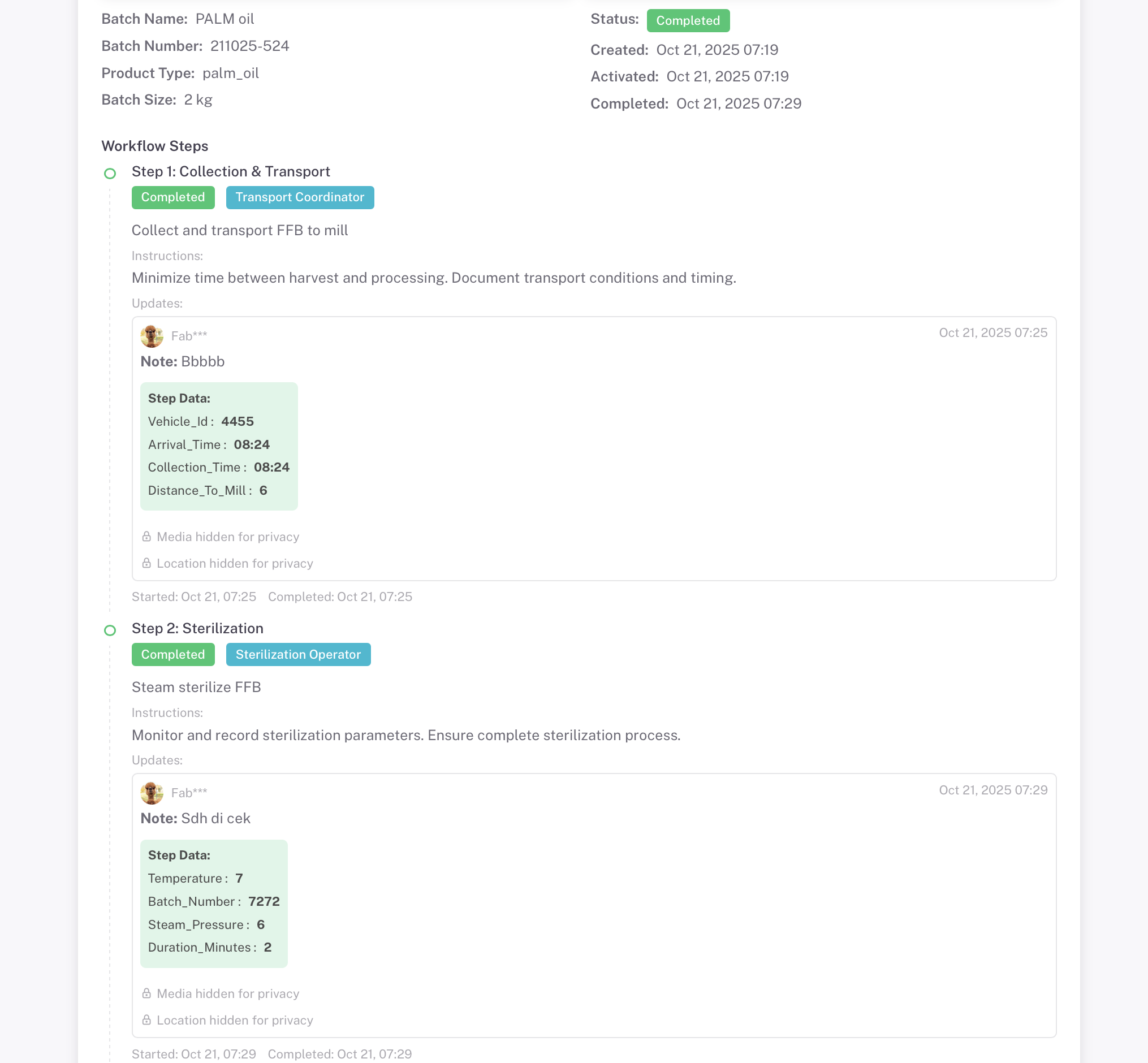
गोपनीयता मोड चालू
Privacy Mode Active - Media and Location Hidden
Media and location data hidden from public view
गोपनीयता मोड बंद
Privacy Mode Inactive - Full Transparency
सभी फ़ोटो, दस्तावेज़, और GPS स्थान दृश्यमान हैं

Control visibility of sensitive data with privacy settings. Set batches as Public or Private based on needs

फोटो साक्ष्य

प्रति चरण टाइमस्टैम्प के साथ एकाधिक फ़ोटो

जीपीएस स्थान

मानचित्र विज़ुअलाइज़ेशन के साथ सटीक निर्देशांक

टाइमस्टैम्प

प्रारंभ और पूर्णता समय रिकॉर्ड किया गया

अटैचमेंट

अतिरिक्त दस्तावेज़ और फ़ाइलें

इसके लिए परफेक्ट

किसी भी सप्लाई चेन के लिए ट्रेसेबिलिटी समाधान

कॉफी

चेरी से कप तक ट्रैकिंग

ताड़ का तेल

सतत सोर्सिंग

सौंदर्य प्रसाधन

विनिर्माण QC

Cacao

बीन से बार तक की यात्रा

वस्त्र

नैतिक उत्पादन

कृषि

खेत से मेज तक

अपना ट्रेसेबिलिटी सिस्टम बनाने के लिए तैयार हैं?

Create your first batch and start tracking your supply chain in minutes. Choose from industry templates or build your own workflow.

Explore More Guides

Discover other powerful Instant QR features